
This blog post is Human-Centered Content: Written by humans for humans.
We had 257 PDFs nobody could search easily — technical manuals for the medical devices our team supports every day. When a tech needed an answer, it was there, buried on page 2 of a file three folders deep in Box. Now, they just ask questions. Here’s how we got there.
Our IT team supports dozens of medical device brands for a customer: Optos, Zeiss, Topcon, Heidelberg, Eidon. Each manufacturer ships its own technical manuals, and each device has its own quirks: Specific browser requirements, calibration procedures, network configurations, firmware update steps.
When a support tech needs to know which browser Optos Advance requires on an iPad, the answer exists — on page 2 of a PDF, in a shared Box folder, alongside every other company file. Should be a simple search, right? I wish.
The knowledge isn’t missing. It’s just slower to find than the customer is willing to wait.
With all these large PDFs, the team’s first instinct was to load them into a Claude Project, which is Anthropic’s way of giving Claude persistent context about a specific topic. Upload your documents, ask questions, get answers with citations. It works well for most use cases. But Claude Projects has a 30MB per file limit, and many of these manuals are significantly larger than that. The team hit the wall quickly and asked us to find another way.
The Simplest Thing That Could Work
The goal wasn’t to build a product. It was to solve a problem: Make 257 PDFs searchable by question, with citations that point back to the source material so techs can verify answers against the original document.
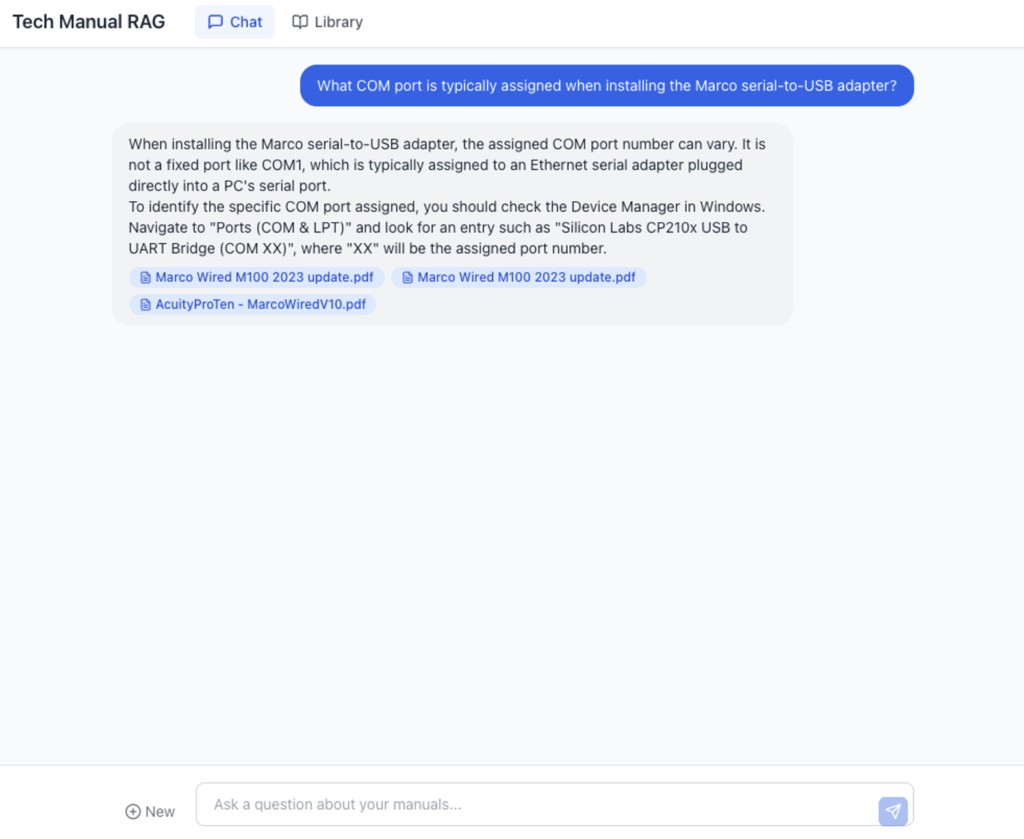
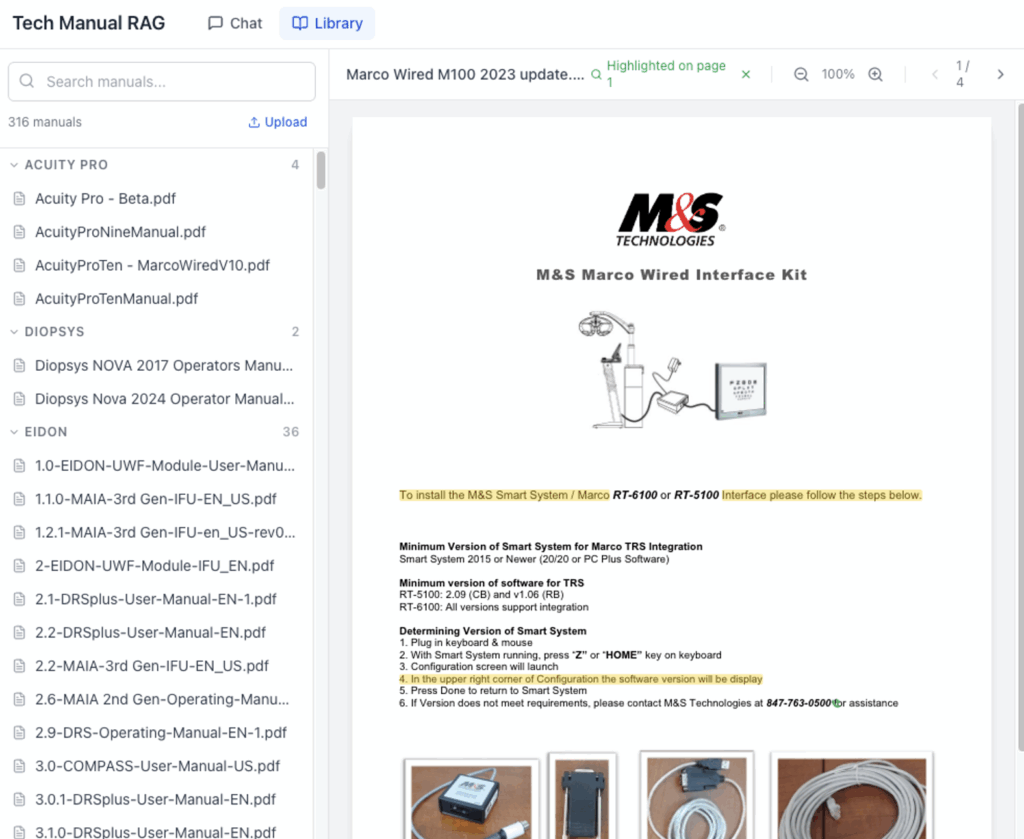
We built a two-page web app. A chat interface on one side, a PDF library on the other. Ask a question in the chat, get an answer with clickable citation badges. Click a badge, and you’re looking at the actual page of the actual manual where the answer came from, with the relevant text highlighted.
The retrieval layer is Google’s Gemini File Search, which handles the heavy lifting of indexing PDFs and finding relevant passages. We evaluated several retrieval approaches as part of a broader RAG proof of concept that I’ll blog about later (my colleague Fadi wrote about the Snowflake Cortex approach to the same class of problem). Gemini File Search scored high on our retrieval accuracy metrics, as well as having high ease-of-use, particularly for the kind of dense, technical content these manuals contain, so it was an easy and fast choice in this case.
We’ve worked hard on our internal dev processes to take advantage of AI, so deploying was easy and secure. For those interested, the whole thing is deployed to Railway behind Cloudflare Zero Trust, so access is governed by the same identity policies the team already uses. No new accounts, no new passwords. If you can access our company’s internal tools, you can access this.
What Made It Useful
Three things turned this from a demo into something the team wanted to use:
Citations that go somewhere. Every answer includes badges showing which manual the information came from. Click one and you land on the specific page of that PDF with matching text highlighted in yellow. This matters because in medical device support, “the AI said so” isn’t good enough. Techs need to see the source, verify the context and make their own judgment about whether the answer applies to their specific situation. The citation link makes that a one-click action instead of a manual search.
The library is browsable. Not everything is a question. Sometimes you just need to pull up a specific manual. The library page groups all 257 manuals by manufacturer with search and an embedded PDF viewer. It replaced the shared folder experience without taking anything away.
The team can add new manuals themselves. When a new device ships or a manufacturer releases updated documentation, anyone on the team can upload the PDF directly through the app. It gets stored, indexed for search and is immediately available to everyone. What started as a static collection of 257 documents keeps growing, driven entirely by the people who use it. This turned it from “a tool Ben built” into “our knowledge base.”
What We Didn’t Build
That’s what made it useful for the team. What kept it shippable for me is everything we didn’t build. No user accounts (Cloudflare handles identity). No database (chat state lives in the browser session). No admin panel. No analytics dashboard. No fine-tuning, no custom embeddings, no vector database to manage.
The retrieval system is a managed service. The deployment is a managed platform. The auth is a managed layer. The only custom code is the chat interface, the citation linking and the upload flow. Everything else is someone else’s problem.
This matters because the biggest risk with internal tools isn’t building them. It’s maintaining them. We wrote about this in When You Can Build Anything, and this project is a direct application of that thinking. Keep the surface area small. Use managed services where they exist. Make sure the tool can survive without the person who built it.
That discipline is also what made it fast. I told the team “a few weeks” on Saturday. Had it working in dev by Tuesday. Shipped to production Wednesday. A few weeks shaved down to three workdays. AI-fueled dev hits different when you streamline the process.
But shipping fast is only half of it. The other half is making sure the tool fits where the team already works.
What’s Next
Our teams already use Claude daily — email drafting, troubleshooting, documentation. Making them switch to a separate app for manuals is friction we don’t need. The natural next step is to bring the manuals into the workflow they’re already in.
We’re building an MCP server (Model Context Protocol) that will let Claude use this app directly. A tech could be in the middle of a Claude conversation about a device issue and ask, “What does the manual say about this?” without leaving the chat. Claude would use the tech manual tool, return the answer and include a citation link that opens the web app to the exact page of the PDF.
The web app remains valuable. It’s the verification layer and the location where all citations lead. AI answers are useful, but in medical device support, the human needs to see the source and make the call. The app ensures that path from “AI told me” to “I verified it myself” is always one click away.
The Pattern
This problem isn’t unique. We constantly see companies with a collection of reference material that everyone needs and nobody can search efficiently. Employee handbooks. Compliance documents. Product specs. Vendor contracts. The knowledge exists, it’s just locked in formats that don’t respond to questions.
The technology to unlock it exists now in many of the platforms you may already use (Claude, Snowflake, Databricks, Microsoft Copilot), and it doesn’t require a six-month project. The harder part is picking the right document pile — the one that would make the biggest difference if it were suddenly searchable — and keeping the solution simple enough to survive contact with reality.
If your team is sitting on a pile of PDFs that people reference constantly but search painfully, this is a solvable problem. Our AI practice at InterWorks helps teams identify these opportunities, build the solution, and set it up so it doesn’t become another orphaned internal tool. Reach out if you want to talk through what this could look like for your organization.