
This blog post is AI-Assisted Content: Written by humans with a helping hand.
Every company has a handbook. And every company has employees who ask questions the handbook already answers — they just don’t know where to look. HR tackles the same requests week after week. New hires scroll through pages of policy. The information exists. The problem is discoverability.
What if your employees could just… ask?
That’s the premise of this post. We built a chatbot that answers questions about the InterWorks employee handbook — grounded in the actual handbook content, across four regional variants (US, UK, Germany and Australia), deployed as a secure internal app, and built entirely inside Snowflake. No external APIs. No vector database to manage. No separate infrastructure to maintain.
The technology making this possible is called RAG. And thanks to data platforms like Snowflake and Databricks, it’s more accessible than it’s ever been.
What is RAG?
RAG stands for Retrieval-Augmented Generation. It’s a technique that makes large language models (LLMs) more useful for real-world, organization-specific questions by grounding their answers in your data — not just what they learned during training.
The problem with asking a plain LLM about your company is simple: It doesn’t know your company. It might produce a plausible-sounding answer, or give generic advice that doesn’t match your actual policies. RAG fixes that.
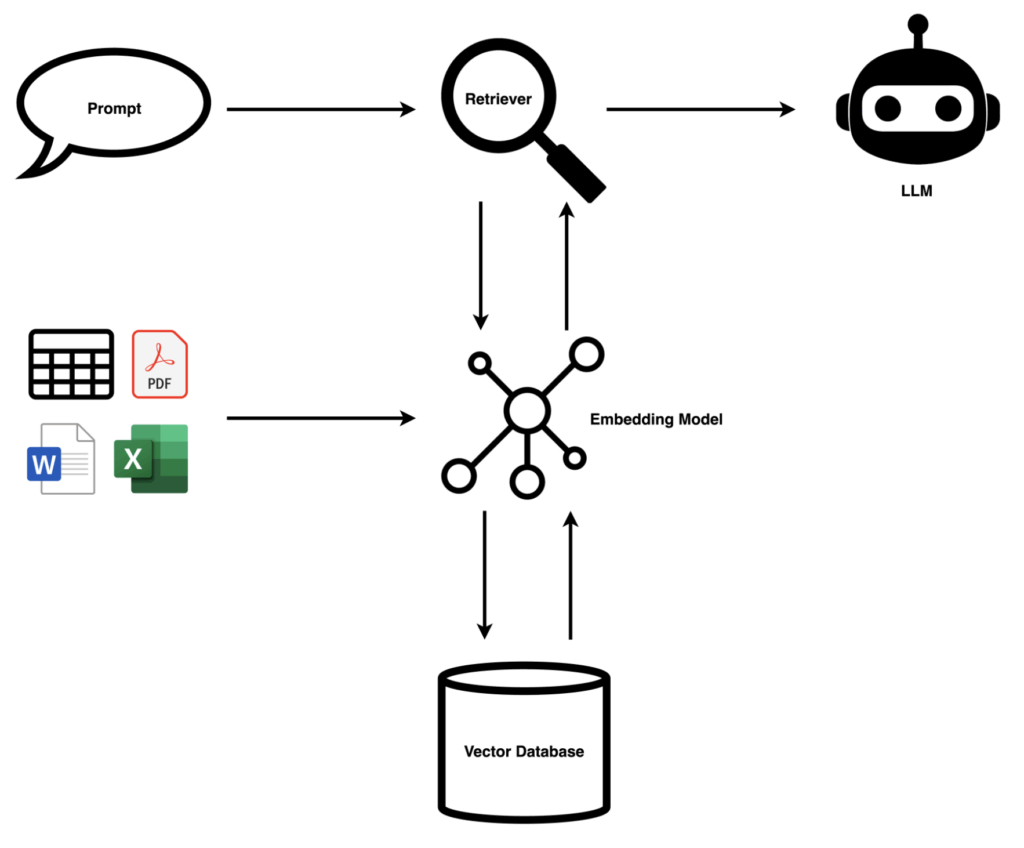
The flow works like this:
- Your documents are chunked into digestible pieces and passed through an embedding model, which converts text into numerical representations (vectors) stored in a vector database.
- When a user asks a question, that question is also embedded and a retriever finds the most semantically similar chunks.
- Those chunks — the relevant context — are passed to the LLM alongside the question, so the model answers using your actual content, not guesswork.
- The result: Accurate, cited answers grounded in your knowledge base. The LLM becomes a reasoning engine over your data.
Why Snowflake Cortex?
Traditionally, building a RAG system meant stitching together multiple services — a vector database (Pinecone, Weaviate, pgvector…), an embedding model API, an LLM and some orchestration layer to tie them together. That’s a lot of moving parts, a lot of credentials and a lot of surface area for things to go wrong.
Snowflake Cortex collapses most of that stack into your existing data platform. Two services do the heavy lifting:
- Cortex Search handles retrieval — it embeds your content, stores the vectors and runs semantic search, all managed by Snowflake. You don’t choose an embedding model or maintain an index. You point it at a table column, write one SQL statement, and it’s running:
CREATE OR REPLACE CORTEX SEARCH SERVICE HANDBOOK_SEARCH
    ON CONTENT
    ATTRIBUTES REGION, SECTION, SUBSECTION, URL
    WAREHOUSE  = HANDBOOK_WH
    TARGET_LAG = 'DOWNSTREAM'
    AS (
        SELECT CHUNK_ID, REGION, SECTION, SUBSECTION, URL, CONTENT
        FROM HANDBOOK_CHUNKS
    );
The “service” here is a persistent, queryable object that Snowflake keeps in sync with your underlying table. Think of it as a continuously maintained search index — it watches your data, manages the embeddings and serves queries so you don’t have to.
- Cortex Complete is Snowflake’s interface to large language models — it lets you call an LLM directly from SQL, passing a prompt and receiving a generated response. We used it with
mistral-large2to take the retrieved handbook chunks and turn them into a natural language answer. Your data never leaves Snowflake.
Cortex Search: What It Can and Can’t Do
A few things worth understanding before you reach for it:
What it’s good at:
- Semantic (meaning-based) search, not just keyword matching. Ask, “Can I work from a different country for an extended period?” and it finds the relevant policy content even if those exact words never appear in the handbook.
- Filtering on metadata attributes — in our case by region, so each search query only returns content relevant to the selected region.
- Zero infrastructure to manage, no separate service to run.
- Freshness control via
TARGET_LAG— set a time interval for automatic refreshes, or trigger manually after each data update.
What to keep in mind:
- The embedding model is managed by Snowflake — you don’t choose or swap it.
- Retrieval is fully managed — e.g. you cannot customise how results are ranked. For most use cases this is fine, but teams with advanced retrieval requirements may find it limiting.
- Pricing is consumption-based. Our full development and setup — multiple ingestion runs, testing and iteration — came to roughly 6.4 Snowflake credits (~3.3 on the notebook’s Container Runtime, ~3.1 on the warehouse). Cortex Search queries added less than 0.003 credits across the entire testing period. Production costs will scale with query volume, so model your expected usage before rolling out broadly.
- Check the Snowflake Cortex pricing documentation for current rates.
How We Built It
The project has three parts: Ingest, index and serve.
Ingest: A Snowflake Notebook
The InterWorks handbook is publicly available at interworks.com/handbook. We wrote a Python notebook that scrapes each region’s pages, extracts the text and splits it into overlapping chunks of roughly 500 words. The notebook lives in GitHub and opens directly in Snowflake via its native Git integration. Outbound access to the site is granted through an External Access Integration — a Snowflake construct for approving external HTTP calls from notebooks.
Chunks land in a table called HANDBOOK_CHUNKS — one row per chunk, with columns for region, section, subsection, URL and content. A single command refreshes the Cortex Search index.
The rule of thumb for source data: if it can become text in a Snowflake table or stage, Cortex Search can index it. PDFs and Word documents work natively via CORTEX.PARSE_DOCUMENT(). Audio and video need a transcription step first.
Index: Cortex Search
The Cortex Search service sits on top of HANDBOOK_CHUNKS. The key detail is the ATTRIBUTES clause in the service definition: By declaring REGION, SECTION, SUBSECTION and URL as attributes, we can filter search results at query time — so the retriever only surfaces chunks from the employee’s region, not the full multi-region index.
Serve: Streamlit in Snowflake
The chatbot UI is a Streamlit app deployed inside Snowflake. The sidebar lets you select your region. From there, the flow is straightforward:
- You ask a question.
- Cortex Search finds the five most relevant handbook chunks for your region.
- Those chunks are assembled into a context block.
- Cortex Complete sends the question and context to
mistral-large2. - The answer comes back with source citations — exact section and subsection — displayed in a collapsible expander below each response.
The app keeps a short conversation history so follow-up questions feel natural.
Who Gets In?
Because this is a Streamlit in Snowflake app, access is governed entirely by Snowflake’s permission model — no separate authentication layer to configure or maintain.
If your organization already uses SSO with Snowflake, employees log in with their existing company credentials and the app is just another Snowflake resource they have access to. You control who can open it at the role level, the same way you’d control access to any other Snowflake object.
Haven’t set up SSO for Snowflake yet? I’ve written about setting it up with Okta previously, and my colleague Danny covers Entra ID in detail — either is a solid starting point. Once SSO and SCIM are in place, every Streamlit app you deploy in Snowflake inherits it automatically.
The Art Is in the Details
The infrastructure is no longer the hard part. What used to require stitching together multiple third-party services now fits in three files. But the craft — what actually determines whether a system like this is useful — lies in the decisions around it:
- Data freshness. The handbook changes. How often do you re-run ingestion? Do you automate it on a schedule, or trigger it manually after each update? For a document that changes infrequently, manual refresh is fine. For something more dynamic, you’d schedule it.
- Chunking strategy. Chunks that are too small lose context, and chunks that are too large introduce noise. We landed on ~500-word chunks with a 50-word overlap at boundaries. This is something you’ll tune to your content — there’s no universal right answer.
- Model choice. Snowflake Cortex supports several LLMs at different capability and cost points. We used
mistral-large2. The right choice depends on your query complexity and usage volume.
Who Can Access What
Access control in a RAG system works at two levels. The first is straightforward: Who can open the app at all — managed via Snowflake role grants, the same as any other Snowflake object. The second is subtler: What content a user is allowed to retrieve. If your knowledge base contains sections that are only appropriate for certain roles — manager guidelines, confidential HR policies, escalation procedures — you don’t want those surfacing for everyone. The same attribute filtering that handles region can handle this: tag sensitive chunks with an access level, and filter on it at query time. The user never sees content they shouldn’t, and you don’t need a separate access control system to enforce it.
Filtering and Access
In our demo, region selection is a manual dropdown in the sidebar. But Snowflake gives you everything you need to make this automatic: session.get_current_user() returns the logged-in Snowflake username, so you could maintain a simple USER_REGION mapping table and look up the employee’s region at runtime — no dropdown needed, and no risk of someone accidentally reading the wrong region’s policies.
This approach can be rolled out to any employee-sensitive content as well.
The System Prompt
A single instruction — “Answer only from the provided context, always cite the section and say clearly if something isn’t covered” — is what transforms a general-purpose LLM into a trustworthy handbook assistant. Getting this right takes a few iterations.
None of these are hard problems. But they’re the decisions that separate a demo from something your team would actually use every day.
See It in Action
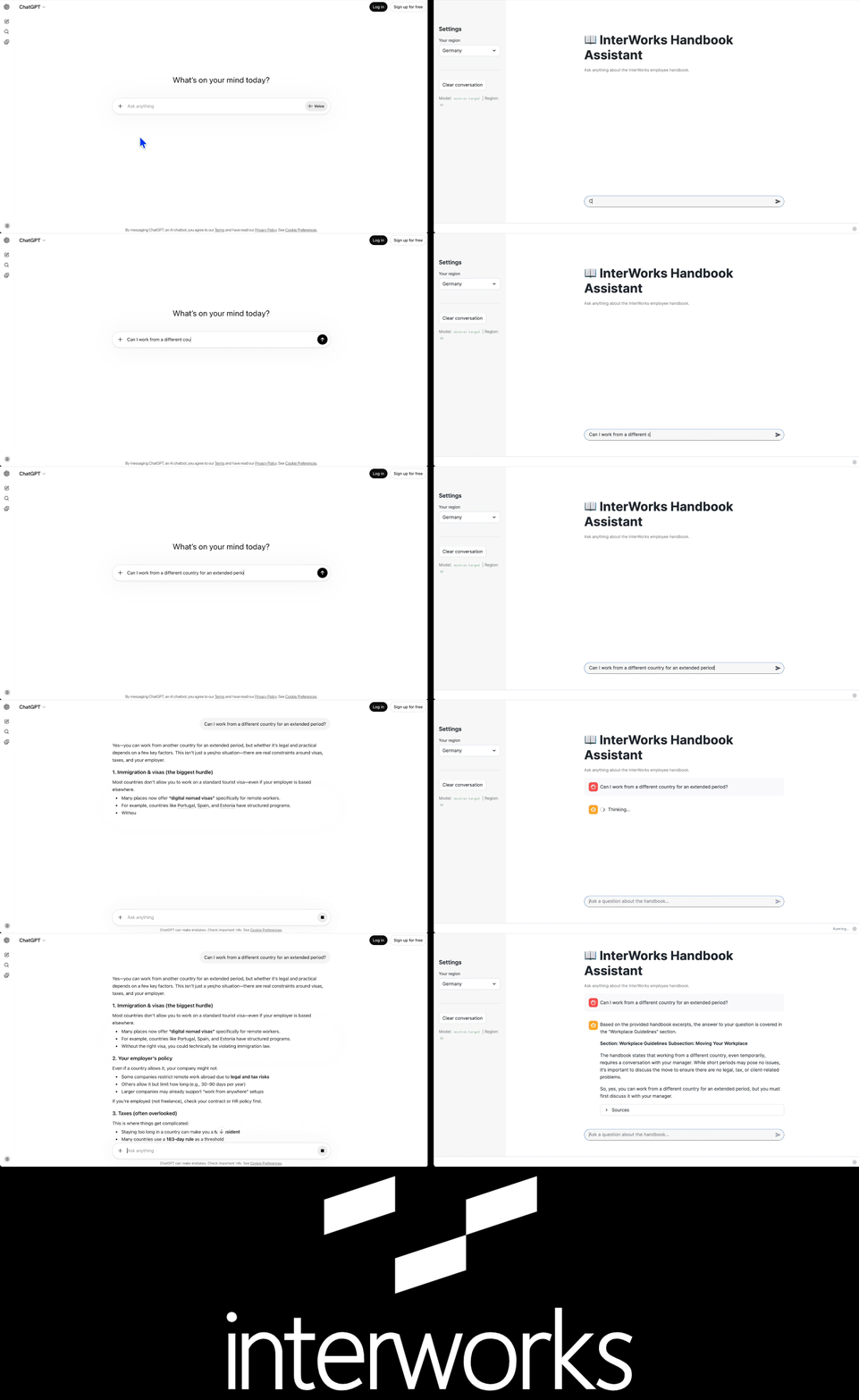
We asked both ChatGPT and the handbook assistant the same question: “Can I work from a different country for an extended period?”
ChatGPT returned a thorough breakdown covering visa types, digital nomad programs, tax residency rules and double taxation treaties — all accurate, none of it specific to InterWorks. The handbook assistant returned a single grounded answer: Talk to your manager first, citing the exact subsection where that policy lives. Same question, very different utility. That’s RAG in a nutshell.
Wrapping Up
We started with a public website, a Snowflake account and a question: “What if employees could just ask the handbook?” Three files later — a setup script, an ingestion notebook and a Streamlit app — the answer is, “Yes, they can.”
The technology for building production-grade RAG has become genuinely accessible. Data Platforms like Snowflake and Databricks remove the infrastructure complexity that used to be the biggest barrier. What remains — and what makes a system actually useful in practice — is the thinking you put into how your data is structured, how it stays fresh, who has access and how you guide the model to behave.
That’s the craft. And it’s well worth the effort.
Related