
This blog post is AI-Assisted Content: Written by humans with a helping hand.
Last post, I built a chatbot that could answer any question about the InterWorks employee handbook. It worked well. Ask about parental leave in Germany, get the actual policy, cited, instantly. But a few weeks in, I noticed something: most of the questions people actually want answered aren’t really about the policy. They’re about them. “Can I take this Friday off?” isn’t a policy question. It’s a question about your time with the company, your balance and a rule you’d have to go and cross-reference yourself to answer honestly.
That’s not a retrieval problem. That’s a reasoning problem, and it needs more than search. So, let’s give the assistant some hands.
From Answers to Decisions
RAG (the thing I built last time) is great at finding the right paragraph. It is not built to look up your employee record, compare it against that paragraph, decide and action it. For that, you need something that can use more than one tool and reason across the results, which is the whole idea behind AI agents. Most major platforms have their own version now: Claude Agent SDK, OpenAI Agents SDK, AWS Bedrock Agents. Snowflake’s version is Cortex Agents.
The shift is small to describe and large in practice: Instead of “search, then generate,” an agent gets a toolbox and works out, on its own, which tools to call, in what order and what to do with what comes back.
Why Cortex Agents?
A Cortex Agent is a persistent object you define once, e.g. in SQL, with three ingredients:
- Models: Which LLM(s) orchestrate the reasoning.
- Instructions: How it should behave and in what order it should reach for its tools.
- Tools: The things it’s allowed to call, such as search services, semantic views over your structured data or your own custom logic.
The part that made it worth reaching for here: Everything else in this build (the handbook search index, the semantic view, the employee table) already lives in Snowflake, so the agent sits right next to the data instead of needing its own hosting, its own vector store or a separate set of permissions to manage. If you’re already running on Snowflake, this is one of the lower-effort paths from “a chatbot that answers questions” to “a system that reasons and acts,” because most of the plumbing, the identity model, the governance, the compute, is stuff you already have.
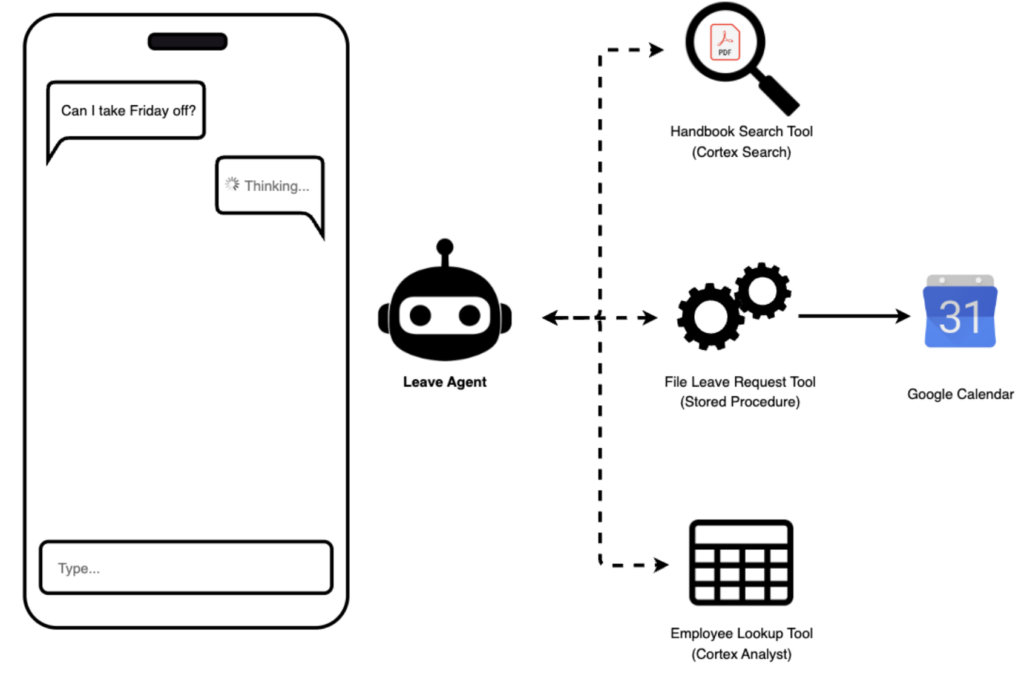
For this project, I gave it three tools:
- Handbook Search: The exact same Cortex Search service from Last post, reused as-is, for policy rules.
- File Leave Request: A custom tool (a stored procedure under the hood) that actually files the request and books it on a calendar, but only once the agent has decided I qualify.
- Employee Lookup: A Cortex Analyst semantic view over a small employee table (time with the company, region, PTO/sick balance), so the agent can check my specific numbers, not just the policy text.
What Cortex Agents Can (and Can’t) Do
What it’s good at:
- Deciding, on its own, which of several tools to call and in what order, based on plain-language instructions rather than hardcoded branching logic.
- Reasoning across tool results, comparing a policy rule against an employee’s actual numbers is just… something it does, if you ask it to.
- Reusing existing Cortex Search services untouched, no rebuilding what already works.
What to keep in mind:
- The “only act if eligible” rule lives in a prompted instruction, not a SQL constraint, so a production system would still want a validation layer (pre-hook) that doesn’t depend on the model behaving.
- Region scoping is weaker here than in the original chatbot: the old app enforced it with a hard filter at query time, here it rides along as context in the message, and the agent is only instructed to respect it, a softer guarantee.
- Getting the agent specification exactly right took real trial and error, more on that below.
How I Built It
A small employee table. Nothing fancy, hire date, region, department, PTO and sick balances. This is the thing Cortex Analyst turns into something the agent can query in plain language.
A semantic view. CREATE SEMANTIC VIEW turns that table into something Cortex Analyst can reason over, time with the company computed as a fact, balances exposed as metrics, all with synonyms so “vacation days left” resolves to the right column without me writing SQL.
A custom tool that acts. It’s a stored procedure, plain Python, running inside Snowflake, that inserts the approved request into a table and then books it onto a real calendar via a short OAuth exchange. Getting there needed one manual, one-time step outside Snowflake entirely: creating a project in Google Cloud Console, enabling the Calendar API, and running through an OAuth consent flow to get a client ID, secret, and refresh token, which then live in Snowflake as secrets the stored procedure reads at runtime. This same approach can work for other calendars too, Outlook among them, just swap the OAuth provider and API calls for the one you use.
The agent itself. A single CREATE AGENT ... FROM SPECIFICATION statement wires the three tools together with instructions that say, in effect: Check the policy, check the employee, only act if both line up, and explain your reasoning either way. Getting the specification right took several rounds, and a couple of the pitfalls were genuinely non-obvious. None shows up in the final result, but it’s worth knowing it wasn’t a five-minute spec.
The cost so far? About 23.6 Snowflake credits across setup, testing, and iteration, spread over 85 agent requests. See the Snowflake Cortex pricing docs for current rates on your own usage.
The Art Is in the Details
A few of the sharper edges here didn’t show up as wrong answers, they showed up as slow ones, or silent ones.
- Semantic modeling affects speed, not just correctness. Mixing a row-level fact (time with the company) with an aggregate metric (PTO/sick balance) in the same query forced Cortex Analyst to retry its own SQL generation five or six times per turn. Splitting the balances into plain facts too, keeping the aggregates for genuine cross-employee questions, cut that to about one or two, reducing the waiting time.
- Prompt wording affects performance, not just correctness. Telling the agent to always check the handbook before checking the employee, in that order, fired an irrelevant policy search on plain balance questions and serialized two tool calls that didn’t depend on each other. Narrowing when the handbook search fires, and letting both checks run together, fixed both.
- A tool that can act in the real world also needs to be honest when the action doesn’t work. If the Google Calendar step fails, say the login token expired,
File_Leave_Requestrecords the actual reason instead of crashing or quietly doing nothing. That matters because silent failure is the worst outcome: The agent could tell you your leave was booked while, behind the scenes, it wasn’t.
Every one of these was found by hand: A debug counter, a raw SQL error, a JSON blob stared at until it made sense. That’s normal for a short proof of concept, not for production. Getting there needs a real evaluation suite, structured prompt testing, a security and compliance review, and, for region scoping specifically, real SSO/SCIM-provisioned identity instead of a manual selector. That’s a different, bigger project than the one described here.
See It in Action
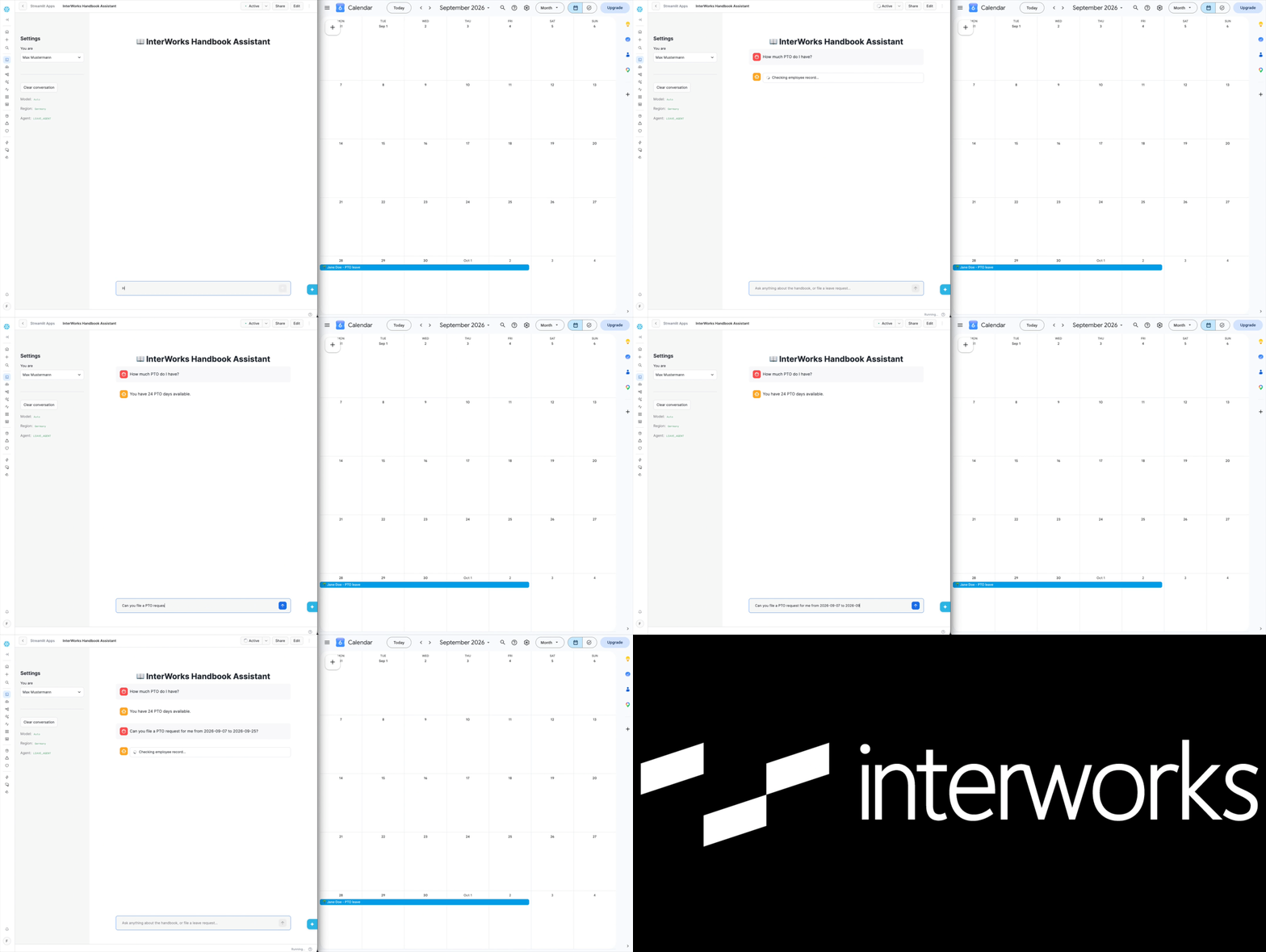
The left-hand side shows a Streamlit app in Snowflake using the agent as its backbone. It’s more or less the same app from the last post, but instead of doing search-then-generate itself, it’s using the agent, which has access to the three tools described earlier. The right-hand side shows a Google Calendar, demonstrating a team calendar.
First, playing Max Mustermann via the app’s employee selector, I asked how many PTO days I have. It answered 24. Then I asked it to book three weeks of PTO, and it answered:
I can’t auto-file this request. Your DE handbook states that taking holiday of more than two weeks will only be approved in exceptional circumstances, and Sep 7 to Sep 25 is 15 working days (three weeks), which exceeds that cap. Your PTO balance of 24 days would otherwise cover it.
Next step: Please shorten the request to two weeks or less, or contact HR to have it reviewed as an exceptional circumstance.
It also provided the source where it got this information. That one response is the best argument for why this is reasoning and not just automation:
Then, switching to my own profile, I asked about my PTO and it said I have 18 days. Then I asked for 3 days, and it went ahead and filed the request, then added it to the calendar, with the reasoning:
DE handbook allows PTO up to two weeks without exceptional approval; this 3-day request is well under that cap. Employee has 18.0 PTO days available, more than enough for 3 days.
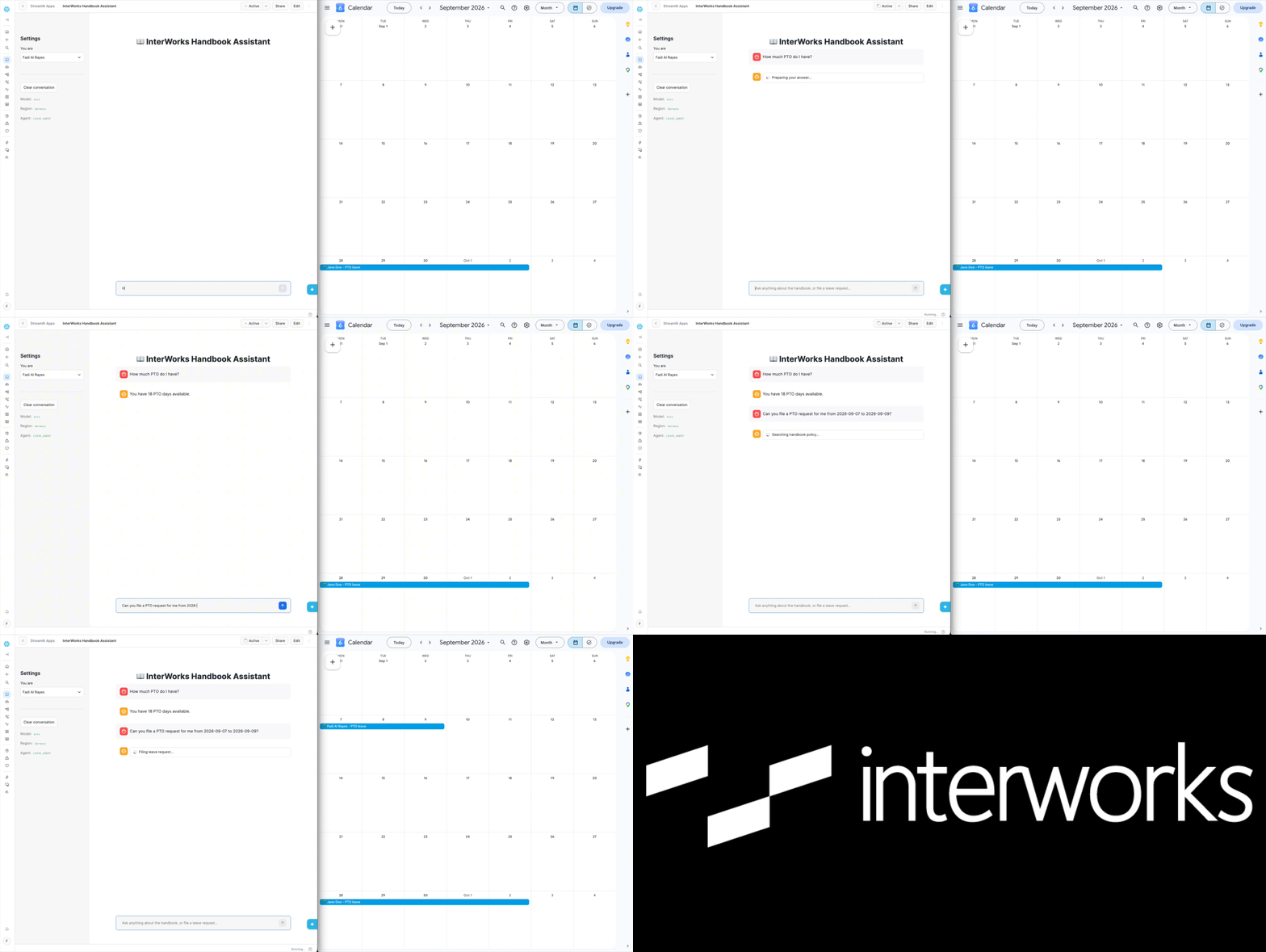
Same assistant, same three tools, two very different outcomes, because it actually checked, instead of just answering.
Wrapping Up
Last post, I gave employees an answer. This one gives them a decision, and when the decision is yes, it acts on it. The infrastructure for this is still just a handful of Snowflake objects, nothing exotic, nothing outside the platform I already had. What changed is what I asked the model to be responsible for.
That’s the next step after RAG. Not a bigger model — a model with a job to do.
Related
