
This blog post is Human-Centered Content: Written by humans for humans.
Snowflake CoWork is the current name for what was, until June 2026, called Snowflake Intelligence. The rebrand wasn’t just a new label: The product expanded at the same time, from a chat window for asking questions about your data into a personal work agent. More importantly, its intended audience expanded right along with it: CoWork isn’t built for the people who already live inside Snowflake (the analysts or engineers who write the queries), but for everyone else, i.e the “knowledge workers” who’ve never opened a warehouse.
What Snowflake CoWork Actually Is
Snowflake CoWork is a conversational tool that lets business users ask questions of company data in plain English, and get back answers, charts, reports or actions, grounded in whatever your company already has set up in Snowflake.
It sits alongside CoCo (the rebrand of Cortex Code), the equivalent surface for developers. CoWork is where a finance analyst or a sales manager asks a question in plain English. CoCo is where an engineer builds and configures the thing CoWork ends up running. Same underlying agent, different front door, more on that distinction below.
Users can reach CoWork from several places: The web interface at ai.snowflake.com, inside Snowsight, or in a native iOS app, Slack or Excel as additional surfaces. If your organization already uses Snowflake Intelligence, no migration is required, the rename applied automatically.
Part of a Bigger Shift
CoWork isn’t a standalone feature bolted onto the warehouse. It’s one of the clearest signs of something bigger already underway: Snowflake positioning itself as an AI platform that acts, not simply a warehouse that stores and answers queries. The same governance models built for read-only reporting can now be leveraged to support something that writes, automates and takes action on your behalf. CoWork is what that shift looks like from a knowledge worker’s seat, rather than an architect’s.
What You Can Actually Ask It
We built a small retail demo (orders, customers, marketing spend) to test this rather than take Snowflake’s word for it. Two of these are real results, not mockups.
Everyday questions about your business
Prompt: “What were our top five product categories by revenue last quarter, and how does that compare to the quarter before?”
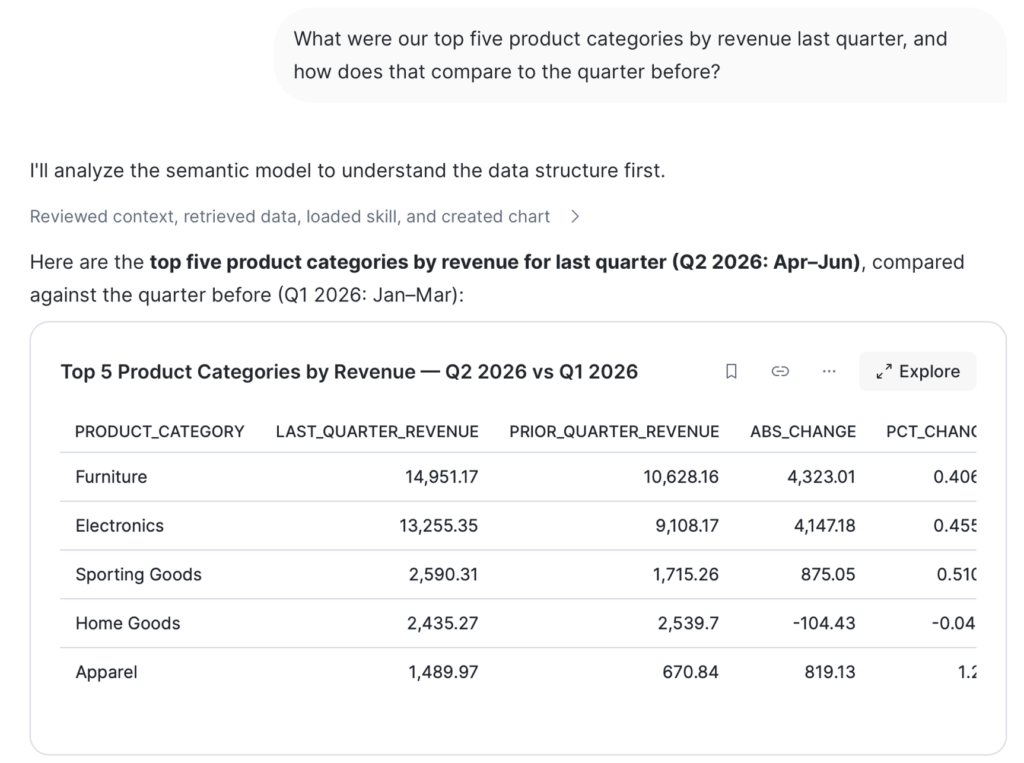
CoWork explains its reasoning and provides a direct answer accompanied with additional tables, visualisations or follow-up suggestions.
Prompt: “How much did the marketing team spend last month, and was that over or under budget?”
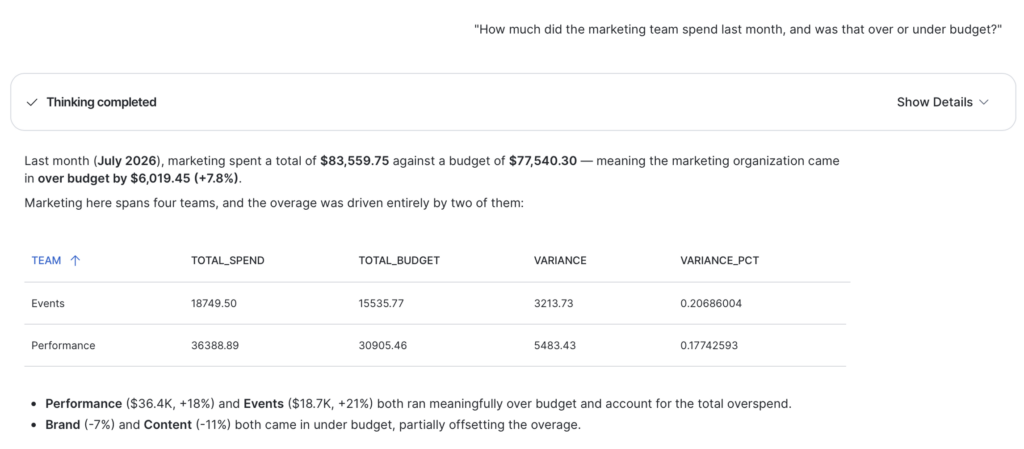
Both answers came back correctly attributed, correctly quartered and broken down by the right dimension without being told which dimension to break down by. That’s the semantic view doing its job, not the chat interface.
For something that needs real digging rather than a single lookup (“Why did this happen?” instead of “What happened?”), you can tick CoWork’s Deep Research mode. It will break the question into sub-investigations, run them across your data and provide a cited report instead of a single answer.
Automations: Getting things done, not just getting answers
Turning a question into a recurring automation is a one-line follow-up, not a separate build.
Prompt: “Turn this into a weekly report, run every Monday at 8am.”
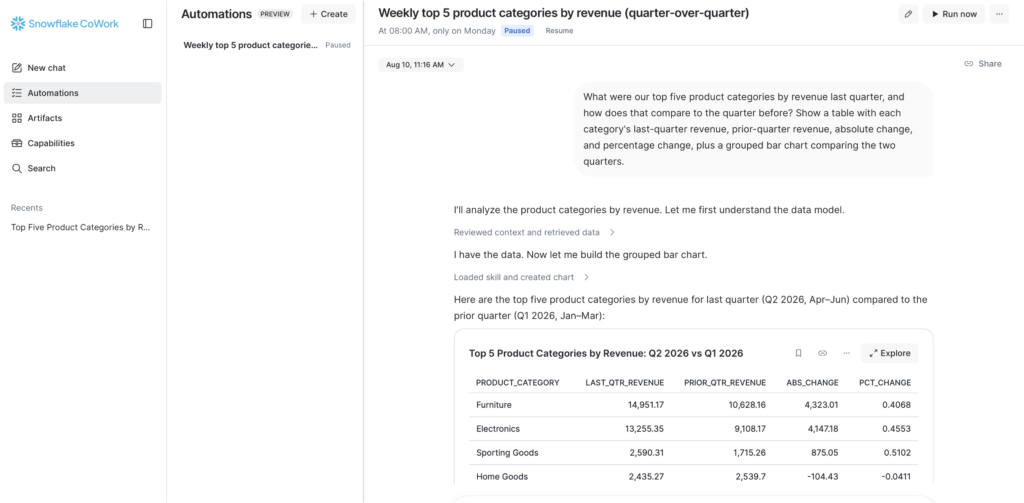
An automation will then be created, and it can be viewed and managed in a designated tab along with other automations. This is the real, branded CoWork product (sidebar, Automations, Artifacts, Capabilities, all visible).
Building One, Start to Finish
The fastest way to actually operationalize CoWork is to build the foundations that sit underneath it. This is the path we used, including the couple of snags worth knowing about upfront so they don’t cost you the time they cost us.
- Structure your data and build a semantic view first. CoWork is only as good as what it’s querying. Skip this step and you get an agent that answers instantly and confidently, in the wrong direction. If your context is scattered across documentation, Snowflake’s AI capabilities can help you create a robust semantic view.
- Go to AI & ML » Agents » Create new to configure and name the agent. Snowflake drops you into a short guided checklist rather than a blank configuration screen. You can also turn this into an automated, conversation-style setup by following the AI-connection wizard.
- Connect your semantic view. This is the one required step in the checklist; everything else (search services, custom tools, instructions) is optional polish on top.
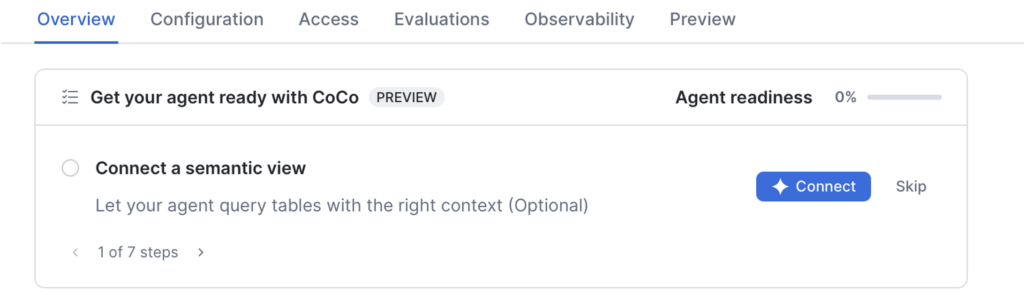
- Test it in the builder’s own Preview tab before touching CoWork at all. This is a plain chat box for sanity-checking the agent’s answers, not CoWork itself, no Deep Research, no Automations, just the raw question-and-answer loop, cheap to iterate on.
- Naviagte to “Preview” -> “Preview in Snowflake CoWork.” This is the point where the same agent shows up inside the actual product, full sidebar, Automations, Artifacts, everything, without needing to publish it for anyone else yet. This is how we got the two real screenshots above.
- Publish with “Add to Snowflake CoWork” only when you want other people to use it.
Nothing about steps 1 through 4 is CoWork-specific. That’s the point, and it’s the honest answer to the next question.
Is This Just a Chat Skin?
This is worth asking directly, because it’s the right question. If configured identically, the same semantic view will answer the same question whether you ask it from CoWork’s chat window, from CoCo’s IDE-adjacent interface, or by calling the underlying Cortex Agent API directly. CoWork doesn’t add intelligence that wasn’t already there. It adds a front door a knowledge worker will actually walk through.
The interface matters because most of the people CoWork is built for were never going to open CoCo, write SQL or learn to read a semantic view definition. The actual work, the part that decides whether an answer is right or confidently wrong, is the semantic view underneath, the same one CoCo, CoWork and the raw API all read from. Pick whichever interface matches who’s asking.
When It’s a Good Idea to Start
CoWork can be useful in different ways. A few signals tend to indicate a good starting point:
- A domain that already has a decent semantic view. If finance, sales or ops already have clean, governed metric definitions, CoWork will produce sharp answers right away. If nothing like that exists yet, CoWork will still answer, just not reliably, and no interface choice fixes that.
- The same handful of questions come up repeatedly. If a team asks a person, or a data analyst, the same three or four questions every week, that’s a strong candidate for a first rollout.
- Recurring reports eat real time. A weekly pull-and-email routine is close to a one-line Automation once the underlying question is proven out.
- Self-serve is the goal, not broader data access. CoWork is a good fit when the goal is fewer people waiting on a data team for a known question, not when the goal is opening up raw SQL access to more people.
None of these are hard requirements. They’re the difference between a pilot that lands in a week and one that spends its first month fixing the data underneath it instead of answering questions.
Getting Started
- Ask your data or IT team whether CoWork is already available. It is, automatically, if you previously had Snowflake Intelligence.
- Start with a domain you already know well, your own team’s numbers, not the most complicated dataset in the company.
- Build the agent yourself first (Steps 1–5 above) and test it in Preview before asking anyone to publish it more broadly.
- If an answer feels shaky, that’s usually a sign the underlying data needs clearer definitions, not that you asked the wrong question, and not a reason to try a different interface.
For teams evaluating this more formally before a wider rollout, that’s the shape of the AI Assistant Pilot we run with clients: A scoped CoWork pilot over one data domain, with guardrails and a token budget, to prove out value before committing to a larger build.
Related