
What’s with Databricks and all these lakes? If you’re anything like me, when you first started learning about Databricks, you were probably overwhelmed (or at least a bit confused) by all the products that had the word “lake” in it. To make myself feel better for having no idea what was going on whenever someone mentioned a “lake” product, I asked my AI agent to give me a comprehensive list of every Databricks product with the word lake in it. Any idea how long the list was? Fifteen products! No wonder I felt like I was drowning in them all.
But enough complaining! Now that I have been working in Databricks for a while, I’m finally able to distinguish and understand each of them. As I slowly learned and gained experience in different aspects of the Databricks ecosystem, more and more I realized that Databricks didn’t just offer a random smattering of poorly named products. They each solved a distinct problem within the data landscape, and they each worked seamlessly with the other.
Two things dawned on me:
- Databricks is the Apple of the data world (why would I not buy a Mac when I already have an iPhone?). The integration is beautifully smooth!
- To quote the famous phrase, “The more I learned, the more I realized how much I didn’t know.”[1] So, while I worked on deploying Databricks solutions for my clients, I also sought out to understand as much as I could about their products, along with why they exist and what problem each was trying to solve.
Which brings us to Lakebase.
As part of my series on Databricks Apps, it was integral to mention Lakebase. Though the database product may seem like it wouldn’t be absolutely necessary to bring up when discussing Databricks’ UI platform, I discovered that Lakebase was actually made for Databricks Apps and solved a problem the data community has been having for decades.
In Part 1 of my Databricks Apps series, I only had space for an introductory discussion on Lakebase. Here, we will dive deep. Things are about to get interesting!
Why Is There a Divide Between OLTP and OLAP?
To understand why Lakebase matters, it helps to first understand the two very different jobs a database can be asked to do. OLTP (online transaction processing) is built for lots of small, fast operations: look up one row, update one record, save one user’s settings. Think of a manager approving a single holiday request or an app remembering a user’s saved filters. OLAP (online analytical processing) is built for the opposite: scanning, aggregating and joining millions (or billions) of rows to answer questions like “what were total sales by region last quarter?” At Databricks’ Data and AI Summit this year, one presenter summarized it well: OLTP lives in
single-digit milliseconds for point lookups and writes, while OLAP uses a columnar engine built to scale across huge tables.
So, why have these historically lived in separate systems? Databricks breaks the history of database architecture into three generations (a history lesson, but a quick one, I promise):
1. Monoliths (like Postgres): Early databases had to live on a single machine, with the processing and the disk side by side, because sending data over a network was too slow to be practical. It was a smart design for its time, but it came with trade-offs: The data could only be read through that one database, and if you needed more power, your only option was a larger server.
2. Proprietary loose coupling (like AlloyDB): In more recent years, cloud databases split processing and storage. This helped performance, but the data was still only accessible from the same engine. If you want to analyze your data elsewhere, you had to build pipelines to copy it out.
3. Lakebase: The product that bridges the gap. More on this below.
In other words, for most of database history, your transactional data has been locked inside the engine that wrote it. If you wanted to analyze it, you had to copy it out. And so began a divide: one system for transactions, another for analytics and a complicated set of pipelines in between.
As you can imagine, that divide comes with real costs. Building an internal tool meant provisioning Postgres, networking, monitoring, custom auth, then mapping permissions across the UI, the API and the database separately. Then with any change, each system was impacted, which required its own set of manual updates and testing. More on how to use a Lakebase transactional data layer here.
Why Do Apps Need OLTP?
Now we’re getting to why I needed to start this conversation in my Databricks Apps series depending on the use-case, some Apps require OLTP. If all your app does is display data, a SQL warehouse is a perfectly good home for it. But the moment your app needs to write something back, the picture changes.
In my previous series, I mentioned that Databricks Apps can be more than visuals. For example, a common use case for Apps involves state. Consider an app that allows HR to approve or reject an applicant, or track where each applicant is in the hiring process, or to have an agent updating each applicant’s profile after it’s done working through dedicated tasks.
Databricks calls out exactly these kinds of use cases for a transactional layer: “Updating state in AI agents, managing real-time workflows and feeding live data into recommendation or pricing engines.”
These workloads look nothing like analytics. They’re small, frequent and need to happen immediately. Agentic apps raise the stakes even further. Every step an agent takes changes state. As such, the database needs to guarantee that an action either fully commits or doesn’t happen at all, so that many agents can work at once without stepping on each other, and so that you can cleanly undo a mistake.
So, What Makes Lakebase Different?
Lakebase closes that gap. It’s a fully managed Postgres database built into Databricks with low-latency reads and writes, branching and point-in-time recovery. And importantly, it isn’t a new database engine or a Postgres fork: It runs open source Postgres.
Where Lakebase breaks from traditional OLTP is in its architecture. Lakebase completely separates storage and compute: the data lives in low-cost cloud object storage in open formats, and the Postgres engine runs as a serverless compute layer on top (see Image 1):
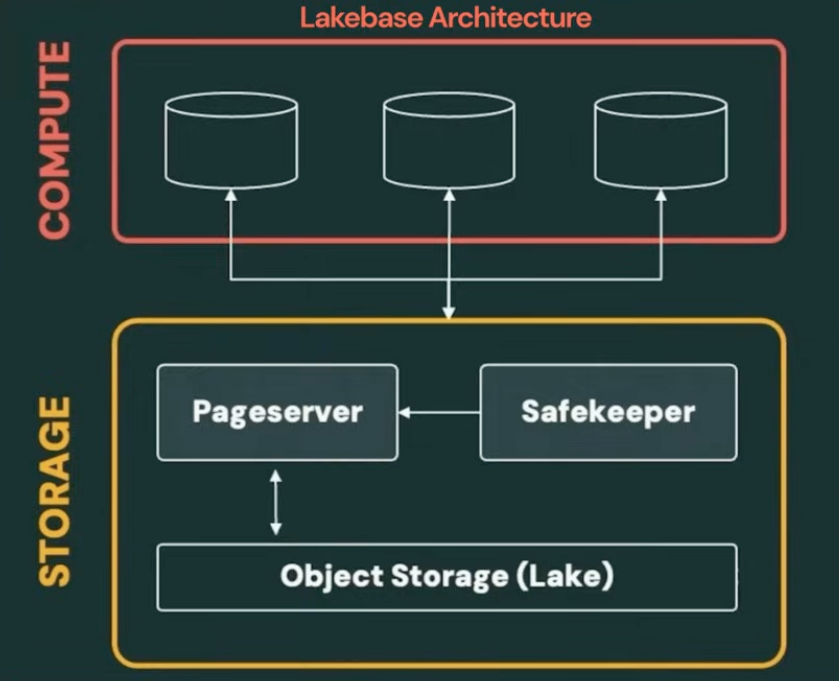
Image 1 (from this video)
Here are some more features that make it a compelling product (see also Image 2):
- Similar to other Databricks products, it scales with you, including down to zero.
- Branching works like Git.
- Transactional and analytical workloads share the same storage. Since Lakebase and the lakehouse share a storage layer, Databricks positions it as a way to run analytics, ML, and AI on transactional data without having to copy it to a separate system (https://www.databricks.com/blog/what-is-a-lakebase).
- It stays inside your governance model.
- Synced databases. You don’t have to manage sync between your lakehouse and lakebase, but you can tell Databricks what data it should manage syncing between the two on your behalf, without requiring custom ETL or reverse ETL.
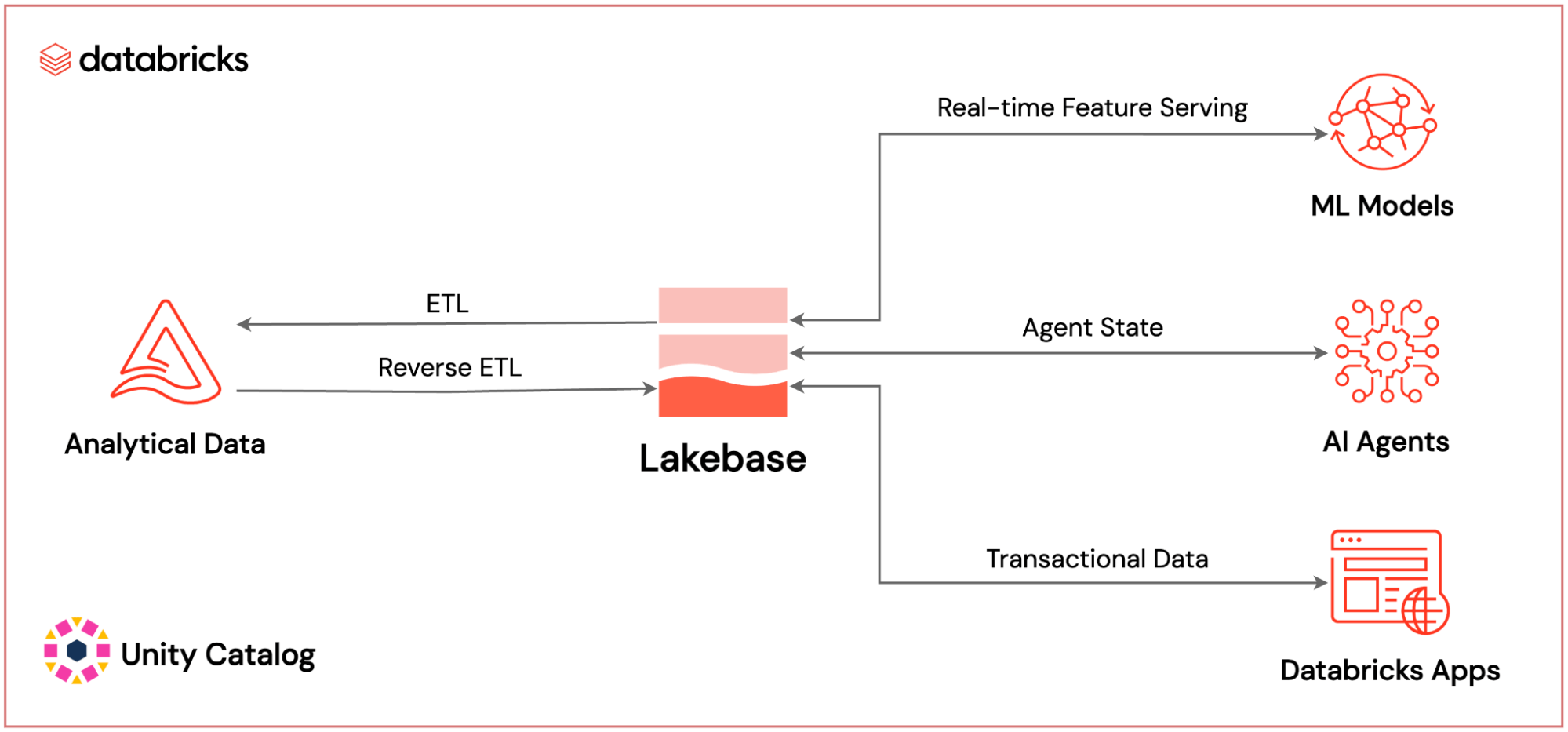
Image 2 (from this blog)
But one important nuance before you rip out every SQL warehouse you own: Lakebase doesn’t replace the lakehouse. The guidance from the conference was to “pick the engine by query shape, not familiarity.” Point lookups and per-user app state belong in Lakebase. Large scans, aggregations and joins across big tables belong in a SQL warehouse. Best yet, you don’t have to pick one or the other for your app. A single Databricks App can use both, routing each query to the engine built for it.
LTAP: One More Lake for You (Maybe the Most Important One)
In fact, this architecture is what Databricks is naming LTAP: Lake Transactional/Analytical Processing (yes, another “lake” name). To be clear, LTAP is not another product. LTAP is the name of the architecture that I just described, built from the Lakebase capabilities I explained above. What all of this means is two-fold:
- Lakebase and Databricks Apps were designed to work together. Apps manage the build, deployment, hosting and governance. Lakebase provides the data in the format you need it without all the messy pipelines. This is why I needed to start this conversation in my Databricks Apps series.
- Databricks now natively offers a solution to the age-old OLTP/OLAP division in one product (Lakebase) with one architecture (LTAP) that manages all the messiness typically involved in maintaining separate data bases in a secure, scalable and efficient manner.
Impressive, isn’t it?
For more details on Databricks Apps, continue along with my series where I cover the how-to in Part 2 and best practices in Part 3. For a throwback, check out my guide on how to build an efficient and cost-effective dashboard.
Footnote
1. It is ironic to me that no one can pinpoint who exactly originally said this quote- Socrates, Aristotle, Einstein and Don Henley are all attributed to this quote. We really don’t know anything at all, do we?