
This blog post is Human-Centered Content: Written by humans for humans.
With the advent of AI, nearly every talking point in the datasphere revolves in some way around how to leverage AI in your business. While there have never been more accessible tools to get started with AI, it can feel incredibly overwhelming via choice paralysis. However, I have recently been exploring Snowflake’s collection of AI features known as Cortex, and I have been shocked by how easy it was to quickly develop a prototype of an actual tool that could easily be leveraged by the rest of InterWorks. In this blog, you’ll see how I went from a simple use case to an MVP in a matter of a couple of days.
What is Cortex?
Cortex refers to a larger collection of features and functionality on the Snowflake platform that integrate Large Language Models (LLMs) into your data ecosystem. This includes:
- Cortex Analyst
-
- Create semantic models on top of your data. Establish meaning and connections between words and terminology to the columns in your tables. These services generate SQL to provide answers to user-provided questions.
- Cortex Search
-
- Create services to perform “fuzzy” searching across unstructured text data using methods like key words.
- Cortex Agents
-
- Orchestrate Analyst and Search services to provide access to your data across the organization. The agent is responsible for determining what tools to use based on a question it is given.
- Snowflake CoWork (Formerly Snowflake Intelligence)
-
- Snowflake’s native interface for stakeholders and business users to leverage cortex services
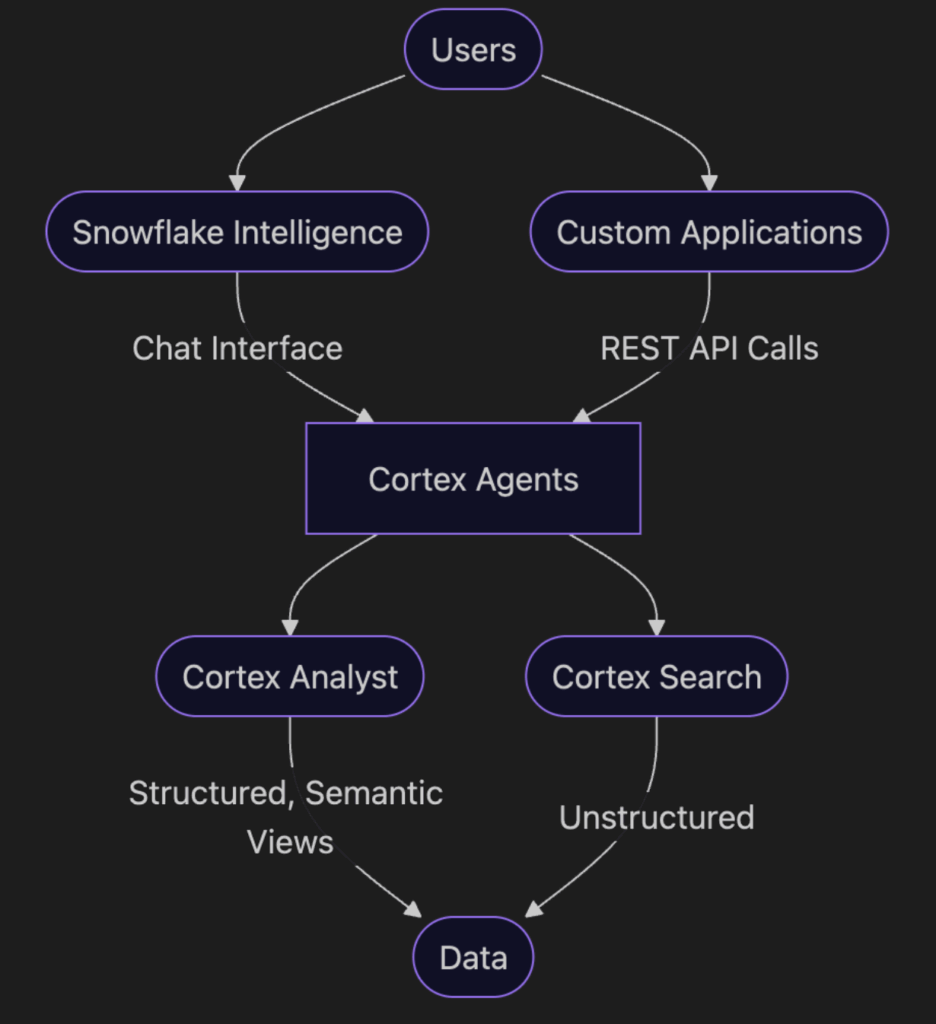
From a high level, you can think of Cortex Agents as what your users “talk” to, which then leverages the Cortex Analyst and/or Cortex Search objects that you have created to provide an answer to users, based on whether or not you need to query structured or unstructured data. From there, you can either utilize Snowflake CoWork to chat with these agents, or connect them to an external application via REST API. A full hypothetical setup leveraging all of these is detailed below:
As organizations are eager to start experimenting and building with AI, the common starting point is finding a use for it. Fortunately, we had a great use case right out of the gate.
The Use Case
I was speaking with our very own Cole Shelton, InterWorks’ Chief Data Officer, one day at the office, and he mentioned to me that he was wondering if there is a way to easily connect our support desk ticketing data into Snowflake and create a chat interface to allow people across InterWorks, including our IT, Assist and KeepWatch teams, to ask natural language questions of our ticket data. This use case is far from unique to InterWorks. Any company that provides any internal or external support services could benefit from a tool like this. With this in mind, I set out to see what I could do.
For example, for this project, I have been exploring Cortex Analyst to allow for natural language to be translated to SQL for our data.
The Process
Before I even thought about creating any semantic models, I started with standard data modeling. As AI continues to grow in popularity, proper data engineering practices will become even more important in order to provide reliable data that the company can be confident in. I remember hearing a phrase during college in a data science/machine learning class that continues to ring true to this day: “Garbage in, garbage out.” In other words, if you feed poor data to the most sophisticated, elegant, and efficient models, you will still get poor results.
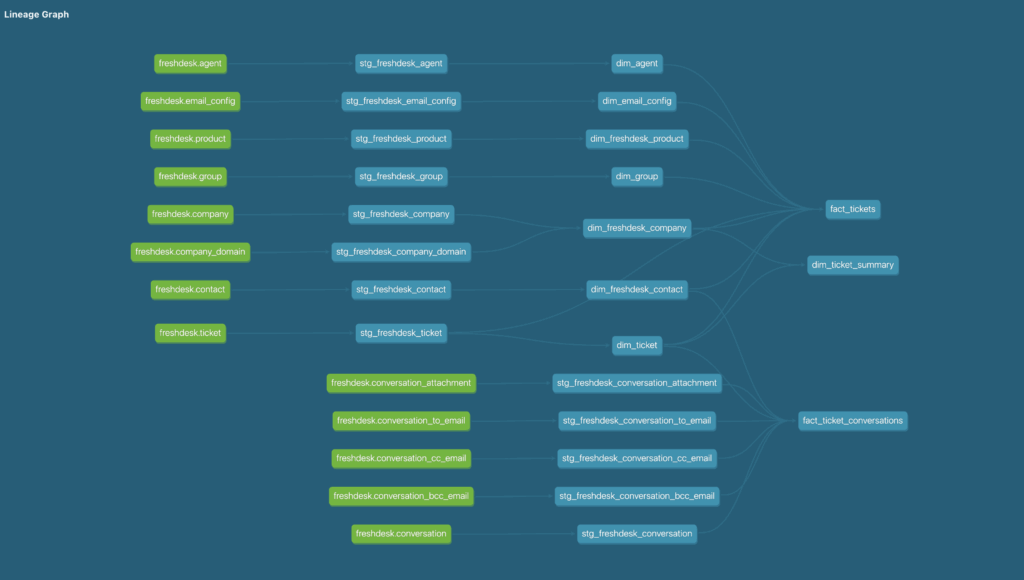
My go-to tool for data modeling has been dbt for some years now. Especially now, dbt is an incredibly convenient tool to use, as you can use it in a few different ways: dbt Platform (formerly dbt Cloud), dbt Core, dbt Fusion or dbt in Snowflake. Fortunately, the source data was already landed in Snowflake, so I was able to create a new project and curate a relational fact/dim model that could then be used to create a Snowflake Semantic View. Here’s a view of a section of the DAG I created that is the cornerstone of this project:
Once this model was created, then I could start digging into the end goal of this project. The first lesson I learned: Snowflake has a dedicated UI for creating semantic views that is incredibly easy to use. Semantic Views, when looking at the bigger picture, are essentially a translation layer between the business and the data. For example, this is how you can map the word “Revenue” to a specific column in a table. In Snowflake, these are schema-level objects, and they are the building blocks for Cortex Analyst. My previous experience with semantic layers and semantic modeling led me to assume that I would be writing a series of YAML files and uploading those to Snowflake. While that is an option, it is not required.
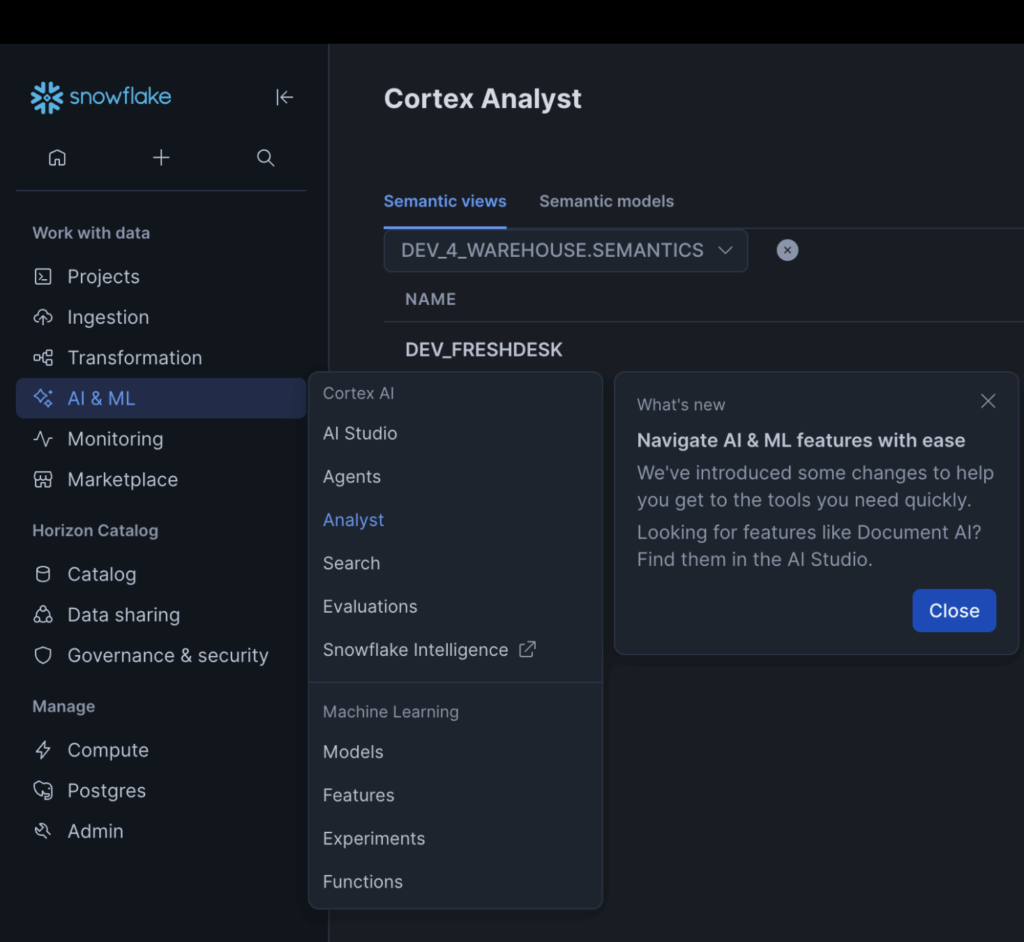
In the “AI & ML” tab of the Snowsight menu, you can either go to the “AI Studio” tab or directly to the “Analyst” tab, as both will take you to the same place:
Since Semantic Views are schema-level objects, you’ll need to choose a database and schema to store your view. I would suggest choosing a different schema than one controlled by your dbt project to help prevent the Semantic View from being accidentally dropped. I created a dedicated “semantics” schema to store any Semantic Views or any other AI-based objects I may create in the future. Finally, Snowflake provides an “Autopilot” menu to create semantic views, which allows you to create them without writing any YAML. This process contains four steps:
Provide Context
While Snowflake labels this step as optional, I highly recommend taking some time to provide as much context as possible. Currently, there are two ways to do this, with more on the horizon.
Verified Queries
First, you can create verified SQL queries and map them to corresponding questions written in natural language. This allows Cortex to recognize common query patterns and pick up any implicit business logic that should be included in any queries that it runs.
Tableau Data Sources
Snowflake also allows you to upload .tds files associated with the data being used in order to map user-friendly dimension and measure names back to their corresponding fields in their tables.
At this time, there is no limit on how many verified queries or data sources you can provide. Your context plays a significant role in how accurate your semantic view is, so take plenty of time fine-tuning it.
Name Your Semantic View
A pretty self-explanatory step. Depending on your organization’s established naming conventions, you may consider including an “sv_” prefix, and also including a “dev_,” “qa_,” or “prod_” prefix if you have established DataOps practices. I chose to name this first iteration of a semantic view “dev_freshdesk.”
Select Tables
The semantic view needs to know what tables it is allowed to access in order to provide answers to questions. For example, a semantic view about support tickets would almost certainly not need to query tables from accounting and finance. I pointed my view to the fact and dimension tables that I created earlier via dbt.
Select Columns
One of the most commonly talked about topics when discussing AI is context or context limits. In this context (no pun intended), context refers to how much information the AI model can use at a time. While humans can use seemingly infinite amounts of context to inform decisions, the same cannot be said for LLMs. If you point your view at a table with hundreds of columns and most of them are not actually useful, the LLM does not know that by default. As a result, it can try to use the wrong column for the job. By selecting the columns the semantic view has access to, you’re helping improve the accuracy of the answers by not overloading the model context with pointless columns.
Custom Instructions
Include any implicit business logic or define default behaviors here. For example, I included two rules for SQL generation:
- Unless specified, only return information on tickets submitted YTD via CREATED_AT >= DATE_TRUNC(‘year’, CURRENT_DATE())
- If aggregating ticket descriptions and using Cortex functions, only use up to 50 tickets per grouping.
Logical Tables
Semantic Views are comprised of logical tables, which differ from the actual “Table” database object. They rely on actual tables, but the logical tables are responsible for limiting data, defining what information can be found in the table, and linking descriptions and synonyms to the data. Essentially, it’s a slightly abstracted version of a physical table that has been optimized for natural language queries.
These logical tables included in the semantic view can be enriched by including information on:
- Dimensions
- Categorical columns that can be used to group data by
- Time Dimensions
- Date/Time columns used to plot data over time
- Facts
- Measures that can be aggregated via dimensions
- Named Filters
- Link natural language to SQL filter statements. For example, I defined active support agents as rows in my DIM_AGENT table with IS_ACTIVE = TRUE
- Metrics
- Commonly used calculations made from columns within a single table. For example, I defined avg_resolution_time_hr in the FACT_TICKETS table as AVG(DATEDIFF(‘hour’, CREATED_AT, RESOLVED_AT))
In my experience, Snowflake is great about detecting dimensions and time dimensions. It can detect some facts, but will generally not detect named filters or metrics. Depending on your use case, this can be an important step in building an intelligent system.
Derived Metrics
You can also create metrics that pull from the table-level metrics that you previously defined to define metrics that cross tables. For example, after creating metrics for total_tickets based on my FACT_TICKETS table as well as total_conversations based on FACT_TICKET_CONVERSATIONS, I then created a derived metric for average conversations per ticket via total_conversations/total_tickets.
Relationships
Here, you can explicitly define the primary key/foreign key relationships between the tables in your model. Note, the underlying physical tables do NOT need to have defined PK/FK relationships for this to work. Snowflake is great about detecting these automatically, but it can be good to double check and see if it missed any that may not be as obvious.
Verified Queries
Continued from any queries that you provided in step one, you can continue to add more verified queries to improve multiple accuracy. Currently, there is no limit on the number of queries you can add.
Addendum: Create and Manage Your Semantic Views via dbt
Seasoned data practitioners may be asking at this point about the best way to keep these manually created semantic views in sync with declarative dbt projects that can easily change over the course of developoment. Would complex CI/CD processes be needed to fetch semantic view metadata and programatically update it when merging a PR to the dbt project? Fortunately, no. After completing the initial draft of this blog, I discovered that at the end of 2025, Snowflake released a dbt package created solely for the creation/management of semantic views directly within a dbt project as a custom model materialization. With your semantic views now also created declaratively alongside the rest of your data model, you can easily version control them and collaborate. You can find out more about the package, including how to install and use it, here.
From this point, your semantic view has been created! However, there are still some things to do in order to improve the accuracy of answers from the LLM.
The Result
One of the best parts of the Semantic Model editing UI is that you have immediate access to a chat interface on the right where you can immediately test your work and see if it works. Just type in a question and watch the magic happen. Snowflake will show you the exact query that it is running in order to answer your questions, which is wonderful for debugging purposes. I asked Snowflake to extract the most common questions that we get in our Assist tickets, and I got a clear-cut answer:
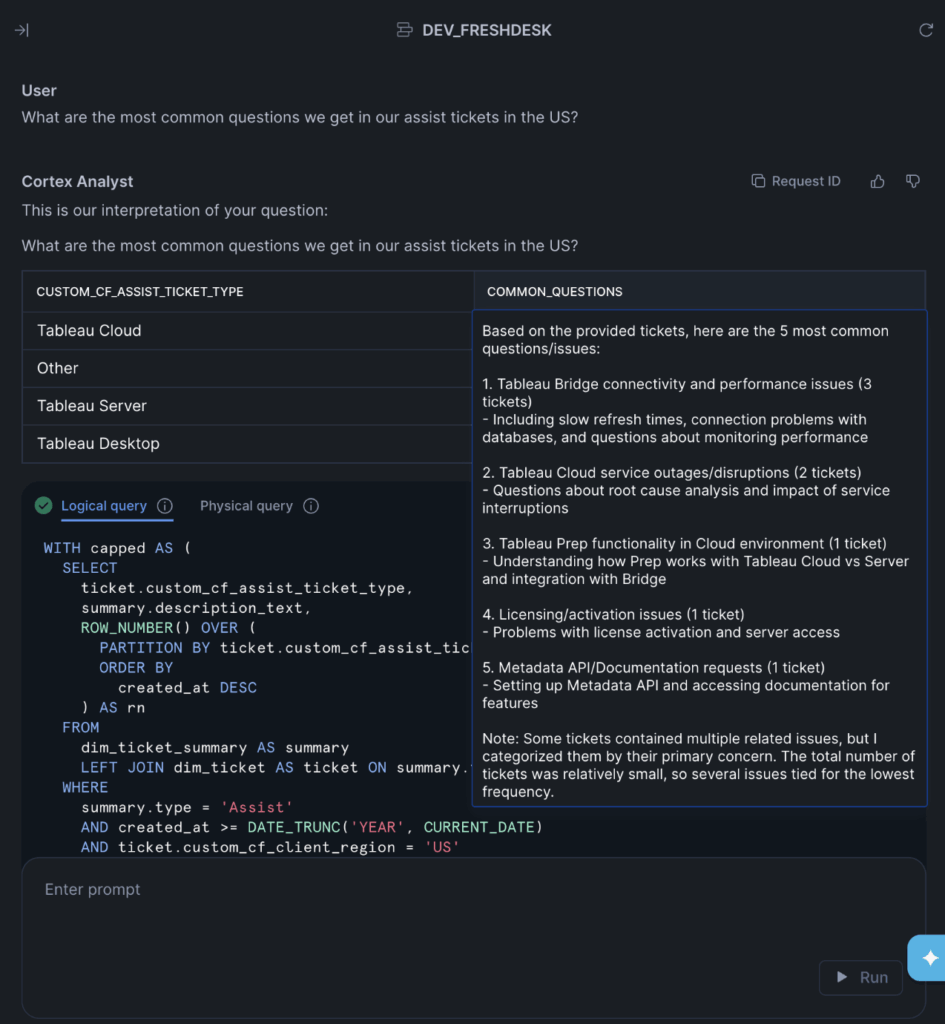
Here’s the full query that it generated:
```sql
WITH capped AS (
  SELECT
    ticket.custom_cf_assist_ticket_type,
    summary.description_text,
    ROW_NUMBER() OVER (
      PARTITION BY ticket.custom_cf_assist_ticket_type
      ORDER BY
        created_at DESC
    ) AS rn
  FROM
    dim_ticket_summary AS summary
    LEFT JOIN dim_ticket AS ticket ON summary.ticket_sk = ticket.ticket_sk
  WHERE
    summary.type = 'Assist'
    AND created_at >= DATE_TRUNC('YEAR', CURRENT_DATE)
    AND ticket.custom_cf_client_region = 'US'
    AND NOT custom_cf_assist_ticket_type IS NULL
),
aggregated AS (
  SELECT
    custom_cf_assist_ticket_type,
    COUNT(*) AS total_tickets,
    LISTAGG(description_text, ' | ') WITHIN GROUP (
      ORDER BY
        rn
    ) AS all_tickets
  FROM
    capped
  WHERE
    rn <= 50
  GROUP BY
    custom_cf_assist_ticket_type
  HAVING
    total_tickets >= 5
)
SELECT
  custom_cf_assist_ticket_type,
  snowflake.cortex.COMPLETE(
    'claude-3-5-sonnet',
    CONCAT(
      'Below are support tickets of type "',
      custom_cf_assist_ticket_type,
      '". ',
      'Identify the 5 most common questions or issues being asked. ',
      'Return them as a numbered list. Include the total number of tickets that ask that question. Tickets: ',
      all_tickets
    )
  ) AS common_questions
FROM
  aggregated
  /* Generated by Cortex Analyst (request_id: xxxx) */
```
Over the span of a couple of days, I was able to model our internal ticketing data, create a semantic view in Snowflake and ask it a question in natural language. The process of creating the view was very simple, and I found it to be very intuitive. Obviously, there are still plenty of ways I can work on optimizing my model, including adding more verified queries, optimizing those queries and, more explicitly defining business logic, metrics, and synonyms, but the initial question has been answered.
“Can we create a chat interface on top of our support ticket data?”
Yes. Yes we can.
While I was just one guy working on an MVP, doing this at production level at enterprise-scale requires a ton of work and coordination among data engineers and business stakeholders. No matter where you are at in your AI journey, InterWorks can help you reach your destination. Whether you need hands-on-keyboard pipeline development, strategic guidance, or you’re brand new to data platforms as a whole, we can get you what you need. Feel free to reach out sometime! We’d love to help you find your path to AI.
Related