
When I first started building Sigma apps, I kept hitting the same performance wall. Sigma Workbook transformations and their repeated SQL queries sent to the warehouse can feel slow. The techniques that make traditional BI fast (like pushing transformations upstream, materializing aggregated views and precomputing heavier calculations), all assume the data holds still long enough to precompute against. Apps break that assumption on purpose. A user submits a form, edits a record or approves a request and the app needs to reflect that change immediately. The data can’t be stale by design, so it can’t sit still long enough for the usual tricks to apply.
That constraint hits at a time where performance matters more than ever. We expect apps to move fast these days. So, what is fast enough? Researchers Walter J. Doherty and Ahrvind J. Thadani sought answers to this question back in 1982, resulting in the commonly cited Doherty Threshold: Software feels most engaging when response times are under half a second.
On a reasonably sized warehouse doing even moderate transformations, it is easy to have apps repeatedly firing queries that take a few entire seconds. Without thoughtfully designing the lineage, speed can put a damper on the UX of an otherwise stellar application.
Luckily there’s a real option that fits this constraint well: structuring the lineage in a workbook to take advantage of Sigma’s Alpha Query engine. Get the lineage right and Sigma can serve most of an app’s calculations straight out of the browser, including Lookups, with no warehouse round trip required.
There are some gotchas and limitations I’ll cover at the end, but it’s pretty amazing to see it in action. Jump straight to the step-by-step guide if you want a distilled lineage strategy.
What Is Alpha Query?
Alpha Query is Sigma’s in-browser query engine. Sigma has written about the mechanics in more depth, so start with Sigma’s documentation on caching and data freshness and the engineering team’s own writeup on partial query evaluation if you want the full picture.
The short version: Alpha Query caches data in the browser and recomputes results from that cache instead of re-querying the warehouse. It handles most of what a Sigma calculation needs, including aggregate functions and most impressively: lookups. When a table’s data already sits in the browser cache, filtering it, resorting it or adding a calculated column can all happen locally, in milliseconds.
Because Sigma caches data directly from Workbooks into the browser, Alpha Query works regardless of warehouse provider. While there may be some nuance in additional data caching upstream between warehouses, this strategy can be applied on any connection.
The catch is that Alpha Query only works on data it already has. Certain operations, joins, unions and some calculation types among them, will break out of the cache and force a new warehouse query. That’s fine when the underlying data genuinely needs a fresh fetch. It’s a problem when a table that should be able to run in browser keeps tripping the warehouse because of how it’s built.
A Three-Tier Lineage That Plays to Alpha Query’s Strengths
The approach that has worked well in practice is a three-tier lineage. Each tier has one job, and the boundaries between them are what keep Alpha Query doing as much of the work as possible.
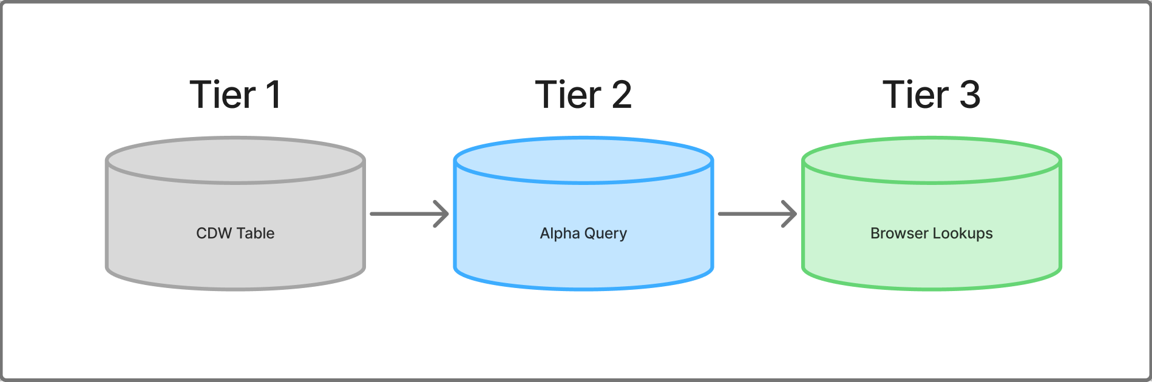
Tier 1: source data in the warehouse. Every Sigma lineage starts with a warehouse source (and/or Data model source). What matters here is not attempting to build Workbook lineage directly from sources outside the Workbook. Make sure to start your Workbook lineage with a base table element as Tier 2.
Tier 2: the base table, configured to prefetch always. Create a table element from Tier 1 in your Workbook. This is your core table that requires a warehouse trip, and where you put anything that would break Alpha Query further downstream.
Set prefetch mode to Always. This tells Sigma to prefetch that table’s data into the browser cache proactively, rather than waiting for an element to request it. This tier should be the last element compiled into SQL when data refreshes.
Tier 3: the calculations and Lookups running in browser. Build another immediate child from Tier 2 and do the app’s remaining work here: calculated columns, Lookups, additional forked lineage, whatever the app’s visible elements need. Because this table’s parent is already cached, Alpha Query can serve these calculations straight from the browser.
The pattern takes source data at Tier 1, forces that result into the browser proactively at Tier 2 and keeps every user-facing calculation downstream of the cache boundary at Tier 3. Get the layering right and most interactions in the (app, filtering, sorting, adding a calculation) feel instant, because they are.
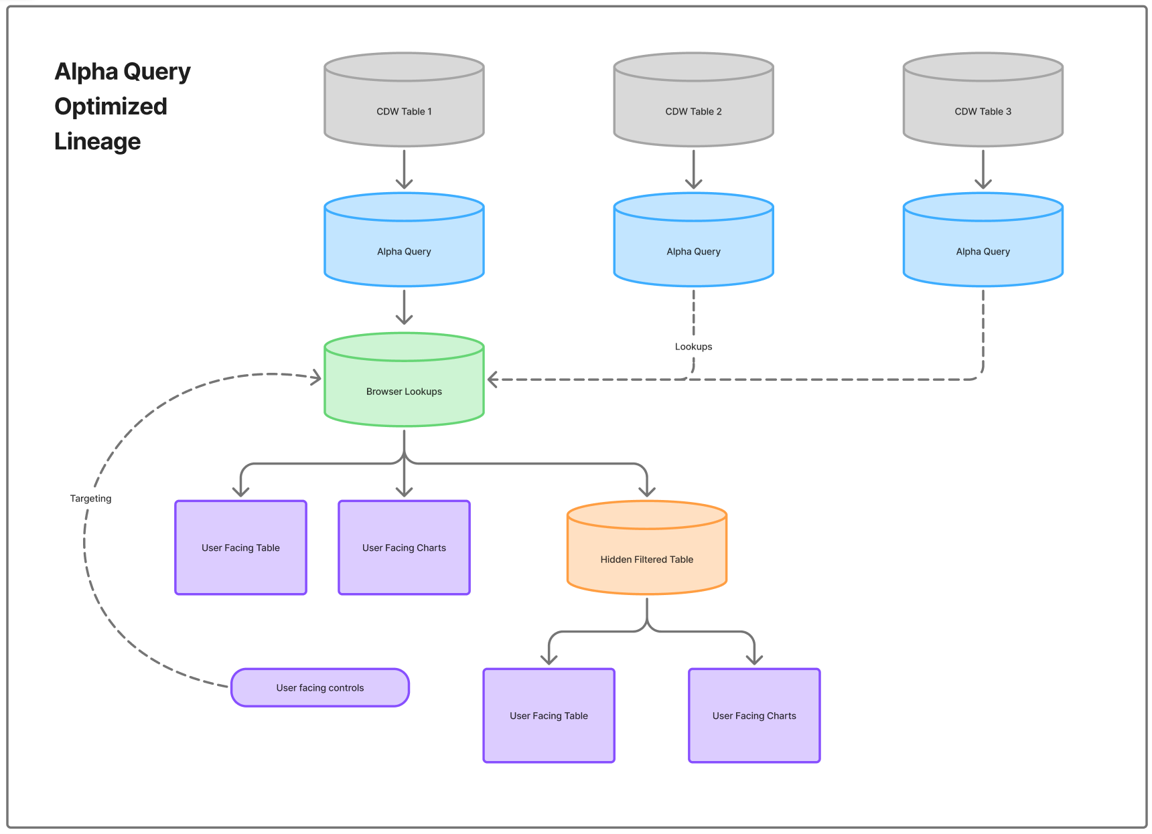
Combine this across multiple tables you would otherwise join, and you can create an optimized lineage that runs lean queries back to the warehouse before doing heavier lifting in browser:
Seeing It in Action
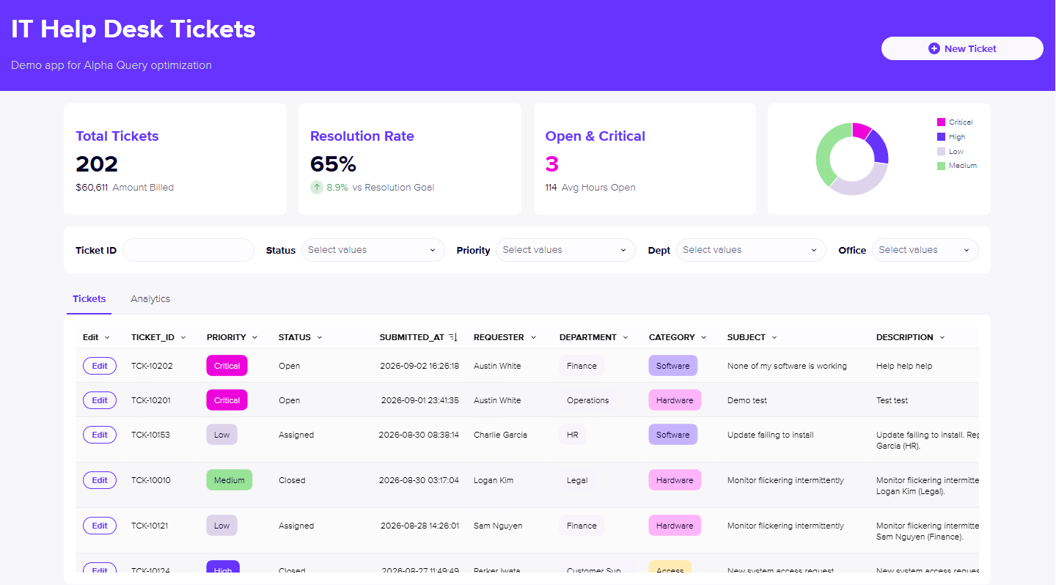
To illustrate this in action, I’ve thrown together a simple demo app to handle billable IT tickets seen above. The app captures a few common patterns requiring some modeling in Sigma:
- Tickets are captured in two input tables, where key ticket edits get logged in an append-only updates table to capture history.
- App generated data has counterparts in other systems we want to reference (e.g., a billing table for hours logged by ticket).
- App generated data contains dimensions we want enriched by referenced dimension tables (e.g. an employee dimension).
For this app, here’s how the model looks all together in a traditional join structure:
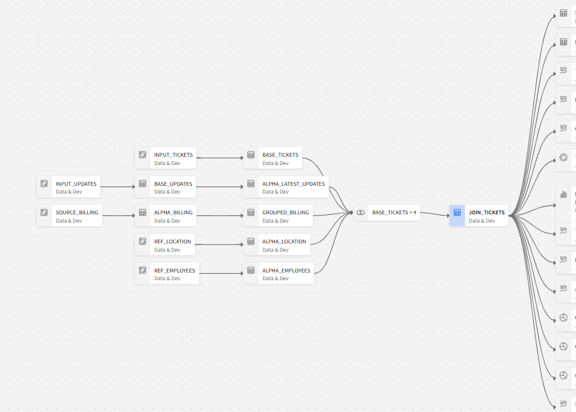
With this lineage, any change to any of the source streams will require a full refresh of JOIN_TICKETS. Because joins are not supported by Alpha Query, this means a trip to the warehouse to execute with SQL. Additionally, any calculated columns added to JOIN_TICKETS will be assessed through the query compiled.
Contrast that with the Alpha Query optimized lineage below:
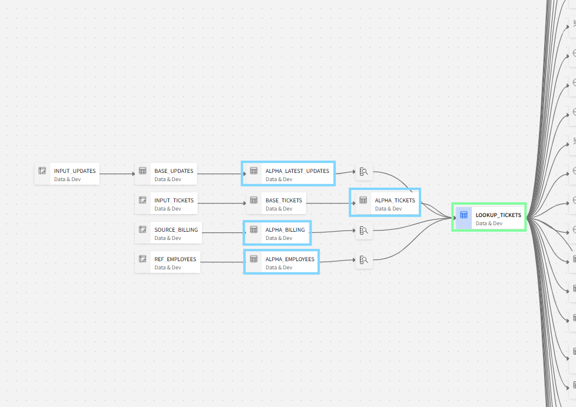
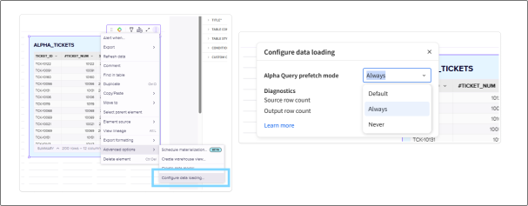
For each of the tables outlined in blue, I’ve configured the settings as shown below:
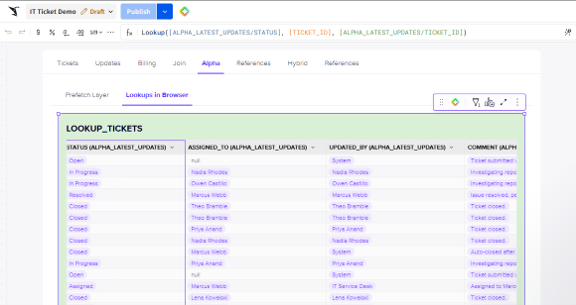
That allows me to create the green LOOKUP_TICKETS Tier 3 layer, which, per the name, contains Lookup() calculations pointing at the other cached tables:
The final test: I’ll hit a browser refresh to force these tables to load again and check the query history to make sure it’s working:
Notice the query history shows four underlying source tables ran data prefetch queries to the warehouse, but the remaining visible elements show execution paths in the browser. Additionally, filtering my data and adjusting parameters is instant.
Contrast that with the same set of visuals and actions operating on the JOIN_TICKETS lineage path:
The execution path showing ‘Warehouse (cache)’ tells me this was run via SQL, incidentally against a cached result in Snowflake. In this demo app with small data, simple structures and essentially no added complexity in calculations, the difference in the initial data load can be negligible. But in production apps we’ve seen 5-7 second queries fall back to 1-2 seconds, which can feel like lightyears of a difference clicking through an app.
What makes an even bigger difference is the filtering using controls after the load completes. To exacerbate this issue, the controls on this page target table elements above the join, which forces the join to re-run on each filter application. That’s an easy mistake to make in Sigma’s flexible environment, but it makes a massive difference in report performance for users.
Where the Difference Really Shines
Trimming the baseline queries needed to support an app is a foundational step for performance optimization, but this won’t be your users’ most noticeable impact. What matters more is the reduction in frequency those queries run at all.
Where the magic really comes together is in navigating through the app, even taking actions like adding new records:
Blink and you might miss it! This form is inserting rows into two separate input tables (INPUT_TICKETS and INPUT_UPDATES), joining those records together (via Lookup()) and doing additional Lookup calculations to reference tables, instantly.
For users who we’re asking to operate in these apps for mission critical work day-to-day, getting this right is a massive win.
The Catch: Alpha Query’s Limitations
For all its magic, there are some limitations. Many of those are documented by Sigma directly, while others have been learned through trial and error. I can’t present an exhaustive list, but I can share my findings from my journey so far.
Alpha Query only works on data it can hold entirely in browser memory, and that ceiling is defined. Sigma’s documentation puts the practical limit at around 10,000 rows, though the true constraint is total memory rather than a hard row count. A table with a handful of narrow columns might comfortably clear 10,000 rows. A wide table with a lot of columns, or a larger JSON column, may trip memory ceiling before that.
For many app use cases, this isn’t a serious limitation. Many of the projects I’ve worked on operate on a bounded, relatively small slice of data powered by form-fill entries like this ticket app example. These solutions fits inside Alpha Query’s memory budget without much thought. Where it gets harder is when the app’s data volume is genuinely large. In that case, the fix looks a lot like the fix you’d reach for upstream: group and aggregate the data down to a size Alpha Query can hold before letting the rest of the lineage run against it. It’s the same instinct as materializing an aggregate table, just applied inside the workbook instead of in the warehouse.
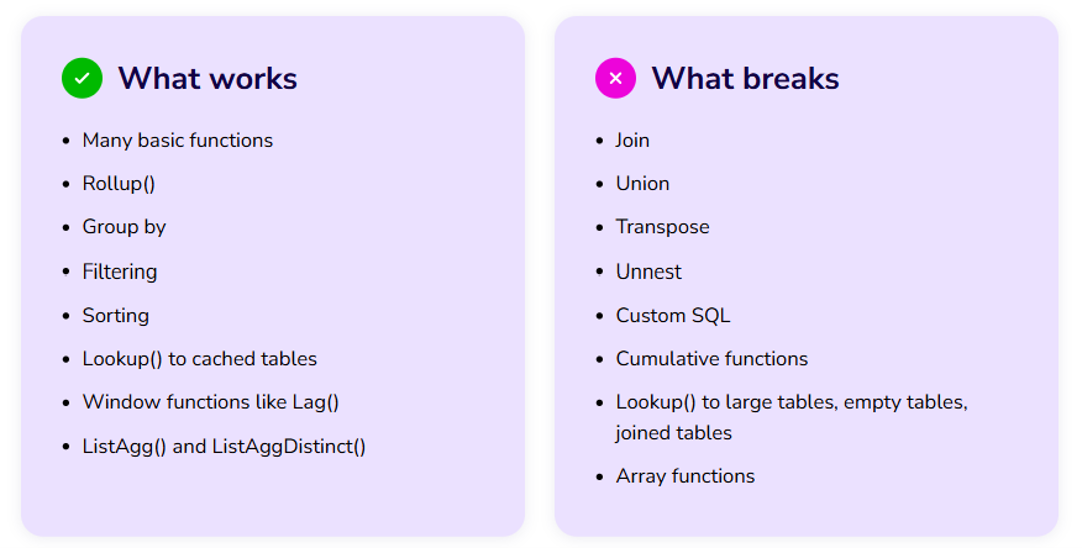
The other well-documented trip-wires include all of Sigma’s table transformation tools (i.e., this cast of characters):

If your solution requires any of the above, put them before your Alpha Query layers. If you introduce them downstream, those elements will compile your lineage back into SQL and make a trip for the warehouse.
Another key learning to build around: keep your browser calculation table (e.g., the LOOKUP_TICKETS table in my example) on a visible page in the Workbook. If that table is on a hidden page, viewing its child elements will trigger LOOKUP_TICKETS as a full prefetch query. You might bury it in a hidden tabbed container or expose your development page only to choice admin types via some custom page navigation UI (a blog to come, I suppose). If you have just one layer of prefetch tables to user facing elements that you want running in browser, the prefetch layer can remain hidden. But if you want to build out a more robust lineage and have grandchildren elements continue to trigger the correct prefetch sequence, the intermediate elements cannot be hidden.
Here’s the list of what does and does not work with Alpha Query in my direct testing so far:
Alpha Query Setup Steps Summarized
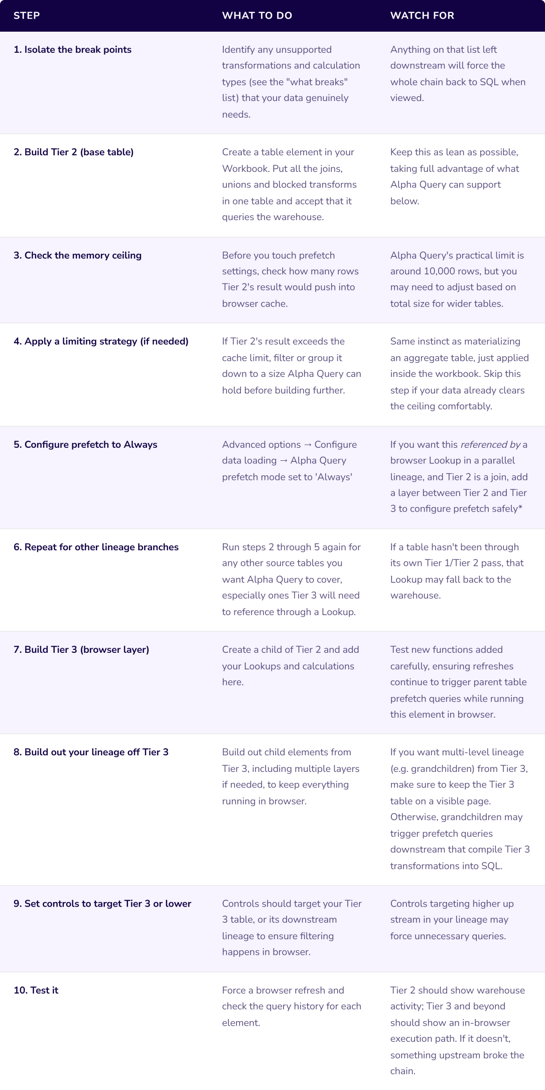
*In testing, Lookups pointed at elements containing joins broke out of Alpha Query and sent Tier 3 to the warehouse.
This Isn’t Just an AI App Pattern
Everything here applies just as well to any Sigma Workbook, not only AI apps. For traditional BI products, apply the same pattern where possible to serve up default visuals that can run on Alpha Query. If users want more granular or complex analytics that require a warehouse trip, design the workbook to have them intentionally navigate to those elements so that the performance is otherwise solid.
The goal is the same either way: Keep the warehouse trips confined to the tables that actually need them and let everything else run in browser. That way, the reporting on top of it responds the way users expect a modern app to respond: instantly.
Conclusion
When I first learned about the Doherty Threshold, my initial reaction was cynical disappointment in our collective impatience. We really can’t wait a few seconds after a click? But after thinking about it more, I concluded (with no evidence) that maybe this is because nature responds to us immediately. Drop an object and it falls.
Lag feels foreign, and pulls us out of an otherwise natural flow. But frictionless software that works fast just makes more sense. That’s really what an Alpha Query optimized lineage buys you: an app that keeps pace with that instinct instead of fighting it. Get the structure right, and your users will be glad to be operating in your app.