
At this year’s Data + AI Summit, I spent a good chunk of my week in Databricks Apps sessions. After spending several months working in Databricks and developing my very own Apps, I knew I still had a lot to learn and jam-packed my schedule accordingly. As someone relatively new to Databricks, I could sense that something was different with the product, but I couldn’t quite put my finger on what it was that was drawing me in.
We’ve all seen a shift recently, where the platform is no longer just where your data lives. It’s becoming where your tools, your processes and your agents live, too. That’s a big shift. Like most big shifts, it comes with a lot of new vocabulary. For Databricks specifically, this includes terms like Lakebase, App Spaces, Micro Apps and more. The list just goes on. My goal at this conference was to not only understand the technical components of each of these new products, but also the why behind them, and finally locate what it was that made Databricks seem a bit different from the other products I was seeing out there.
After a few more months of putting into practice what I learned at the conference, I felt I was finally ready to put into words what I’ve been learning and deploying. This is the first post in a short series on Databricks Apps. Here, I’ll cover what an app actually is, how the different types of apps differ and why Lakebase is the piece that ties it all together. Part 2 will get into the how-to, and Part 3 will cover best practices.
What Is a Databricks App?
The simplest way to describe Databricks Apps is to summarize a talk from one presenter at the conference: Databricks Apps are a resource to build, deploy, host and govern your tools, data and processes in one central place (note: The speaker presented build, host and govern as pillars of Databricks Apps, but I’m adding in deploy as a fourth, distinct pillar). Notice how I didn’t say that their Apps are a place to replicate your previously-built dashboards or create workflows that allow write-back and real-time analytics. Though Databricks Apps can, of course, do those things, it is actually more simple than that. And, from that simple foundation, your options become seemingly limitless. Let me explain by walking through each of those four pillars.
Build
To start, Databricks gives you the option to build from scratch using the frameworks you already know (like Dash, React, Streamlit, Node and more), or choose from one of their many templates. If you’re working in TypeScript, Databricks also offers AppKit, an SDK with pre-built React UI components, type-safe data access and a plugin system for connecting to Databricks services. They are designed to work with your coding agent of choice, using custom skills, MCPs and plugins to build and deploy.
But it’s when I was skimming the templates that I realized Databricks Apps were more than the type of apps I was familiar with. These are usually some combo of visuals, data write-back, automated workflows and real-time analytics. From the available templates, I saw that Databricks Apps could also be used to deploy a custom agent or MCP Server, or to host a frontend chat-interface of a pre-existing agent, or even to easily configure a backend Lakebase Postgres database without the need to setup the server, database instance or connection plumbing (see Images 1 and 2 below). This was beyond what I was seeing from other platforms, It was also the first hint that I was getting closer to locating what it was that made Databricks feel different.
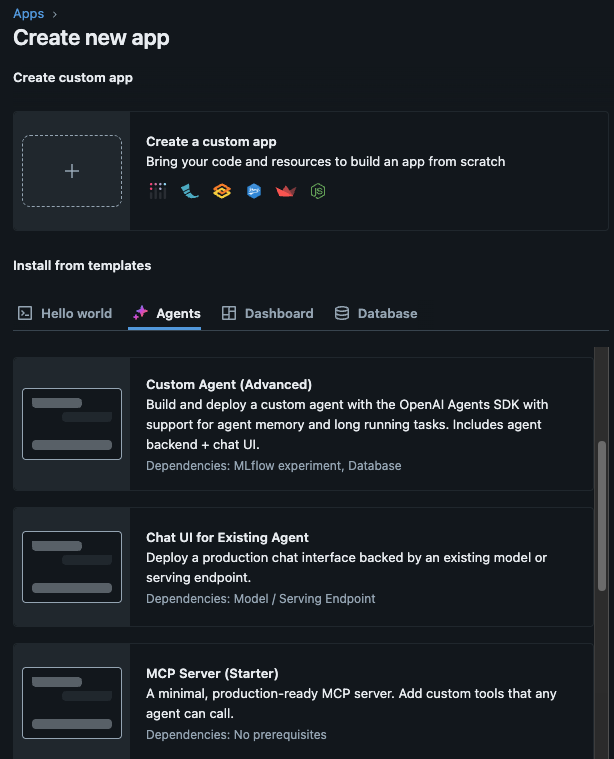 (Image 1)
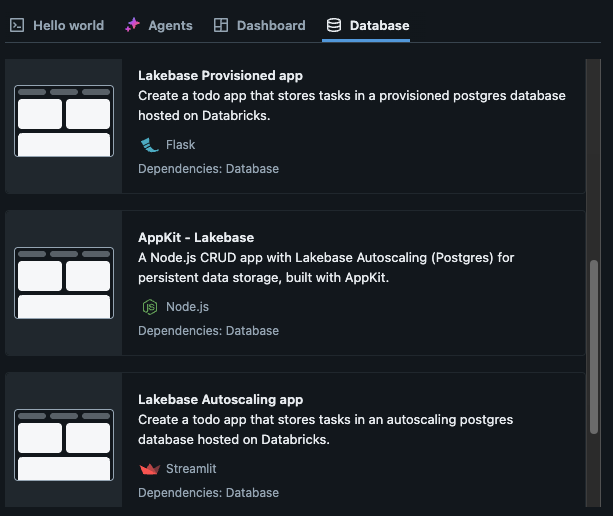 (Image 2)
Deploy
Now for the second pillar of Databricks Apps: deploying. Though this could probably be rolled up into building and hosting, but I thought it important enough to give it it’s own time to shine. My favorite aspect of this step is the seamless integration Databricks offers with your Git provider so you can continue to practice proper SDLC (see Image 3).
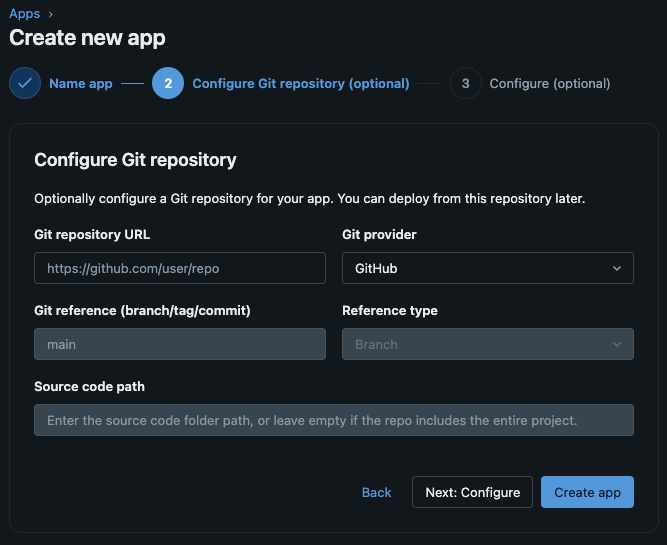 (Image 3)
As we know, a Git provider offers some powerful features: version control, clear production vs. development branches and an easy way for multiple developers to work on the same codebase at once. Additionally, Databricks offers seamless integration between GitHub Actions and their Databricks Automation Bundles (previously Databricks Asset Bundles) for strong CI/CD pipelines during build and deployment.
And it gets better. Through the terminal, you can manage all toolings from build and deploy in one spot as your agent, Databricks and Git all offer CLI installations.
Host
Like with deploy, Databricks also manages the hosting infrastructure. This is not unique from other platforms, which also host on your behalf so you don’t have to pull in your DevOps team to help you set up or manage separate servers or authentication systems. Yet in classic Databricks fashion, you still get to choose exactly how you’d like Databricks to host your app by configuring what resources the app can access, instance sizes and more (see Image 4).
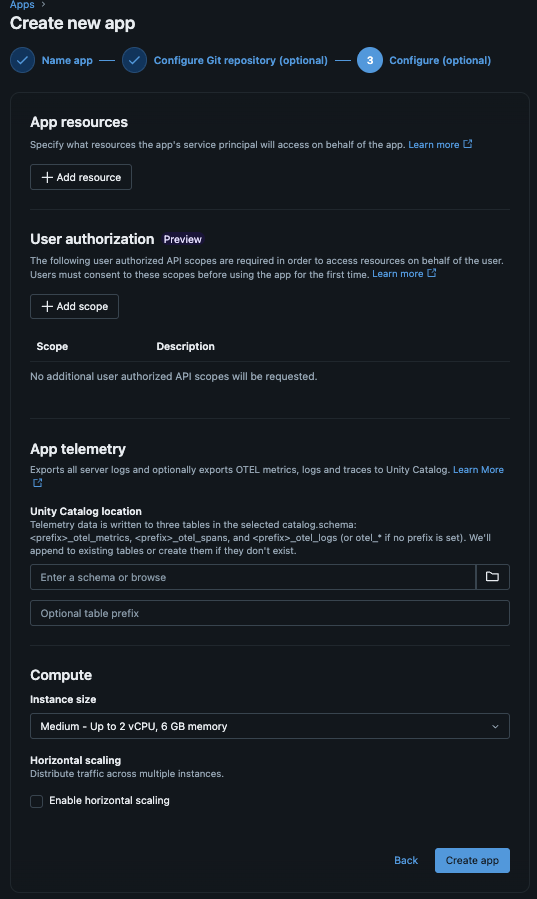 (Image 4)
Govern
Finally, the fourth pillar of Databricks Apps is where they really separate themselves from the AI-generated dashboards or apps we’ve become all too familiar with seeing lately (anyone else been in meetings recently where each person has their own AI-generated artifact with their own definitions and metrics that somehow don’t match with anyone else’s?).
By building, deploying and hosting within the Databricks ecosystem, you also get access to Databricks-managed governance. Authentication is handled through Databricks SSO, resource and data access is managed through Unity Catalog, and app usage and audit logs are automatically written to system tables.
This is why it’s so important to set up your governance and semantic layers first, before you start to build anything, so you can ensure from the start that the right people see the right data, every time. Though I won’t dive into the details, you can read more about ABAC here and metric views here.
How Is Lakebase Involved?
Though it may seem like a tangent, it’s now important to take a moment to discuss Lakebase, how it’s involved and why it helps to wrap up our introductory discussion on Databricks Apps. This will be very brief, so for a more thorough explanation that does the topic justice, see my corresponding blog on Lakebase (link here).
Historically, analytical data (OLAP) and transactional data (OLTP) lived in separate systems. Moving data between them meant crossing system, network and sometimes cloud boundaries, along with custom pipelines, syncing and a fresh round of security work. Building an internal tool meant provisioning Postgres, setting up custom auth, duplicating permissions across systems and much more.
Lakebase closes that gap. It’s a fully managed Postgres database built into Databricks, with low-latency reads and writes, branching and point-in-time recovery. Like with the lakehouse, Lakebase separates storage from compute and sits under Unity Catalog. The best part is that you don’t have to manage the sync between your lakehouse and Lakebase. Databricks takes care of that for you (but you can still tell Databricks what data to maintain and sync).
What all of this means is that Lakebase and Databricks Apps were designed to work together. Apps supply the serverless UI runtime with built-in auth and governance, and those controls apply automatically to the same data Lakebase serves.
Keeping It All in One Place
When you zoom out, the real value of Databricks Apps isn’t any single feature. It’s that the whole stack lives on one platform under one identity model:
- Lakebase for transactional, operational state
- Unity Catalog as one governance plane across tables, models, endpoints, functions, and Lakebase
- Databricks Apps as the deployment surface
In other words, the data, the governance, the app and the agent all sit in the same place. Once I understood this, I started to see why Databricks was such an intriguing product. The big picture pieces were coming together, and I was beginning to put my finger on what was drawing me in from the very beginning.
Up Next
Understanding what an app is turns out to be the easy part. In Part 2, I’ll walk through what you actually need to set up before you hit “Create app” (spoiler: It’s most of the work) and how to get your first app deployed without reinventing the wheel. Stay tuned for Part 3, where I will cover best practices to implement and pay attention to when building your very own Databricks App.