
How We Got Here: the Dual-Cloud Pattern
Organisations rarely start their data journey with a clean slate. Most engineering teams built their core compute and application workloads inside primary cloud providers long before adopting platforms such as Snowflake. As Snowflake grew into their central data foundation, these existing workloads naturally needed to reach across the network to read, process and return data.
A common pattern for running these jobs is deploying serverless containers in services like AWS ECS Fargate or Azure Container Apps. In this architecture, a container spins up inside the cloud provider, authenticates to Snowflake, fetches data over the wire, performs its processing and writes the enriched dataset back to a target table before shutting down.
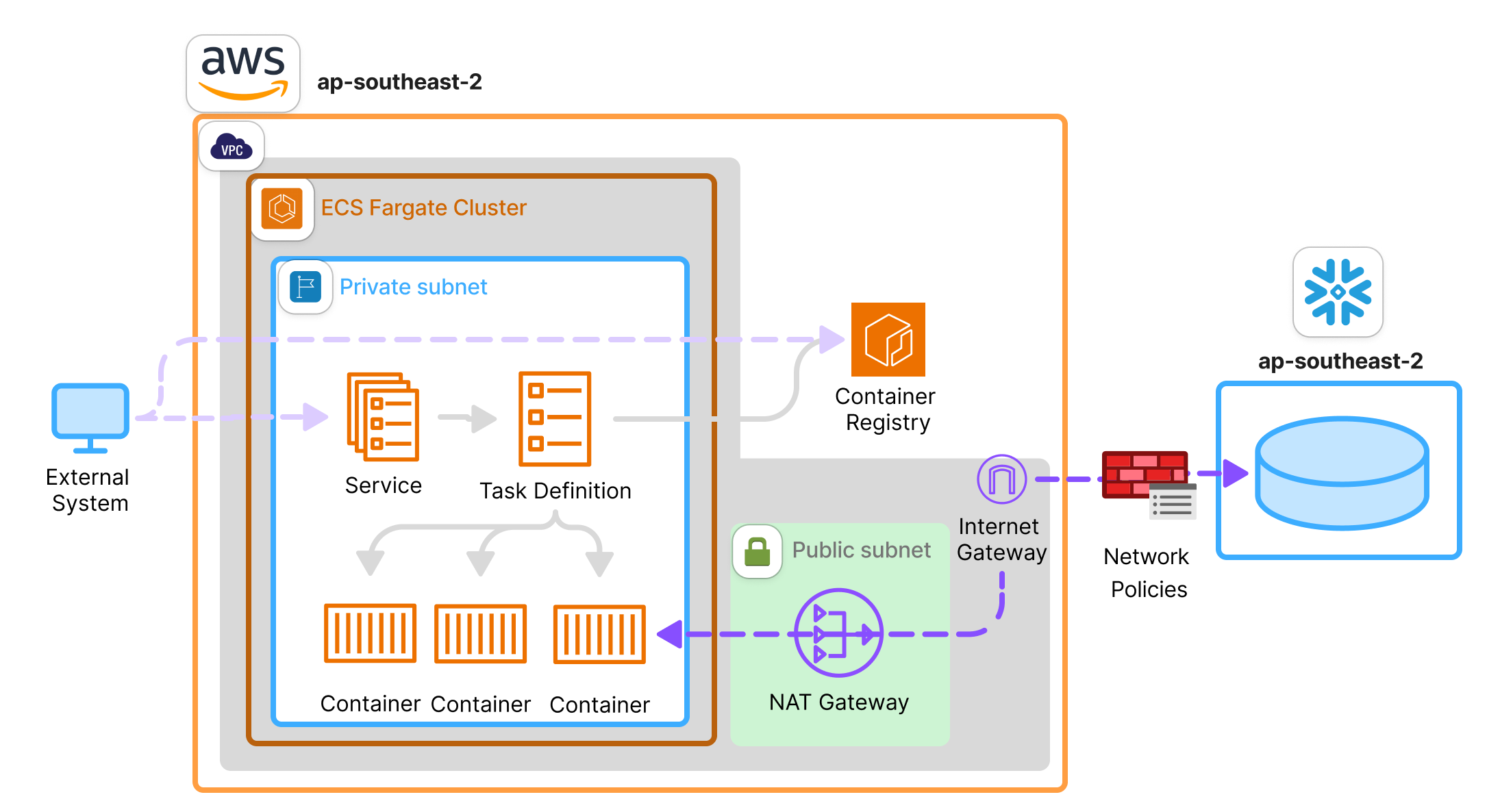
Above: Example of a simple ECS Fargate architecture reading from and writing to Snowflake.
This separation keeps compute and storage modular: placing compute in the cloud provider and data in Snowflake. But this design introduces architectural friction, which broadly speaking can be broken down into three fronts:
- The infrastructure tax. Reaching your data means provisioning and paying for networking components that exist only to bridge the gap. A NAT gateway, for instance, carries additional charges, even when your Snowflake account sits in the same region as your containers.
- Duplicated security boundaries. The same controls have to be maintained twice in two different models: IAM policies alongside Snowflake RBAC, security group rules alongside network policies, secrets management in two platforms, etc.
- Data leaving the platform. By default, every row travels twice over the public internet: once when it is read from Snowflake and again when the results are written back. You can, of course, keep the traffic private (via AWS PrivateLink, for example) but that carries its own charges.
This dual platform setup raises a fundamental design question: if the data lives in Snowflake, why are we still running our containers across the network?
The Data Locality Principle
This question brings us to a foundational paper in systems architecture. In his seminal 2003 Microsoft Research paper Distributed Computing Economics, Turing Award winner Jim Gray examined the fundamental cost structures of large-scale distributed systems. His analysis covered many aspects of system design, but one guiding rule stands out above the rest: “Put the computation near the data.”
Gray’s argument was economic. He demonstrated that transmitting bytes across a wide-area network was more expensive than executing logic locally where the data resides. Network prices have changed a great deal since 2003, but the principle still holds. For years, data engineering teams accepted that network transit penalty because cloud data platforms such as Snowflake simply couldn’t host container environments. The introduction of Snowpark Container Services (SPCS) fundamentally alters that trade-off.
Snowflake now provides native compute infrastructure capable of executing OCI container images directly inside its platform boundary. If Gray’s principle holds true, what happens when the exact same container that was running in AWS ECS Fargate is moved into SPCS? That is precisely what we set out to explore.
What a Container Is (the TL:DR Version)
Before going any further, let’s establish a basic baseline of what containerisation means. Traditional virtual machines virtualise underlying hardware, running a full guest operating system atop a hypervisor for every workload. Containers, by contrast, virtualise at the operating system level. They share the host kernel through a container engine, eliminating guest OS overhead so instances launch in seconds with minimal system memory.
In very simple terms, a container image is a blueprint containing your application code, language runtime, libraries and dependencies. And a container is simply a running instance of that blueprint, pulled from a registry where built images are stored.
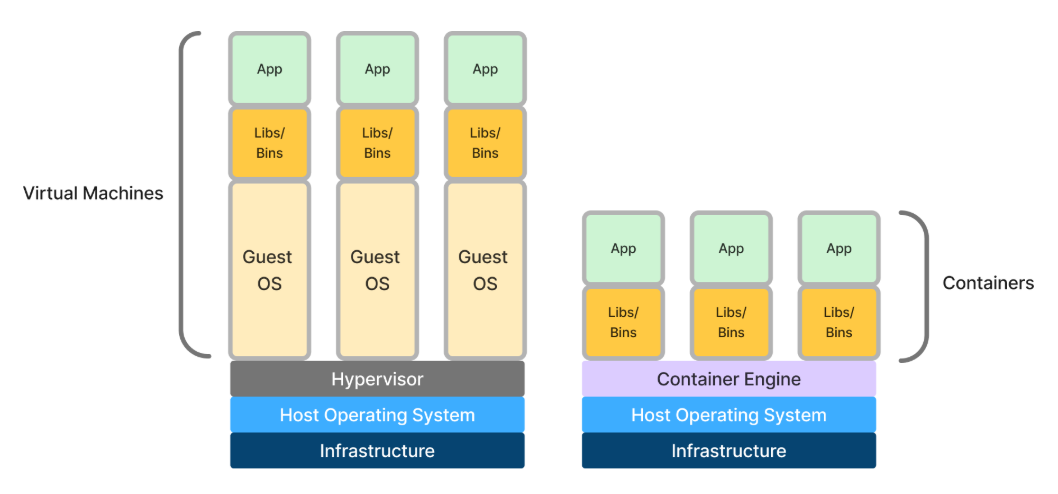
Above: Virtual machines and containers side-by-side layered stack.
Because SPCS is a fully managed platform, Snowflake handles the underlying container engine and host infrastructure for you. You simply deploy your workloads using three core Snowflake primitives:
- Image Repository: Snowflake’s built-in registry where you push container images to make them available inside your account.
- Compute Pool: A provisioned cluster of hardware nodes that host and execute your container workloads, kept entirely separate from standard SQL virtual warehouses.
- Service or Job Service: Two ways to run a container. A service runs continuously, suited to a web application, API or background process; whereas a job service executes once, runs to completion and then shuts down, after which the compute pool can suspend.
In this article, we’re going to setup these components in Snowflake and execute in them a container that was previously running on AWS ECS Fargate. The focus is on how containers run in Snowflake, not on when to choose them over virtual warehouses or other Snowflake compute options, which is a topic for another day. Let’s see what happens.
Setting up the Snowflake Infrastructure
First, we need to define some explicit privileges to create compute pools, along with schema-level privileges to manage image repositories and services. I am also assuming the usual access to the database, schema, warehouse and source tables is already in place, so the script below only includes the grants specific to running containers.
SQL

-- Creates the dedicated SPCS role and grants required account and schema privileges
CREATE ROLE IF NOT EXISTS SPCS_TF_ROLE;
GRANT CREATE COMPUTE POOL ON ACCOUNT TO ROLE SPCS_TF_ROLE;
GRANT CREATE IMAGE REPOSITORY ON SCHEMA SPCS_DB.WORKLOAD TO ROLE SPCS_TF_ROLE;
GRANT CREATE SERVICE ON SCHEMA SPCS_DB.WORKLOAD TO ROLE SPCS_TF_ROLE;
Second, to store container images within Snowflake, we construct an image repository. This creates an OCI-compliant private registry embedded directly within the Snowflake schema. Note that as of the time of writing this article SPCS does not support pulling images from external public registries.
SQL

-- Provisions an OCI-compliant image repository inside the Snowflake schema
CREATE IMAGE REPOSITORY IF NOT EXISTS SPCS_DB.WORKLOAD.BENCHMARK_REPO;
Next, we establish a compute pool, which represents the physical compute nodes where container instances execute. Compute pools are entirely distinct from Snowflake virtual warehouses: the latter handle standard SQL query processing; the former provision hardware nodes specifically dedicated to running container workloads.
SQL

-- Provisions a single-node compute pool for container execution. No placement group defined
CREATE COMPUTE POOL IF NOT EXISTS BENCHMARK_POOL
  MIN_NODES = 1
  MAX_NODES = 1
  INSTANCE_FAMILY = CPU_X64_XS;
Snowflake supports placement groups which are similar isolation domains as Availability Zones in the traditional cloud. In the script above, I am not defining such a group so Snowflake will decide for me.
We still need a service, but we’ll define that a bit later. For now, let’s take a very quick look at the application that we want to run.
What the Application Does
The container itself is deliberately simple: a slim Python base image, the dependencies, the application code, and a command to run it. Nothing in here knows or cares whether it will end up on Fargate or inside Snowflake.
# Dockerfile
# Packages the Python scoring application onto a lightweight Linux base
FROM python:3.11-slim
WORKDIR /app
COPY requirements.txt .
RUN pip install --no-cache-dir -r requirements.txt
COPY *.py ./
CMD ["python", "main.py"]
main.py executes a three-stage pipeline: using the Snowflake Python connector’s native pandas integration to a) stream data into an in-memory DataFrame, b) running a machine learning scoring model across the batch, and c) using write_pandas to bulk-stage and load the predictions back into Snowflake. The ML model fits a small random forest across four numeric columns against a synthetic target, then scores the full dataset:
# Fits a small random forest, then scores every row in the dataframe
model = RandomForestClassifier(n_estimators=10, max_depth=8, n_jobs=-1)
model.fit(features, synthetic_target)
df["RISK_SCORE"] = model.predict_proba(features)[:, 1]
I am using a machine learning task as an example of something computationally heavier than a standard transformation. For production machine learning jobs, Snowflake offers better-suited paths (such as Snowpark-optimised warehouses), but this will do as a payload for illustration purposes.
Let’s now push this image to the Snowflake repository using standard docker commands.
I am assuming Docker has already been authenticated against the Snowflake image registry. Note that SPCS requires images built for the linux/amd64 platform, hence the –platform flag, and that this Docker image is the same one that was running on AWS ECS.
# Bash
# Builds, tags, and pushes the container image
docker build --platform linux/amd64 -t benchmark-app:amd64 .
docker tag benchmark-app:amd64 ORG-ACCOUNT.registry.snowflakecomputing.com/spcs_db/workload/benchmark_repo/benchmark-app:amd64
docker push ORG-ACCOUNT.registry.snowflakecomputing.com/spcs_db/workload/benchmark_repo/benchmark-app:amd64
We can then confirm the image has been uploaded correctly:
SQL
-- Confirms the image is present in Snowflake's registry before running it
SHOW IMAGES IN IMAGE REPOSITORY SPCS_DB.WORKLOAD.BENCHMARK_REPO;
Running the Job and Watching What Happens Under the Hood
To execute the workloads we need to submit a job service. Unlike long-running services that act as continuous daemons, a job service executes a task once to completion and then stops, after which the compute pool can suspend and stop billing. We configure runtime parameters through environment variables directly inside the specification (in this case the output table and the number of rows to process) as you can observe in the below script:
EXECUTE JOB SERVICE
  IN COMPUTE POOL BENCHMARK_POOL
  NAME = benchmark_job
  FROM SPECIFICATION $$
  spec:
    containers:
    - name: benchmark-app
      image: /spcs_db/workload/benchmark_repo/benchmark-app:amd64
      env:
        BENCHMARK_ROW_LIMIT: 3000000
        BENCHMARK_OUTPUT_TABLE: BENCHMARK_SCORED_SPCS
  $$;
Once submitted, Snowflake provisions the container instance on the compute pool and begins execution. It should take a couple of minutes. Once the task completes, I can inspect the table BENCHMARK_SCORED_SPCS. In it, I can see the job has successfully persisted the results of the machine learning exercise:

But how does the container have permissions to write into this table? When you create a service, Snowflake also creates a user that is specific to that service and has the same role as the service owner. Let’s verify that, and notice that the WHERE clause refers to the same name as the service:
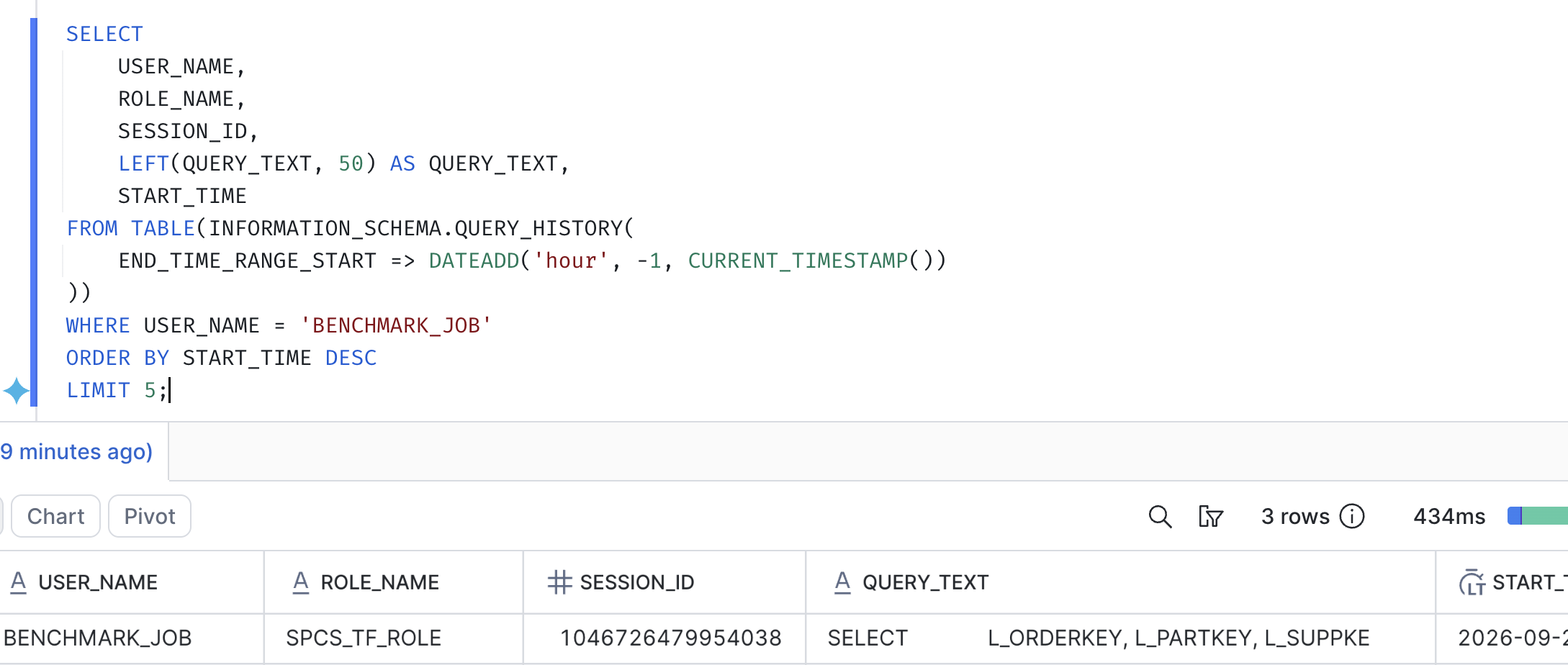
Snowflake then provides credentials, in the form of an OAuth token, in a file named /snowflake/session/token, which the container code uses to authenticate as the service user. But let’s expose it. To do so I am going to need to run a probe run since the tokens only exists inside a live container:
EXECUTE JOB SERVICE
IN COMPUTE POOL BENCHMARK_POOL
NAME = token_probe
FROM SPECIFICATION $$
spec:
containers:
- name: probe
image: /spcs_db/workload/benchmark_repo/benchmark-app:amd64
command:
- sh
- -c
- |
echo "SNOWFLAKE_HOST=$SNOWFLAKE_HOST"
echo "SNOWFLAKE_ACCOUNT=$SNOWFLAKE_ACCOUNT"
head -c 60 /snowflake/session/token
echo ""
$$;
Then I will inspect the logs of that run:
SELECT SYSTEM$GET_SERVICE_LOGS('TOKEN_PROBE', '0', 'probe');
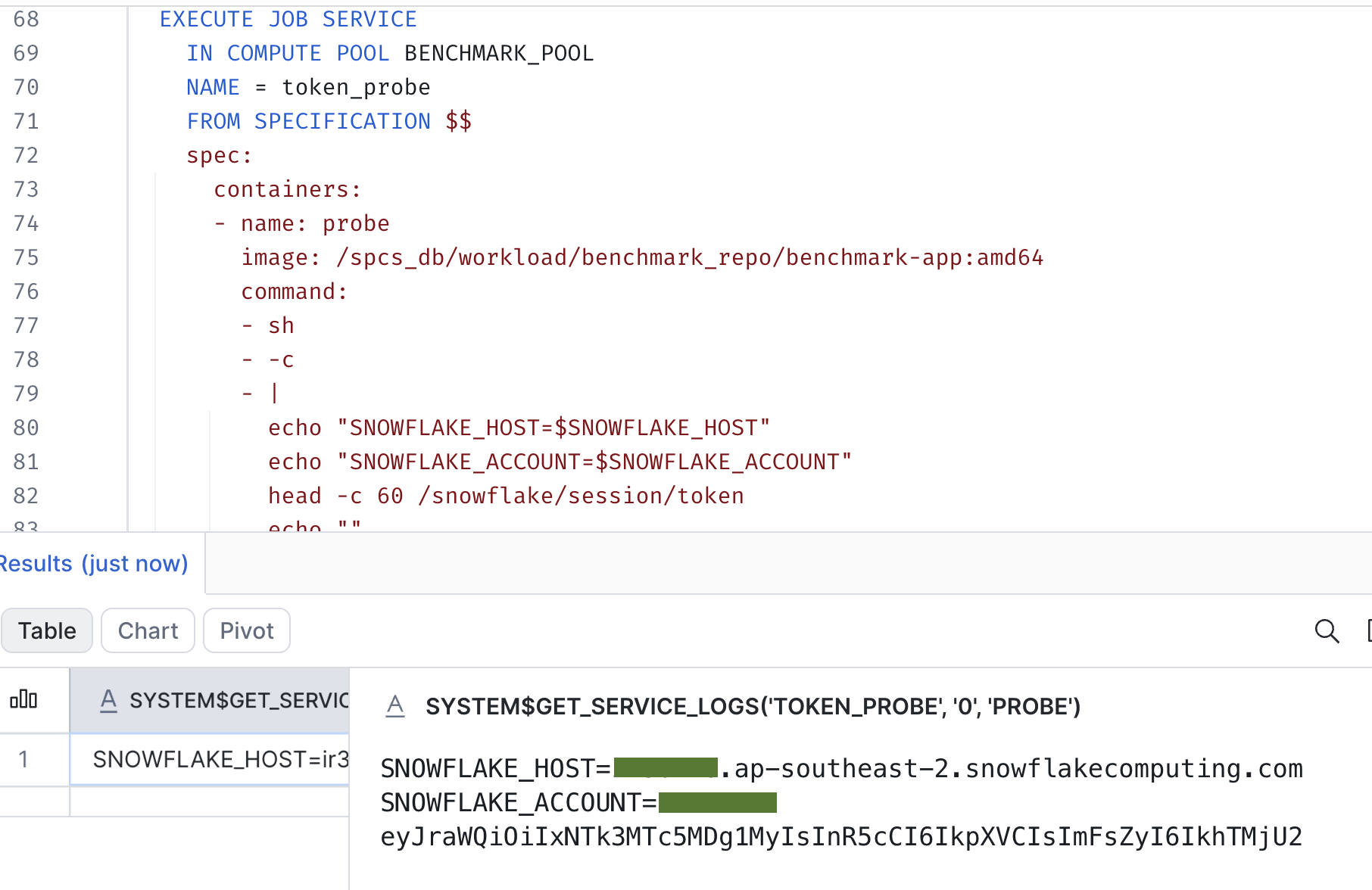
And voila! The logs show the host and account environment variables and the beginning of the short-lived OAuth token stored at /snowflake/session/token. Snowflake documents that this token only works from inside SPCS, so it cannot be reused elsewhere.
So far, we have confirmation that our Docker image has successfully run in our Snowflake infrastructure. Let’s see how its performance compares to the previous architecture.
Putting Compute Near Data: Initial Observations and Practical Insights
To explore the practical effects of data locality, I ran a simple proof-of-concept comparing a containerized Python pipeline running on AWS ECS Fargate against the exact same workload hosted inside Snowpark Container Services (SPCS). On the AWS side, the infrastructure was kept straightforward: a lightweight ECS Fargate task deployed within a dedicated VPC using public subnets and egress-only security rules to communicate with Snowflake over HTTPS. This is a simpler variant of the architecture shown earlier, as placing the task in a public subnet removes the need for a NAT gateway. (As outlined in previous sections, the SPCS environment ran natively within Snowflake’s platform boundary). Processing a modest 3-million-row sample dataset, my goal was not to run a head-to-head performance contest between platforms, but rather to observe how physical network proximity influences data transit times in a routine pipeline.
| Phases of the Script | AWS ECS Fargate | Snowflake SPCS |
| Query Execution | 1.07s | 0.35s |
| Result Fetch | 6.38s | 2.74s |
| Read Total | 7.46s | 3.10s |
| Write | 22.49s | 21.17s |
Table: Phase Timings in seconds across processing environments. All values represent the average duration (in seconds) calculated across three separate execution runs for each platform. Both platforms executed the exact same container image without modification. Compute phase timings are excluded due to unaligned hardware specifications between environments.
Looking at the numbers, the most noticeable difference appears in the Result Fetch phase. Because this phase is mostly about transmitting query results across the network into container memory, SPCS demonstrates a clear advantage. This latency gap on Fargate is likely driven by public network transit and, depending on the connector version, external OCSP certificate checks, whereas SPCS transmits data directly across Snowflake’s internal platform. I did not isolate these factors, and differences in CPU allocation between the environments may also contribute, as the client has to convert the results into a DataFrame.
Conversely, the Write phase yielded nearly identical timings across both environments. This is likely because the underlying write_pandas helper compresses the data into local Parquet files, uploads them to a stage and then runs a COPY INTO on a warehouse. Only the upload step is sensitive to network proximity, so its impact is diluted by the local compression work and by the COPY INTO, which runs inside Snowflake regardless of where the container lives. While a difference of a few seconds on three million rows might seem small, these network savings would be expected to grow with data volume, so they could become more noticeable as pipelines reach tens or hundreds of millions of records.
Important: These results are meant to be an encouraging directional signal rather than a rigorous scientific conclusion. For a strict “apples-to-apples” evaluation, several additional architectural variables would need to be normalized (e.g., exact CPU and memory bandwidth, testing private network paths, aligning local disk I/O performance, among others). Still, these initial observations offer a practical, real-world glimpse into the power of proximity—lending thoughtful support to the enduring relevance of Jim Gray’s data locality principle.
If you are evaluating containerized workloads or considering migrating data pipelines closer to your analytics engine, we would love to help. Whether you are benchmarking performance, designing hybrid AWS-Snowflake architectures or optimizing SPCS deployments, please feel free to reach out to discuss your implementation.
Related