
A B2B order fulfillment scenario.
It’s common to build implementations around transactional systems: an application writing new records into a database, an event triggering an orchestration step or a stream of individual transactions landing somewhere to be processed being common examples of it. A question that comes up often is how these transactional systems interact with Snowflake. In this article, I want to explore a few possibilities to bridge that gap.
Picture this simple pattern: an order comes in, and a decision on how to fulfil it needs to be made. This is generic enough to stand in for plenty of business scenarios: an order, a claim, a booking or any transaction that needs a decision made against it. Often times, the decision-making has to happen in Snowflake, because the reference data the decision depends on (e.g., stock levels, delivery preferences) already lives there.
Multiple Ways to Use Snowflake for Transactional Data
There are many ways to bridge a transactional system like this with Snowflake. In fact, support for transactional, OLTP-style workloads isn’t new. Snowflake Hybrid Tables have been around for a while, providing native, low-latency, single-row reads and writes.
But Snowflake now runs Postgres natively too: a fully managed instance living inside your account, provisioned, billed and secured through the platform, yet reachable with any ordinary Postgres client. In practice, that means Snowflake handles the operational side you’d normally own yourself: compute and storage sizing, patching, backups and high availability, access control through the same roles and network policies as the rest of your account, all while the instance still speaks unmodified Postgres wire protocol underneath.
But the question is inevitable: In what scenarios should we use either of these, considering that Snowflake Postgres and hybrid tables, to an extent, solve overlapping problems in different ways? The table below is how I think about choosing between them, alongside plain standard tables for the cases that don’t need either:
| Standard Tables | Hybrid Tables | Snowflake Postgres | |
| Use When | The default for almost everything. Escalate only when concurrent writes under load become the bottleneck. | Many concurrent actors doing fast single-row read/write by key, and that data also needs to live alongside analytics. | Building or migrating an application with an evolving relational model and Postgres-ecosystem needs. |
| Writers / Concurrency | Any number of readers; writes fine at low-to-moderate frequency. Concurrency on the same rows is the actual limit. | Many parallel writers hitting the same table (e.g., hundreds of pipeline workers updating status concurrently). | Any; designed for high concurrency same as any managed Postgres. |
| Throughput Ceiling | No hard cap, but performance degrades with concurrent updates because writes rewrite whole micro-partitions | ~16,000 ops/sec per database (80% read / 20% write mix); hard quota, throttles beyond it. | No Snowflake-imposed cap. |
| Schema Evolution | Yes; add/alter columns, clustering keys anytime. | Columns can be added; indexes cannot be altered (must drop and recreate). | Yes; normal Postgres DDL, CREATE INDEX CONCURRENTLY, migrations anytime. |
| Relationships / Constraints | Not enforced (declarative only). | Enforced (PK/FK/unique), but locked in at table creation. | Enforced, fully mutable over time. |
| Ecosystem / Tooling | Snowflake SQL only. | Snowflake SQL only, no ORM, no extensions. | Full Postgres: ORMs, pgvector, PostGIS, existing app code. |
| Not Compatible with | — | Several objects e.g. streams, dynamic tables, clustering keys, among others. | — |
| Concrete Example | Your pipeline status table; a Streamlit feedback form with modest traffic. | An inventory system checking and decrementing stock counts for a single SKU at checkout. | A KYC case management backend with growing tables, foreign keys, and audit history that changes shape over the engagement. |
| Default Assumption | Start here unless you have a specific reason not to. | Escalate here only when concurrency/latency on point lookups is the actual bottleneck. | Escalate here when the workload is an evolving application rather than a simple lookup, or when it needs to speak native Postgres. |
With the above in mind, let’s go back to our scenario. A pattern that is fairly common in OLTP-OLAP, and the one this article is actually built around, is this: You do not always have influence on the architecture or the code of the transactional applications. This can determine what type of technology we need to use.
I built a basic infrastructure simulating a standard transactional system. If we take a look at how the order-intake application in it actually writes its data we unearth something interesting:
# Connects to a plain Postgres database using its own driver
import pg8000.native

conn = pg8000.native.Connection(...)
That’s plain Postgres wire protocol. Lots of integration and legacy systems have been built that way, and we don’t get to refactor an entire application just so that it can speak Snowflake natively. We can’t use Standard or Hybrid Tables here. That’s where Snowflake Postgres comes in. Let’s see how we can get it off the ground.
Setting Up Snowflake Postgres
The first thing worth understanding is that Snowflake Postgres is a separate instance. It’s hosted in in Snowflake, yes, but it runs in its own private network. By default, Snowflake itself has no network path into it, the same way a virtual machine or a laptop wouldn’t. We can think of the instance to be in the Snowflake environment, but we’ll need to take into account these networking considerations in our design.
Below is the target architecture with the end-to-end flow. In this article, I’ll focus only on the Snowflake Postgres and associated networking configuration.

- An external AWS process connects to the Snowflake Postgres instance with a standard Postgres client and inserts a new order.
- That process reaches the instance through a NAT gateway, which gives it a single, stable outbound IP address that Snowflake’s network policy can allow.
- Snowflake continuously replicates the changed data out of Postgres into a native Snowflake table, using its own change-data-capture mechanism.
- Once the new order lands in Snowflake, an orchestration layer picks it up and joins it against reference data that already lives in Snowflake, to work out how the order should be fulfilled.
- The resulting decision is written to a table in Snowflake and, separately, back into the original Postgres instance itself, over the same wire protocol.
- Once the write-back succeeds, Snowflake calls out to an external endpoint to confirm the decision has been made.
- The above closes the loop back to AWS, where the infrastructure deals with other applications and systems in the outside world.
Provisioning a Snowflake Postgres Instance
Spinning up the database in Snowflake can be done in a single statement:
-- Creates a Snowflake Postgres instance
CREATE POSTGRES INSTANCE my_postgres_instance
COMPUTE_FAMILY = 'STANDARD_M'
STORAGE_SIZE_GB = 10
AUTHENTICATION_AUTHORITY = POSTGRES;
With this authentication parameter, I am enforcing old-school username and password, but Snowflake also supports allowing mapped Postgres users to authenticate with short-lived Snowflake access tokens while unmapped users continue using passwords. I kept things simple as the requirements don’t call for more sophistication, but in other implementations a different approach may be more suitable.
Either way, running the CREATE statement above returns the instance’s host, database name and admin credentials, and that’s the only time the password is shown. There’s no way to retrieve it again afterwards, so make sure you save them. In my case I’m using Snowflake’s secret objects.

Above: Postgres instance created in Snowsight, showing status and connection details. Keep these handy as we’ll need them later during the networking setup.
According to the official documentation, any data persisted in this instance will be mirrored out of Postgres and into Snowflake without a hand-built pipeline.
Wait, What’s Mirroring?
Under the hood, this is a capability Postgres already has: logical decoding, which reads the WAL and turns it into a stream of row-level insert/update/delete events. What Snowflake added is a Postgres extension called snowflake_cdc that runs inside the instance and continuously pushes batches of those changes straight into Iceberg tables (writing them out through pg_lake), rather than waiting for an external tool to pull them over the network the way traditional replication setups do. That storage is fully managed by Snowflake, no external bucket or storage integration to configure. Snowflake then applies those batches into the target table, so changes land in Snowflake without an external CDC service or pipeline running in between. This article goes deep on the engineering behind it if you want the full picture.
Setting mirroring up needs a one-time grant before it’ll work, then a single procedure call to create the mirror itself which is fairly self-explanatory:
-- One-time grants required before mirroring can be configured
GRANT APPLICATION ROLE snowflake.postgres_mirror_admin TO ROLE my_role;
GRANT USAGE ON POSTGRES INSTANCE my_postgres_instance TO APPLICATION snowflake;

-- Create the mirror. The target database must not already exist, this call creates it

CALL SNOWFLAKE.POSTGRES.CREATE_MIRROR(
    mirror_name         => 'my_orders_mirror',
    postgres_instance   => 'my_postgres_instance',
    postgres_database   => 'postgres',
    target_database     => 'my_mirror_target_database',
    postgres_tables     => ['public.orders'],
    postgres_schemas    => NULL,
    refresh_interval    => '30 seconds'
);
Progress can be checked with a single call, which moves from SNAPSHOTTING to REPLICATING once the initial sync completes:
CALL SNOWFLAKE.POSTGRES.LIST_MIRRORED_TABLES('my_orders_mirror');

Next: networking. This covers three separate traffic directions:
- I set up psql on my own laptop (I know, just for illustration purposes) to connect directly to the Snowflake PG instance and create the one-off tables the rest of this build depends on. Therefore, I need to whitelist my local IP.
- Inbound traffic from the systems actually writing orders, which in this build means AWS. Despite a fully serverless architecture on that side, the traffic egresses through a single, static IP address, a common pattern for exactly this kind of whitelisting. Incidentally, the Lambda doing the writing sits in a private subnet with no direct inbound exposure of its own, a must whenever compute is talking to a database.
- Outbound traffic initiated by Snowflake itself, both writing the allocation decision back into Postgres and calling out to confirm it elsewhere. Again, remember that the Postgres instance is separate from the rest of Snowflake from a networking perspective.
To handle the networking, I am just using network policies and external access integrations.
Starting with the first two directions, both are inbound, so they’re covered by a single rule:
-- Fetch Snowflakes own published outbound IP ranges before creating the rule
SELECT SYSTEM$GET_SNOWFLAKE_EGRESS_IP_RANGES();

-- Allows Postgres connections from known sources: my laptop, the writer apps
-- stable outbound IP, and Snowflakes own outbound ranges for the write-back call

CREATE NETWORK RULE my_postgres_ingress
  TYPE = IPV4
  VALUE_LIST = (
'<laptop-ip>/32',
'<writer-outbound-ip>/32',
'<snowflake-egress-range-1>',
'<snowflake-egress-range-2>'
)
  MODE = POSTGRES_INGRESS;

CREATE NETWORK POLICY my_postgres_policy
  ALLOWED_NETWORK_RULE_LIST = ('my_postgres_ingress')
  COMMENT = 'Laptop for manual setup, stable IP for the order-writing system, Snowflake egress for the write-back.';

ALTER POSTGRES INSTANCE my_postgres_instance
  SET NETWORK_POLICY = 'my_postgres_policy';
Note that those Snowflake egress ranges expire and rotate, so this isn’t a set-once value. Either way, that covers inbound.
Let’s now handle outbound traffic. We will have a stored procedure making the write-back to the Postgres instance and also to AWS, which will need two egress rules.
-- Two separate outbound destinations: the Postgres instance itself, and the external confirmation endpoint in AWS
CREATE NETWORK RULE my_postgres_egress
  TYPE = HOST_PORT
  MODE = EGRESS
  VALUE_LIST = ('<postgres-instance-host>:5432');

CREATE NETWORK RULE my_api_gateway_egress
  TYPE = HOST_PORT
  MODE = EGRESS
  VALUE_LIST = ('<aws-api-gateway-domain>:443');


-- Bundles both outbound destinations and both secrets into one integration the stored procedure can use
CREATE SECRET my_postgres_credentials
  TYPE = PASSWORD
  USERNAME = '<username>'
  PASSWORD = '<password>';

CREATE SECRET my_api_key
  TYPE = GENERIC_STRING
  SECRET_STRING = '<api-key-value>';

CREATE EXTERNAL ACCESS INTEGRATION my_external_access_integration
  ALLOWED_NETWORK_RULES = (my_postgres_egress, my_api_gateway_egress)
  ALLOWED_AUTHENTICATION_SECRETS = (my_postgres_credentials, my_api_key)
  ENABLED = TRUE;
As mentioned earlier, I had manually created objects in the Postgres instance:
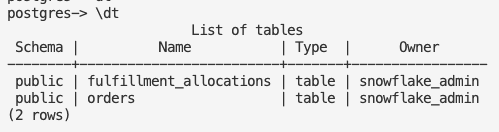
Let’s take stock before we go any further: We’ve got a Postgres instance running inside Snowflake, a mirror keeping it in sync, with our Snowflake tables, networking sorted in both directions and a couple of tables sitting in that Postgres instance waiting for data. What’s missing is the thing that actually kicks the whole pipeline off: a write.
Enter the Lambda Order-Writer
To simulate this, I’ll manually trigger a Lambda function that writes a dummy order straight into Postgres, standing in for that external system. From there, we’ll track how this order moves across the rest of the Snowflake side.
# Manually simulates the external system submitting a new order
aws lambda invoke \
  --function-name fulfillment-poc-order-writer \
  --payload '{"body": "{\"order_id\":\"SO-12483\",\"delivery_region\":\"NSW\",\"priority\":\"standard\",\"sku\":\"WIDGET_B\",\"quantity\":5,\"submitted_by\":\"test-user\"}"}' \
  --cli-binary-format raw-in-base64-out \
  response.json

If I check the Postgres instance, I can see the order SO- 12483 correctly written:

From there, let’s see if Snowflake mirrored it out of Postgres by simply querying the target table in Snowflake:

Great, we can see the new record, but let’s understand how it got there. Snowflake provides a $changes object, a rolling 7-day change feed that shows every insert, update, and delete as queryable rows of the target table. If we inspect the ORDERS$CHANGES object we can see the event stream:

Here we can see the actual captured change event. A couple of interesting details:
- _CHANGE_TYPE = ‘I’ confirms this specific row was captured as an insert.
- _COMMIT_LSN and _XID tie it back to the exact Postgres WAL position and transaction that produced it.
- _COMMIT_TIME shows when that transaction committed on the Postgres side, versus CREATED_AT showing when it landed in Snowflake.
Once the record lands in the Snowflake native ORDERS table, a Snowflake internal pipeline takes over. A few steps are executed (e.g., streams, tasks and stored procedure) but the part focusing on is the outcome: Snowflake calling back out to AWS (via the networking configuration we did earlier) with a decision. Let’s test that hypothesis. If I check the AWS logs, I can see that the payload from Snowflake was received:
Received from Snowflake: {"order_ids": ["SO-12483"], "status": "fulfilled"}

Above: AWS logs.
That closes the loop. The order was written, mirrored, decided on and the decision made its way back out, all without any manual step in between.
Wrapping Up
What this demo actually proved is narrower than “Postgres works inside Snowflake,” it’s that a system speaking plain Postgres can write, get mirrored, get decided on using data that already lives in Snowflake and have that decision written straight back, all without anyone touching the original application. That’s the whole case for Snowflake Postgres: not raw speed, not concurrency, but genuine protocol compatibility with something you don’t control and can’t rewrite.
Snowflake Postgres earns its place when the workload genuinely needs to speak Postgres, not when it just needs to move fast. In this case, that meant an order-intake system I couldn’t rewrite, and a Snowflake account that already held the reference data the decision depended on. If you’re weighing up something similar, or you want a hand thinking through where standard tables, hybrid tables or Postgres actually fit your workload, feel free to reach out.
Related