
This blog post is Human-Centered Content: Written by humans for humans.
Let’s talk about money. Well, not really, I won’t present and Euros or Dollars here. Migration costs change from month to month, curating the numbers game is fairly impossible right now.
But we can talk about, what money arguments to consider. Because let’s face it: Every tool or platform migration we have ever done and will ever do, has a cost factor. For most, getting to that one BEFORE the migration is a mixture of magic and Nostradamus skills. My guess is that no one reading these words here has either. I definitely don’t.
So, what are we tackling here?
- The Core Problem: Licenses are not the bill
- Coupled Consumption: The second bill
- Pricing Units shaping behavior, and with that cost
- Comparison Traps
- The Costs Nobody Budgets
- CHECKLIST!
If at least one of those sounded cryptic to you, this is your article! If not, your feedback is more than welcome. 🙂
My goal is to give us all some guidance, some arguments and describe a few dynamics and mechanisms that not everyone is aware of. InterWorks isn’t a vendor. We are not in the habit of sugarcoating things. And since we have seen a lot of scenarios that could have worked better, if certain ideas or points would have been considered earlier, we know what we are talking about here.
The Core Problem: The License Is Not the Bill
When people compare data or BI platform costs, they compare license price lists. But a BI tool’s total cost has three bigger components, and the license is often not the largest one.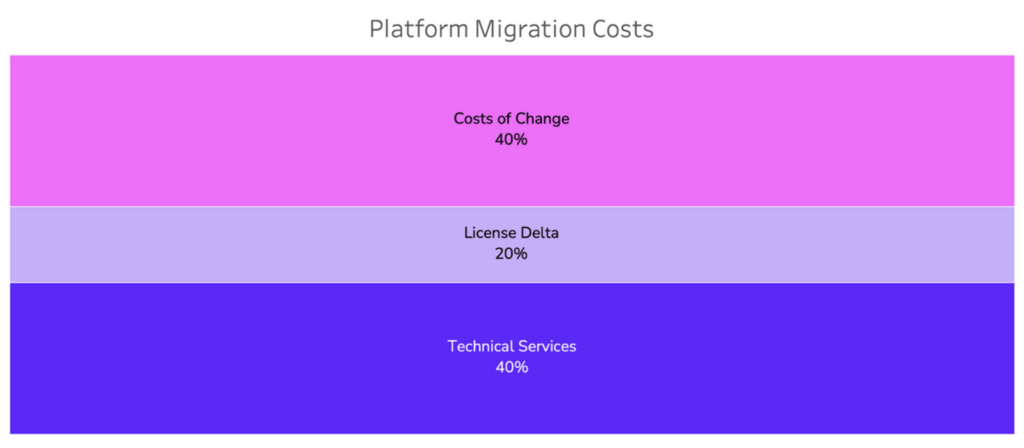
- Technical services, or the technical part of the migration: Development, re-factoring, configurations, testing, support, etc.
- The license delta: During the migration we will have license costs for both tools. That additional costs in that period plus the potential license difference once the old platform is decommissioned, is the license delta. Pro tip: The vendor’s pricing page or “Contact Sales” are not the only sources. Other companies who already work with a platform or consultancies specializing on a platform usually know more precise prices.
- Costs of change: Temporary productivity dip, training/upskilling, communication, coordination, project management, potential turnover, etc.
Vendor pricing pages show component 1, if we are lucky. Components 2 and especially 3 are where migration business cases tend to fail.
Coupled Consumption: The Second Bill
Modern BI tools don’t store and compute everything themselves. They push work to our data platform and that work appears on our data platforms’ bill, not the BI tool’s bill.
How tightly our BI tool’s usage drives platform cost depends on its query architecture:
- Live-query architecture:
Examples: Sigma, ThoughtSpot, Looker, Power BI DirectQuery, Tableau live connections. Every user interaction can trigger a query against our warehouse, whether it’s a filter click, a drill-down or a page refresh. We all love for our users to be curious, but there is a Dollar sign behind that curiosity. Sigma is a very clear example: License tiers cover the users, but interactive usage drives Snowflake (or Databricks, or BigQuery or Reshift) compute. Looker works the same way against BigQuery. In practice, the warehouse compute bill is dependent on many things: Data volume, data modelling and best practices and of course, caching. The better the analytics tool is at caching results, queries, calculations, the less the cost in our data platform. - Extract/import architecture:
Examples: Tableau extracts, Power BI import mode, Qlik’s in-memory engine, MicroStrategy cubes, QuickSight’s SPICE. User interactions are decoupled from the warehouse, but refresh schedules aren’t. The cost moves from “per interaction” to “per refresh.” Cheaper and more predictable per user, at price of data freshness. Of course, we also need to consider capacity and memory of the machine, we are saving the extract to. Especially cloud platforms (like Tableau Cloud) have a limit for extract sizes. For example: Power BI offers 8 refreshes a day within Power BI Pro, and 48 ( = half hourly) refreshes within their Premium license. - Self-contained platform analytics:
Examples: Databricks AI/BI, Snowflake’s Snowsight and Streamlit, SAP Business Data Cloud bundling SAP Analytics Cloud. The analytics capability is included with the data platform, so the license line disappears entirely. The BI tool looks free and is priced as compute. Every dashboard is consumption. There are problems with that, too. For example: nobody sees a BI bill, so nobody owns it.
Pricing Units Shape Behavior
Every pricing model is an incentive structure. Vendors want to sell, so models tend to seem as attractive as possible, and at the same time as distinctive as possible. We don’t have to think very hard to conclude: The more we know, the less attractive all options are.
Bottom line here: Based on the pricing model, users shift their behavior which is then driving costs. Let’s look at the most popular ones:
- Per-user pricing:
Examples: Tableau Creator/Explorer/Viewer, Power BI PRO/PPU, Sigma’s user tiers, SAP Analytics Cloud, Microstrategy. Predictable, but it penalizes broad rollout. The rational response is license sharing (something that should pop up immediately in governance tools), and the very common: “Can you export that for me?”. This, of course, undermines the exact adoption, the migration is supposed to bring. Role tiers add a second trap: misjudging the tier mix. A “viewer” who wants one filter more is suddenly a higher tier, as the viewer will trigger another tier to build one. - Capacity pricing:
Examples: Fabric F_SKUs, Tableau Server cores, Qlik capacity, Cognos on-prem. A fixed pool shared by all workloads. The bill is predictable, but the competition inside the pool is invisible. For example: a heavy dataflow can starve dashboard refreshes, and no one knows where it’s coming from. Costs stay smooth, performance is what fluctuates. Capacity pricing distinguishes between cloud and on-prem, since on-prem the hardware is our own responsibility. - Consumption pricing:
Data: Snowflake credits, Databricks DBUs, BigQuery on-demand, Redshift serverless RPUs. Analytics: Sigma usage credits on top of user tiers, QuickSight’s per-session reader pricing. Pay for what you use. Or the scaling option. If you don’t use much, you won’t pay much. The downside: every platform will incentivize users to use the platform as much as possible. Also: every badly written query and every over frequent refresh schedule is now a line item (in a way). Consumption pricing enables efficiency and requires someone to watch it. That’s a FinOps capability. If you don’t have it, consumption pricing has you.- Consumption: quota pricing
Looker: Platform fee + per-user fee + a bundled monthly quota of query-based API calls, with overage beyond it. Until a certain quota is hit, consumption is basically free, the price is baked into the platform or user fee. After the quota is hit, the consumption pricing is activated again.
- Consumption: quota pricing
- Bundled Platform pricing:
Examples: Microsoft, Salesforce, Google. Or: the vendor lock-in. Once we’re in, we don’t get out that easily. And it does make sense: putting all our eggs in one basket is risky, but as long as nothing happens, we have a very smooth experience. Pricing-wise, a vendor-lock-in puts us under the vendor’s thumb, which includes price increases, but also add-on purchases that we were not aware of before. - Free/open-source core + paid support or cloud tier:
Examples: Metabase, Apache Superset. The incentive trap isn’t cost, it’s org design. “Free” licensing sounds great, but of course there are costs attached as well. They just quietly shift into headcount costs for self-hosting or deployment, patching, and scaling, curating and many other things. And that cost is easy to leave out of the business case because it never appears on a vendor invoice.
It sounds a bit devious, but vendors tend to make pricing like an open field when they start off, but from them the weeds grow wild, until at some point, we need to navigate through a thick jungle.
Many solutions have hybrid pricing models, where user-based licensing is coupled with consumption pricing, for example.
Theshold Logics
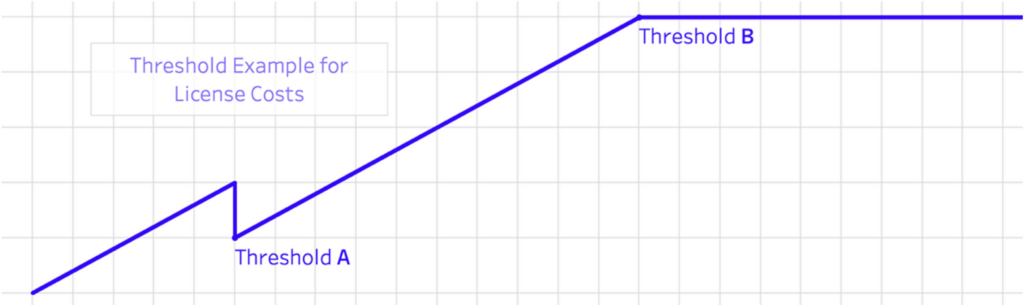
One last note for pricing models: Capacity models (think warehouse sizes, or memory capacity in Tableau Cloud) are not always on a continuous scale. Tier models often contain step functions where cost jumps. A few examples:
- Microsoft’s F64 threshold: Below it, every report viewer needs a paid license. Above it, viewers are free. For a large viewer population, crossing that threshold changes the per-viewer math completely, in either direction.
- Warehouse sizing works the same way: Each size up typically doubles the consumption rate. A migration that changes query patterns can force a size class change.
- Contract minimums and committed-use discounts create the reverse cliff: Capacity you pay for whether you use it or not.
Here are two questions that help with those issues, and that we should always ask:
- Where are the thresholds in the target tool, and which side of them do we land on? Today and at projected adoption rate?
- What user behavior does the new pricing unit punish, and do our users behave that way?
The Comparison Traps
Four systematic errors make tool-cost comparisons look better than they are. This is a fun list, and at least for me, very relatable, when I think of my recent projects.
- Negotiated vs list. We compare our current tool’s negotiated, discounted, multi-year price against the new tool’s list price. The other way round is equally bad: The new vendor’s aggressive first-year discount against our current renewal quote. We always need to compare steady, post-honeymoon pricing on both sides.
- Optimized vs. day one. Our current environment has years of accumulated optimization: Tuned extracts, cached queries, right-sized capacity. The new environment starts unoptimized. Year-one consumption on the new platform is not steady-state consumption. We might calculate with lower costs because of user adoption taking a while. But that can easily be balanced by a not optimized platform. Here I will definitely advice to get input from an experienced person, who knows the new tool already for a while, as they will follow rules or practices, a new person to the tool cannot know yet. That person can be someone from InterWorks side, some experienced colleague or a new hire.
- Feature-set drift. We need to be careful and deliberate in asking vendors about specific features, that are on our wish list. There is a very big difference between “Yes, our tool can do that” and “Yes, but only in a higher tier.” We need to make sure, we know what’s in the package we are buying. Otherwise we might encounter limits and then upsells or addons we might need.
- Currency and region. Prices differ by region and billing currency. Early awareness of currency conversions, but also tariffs and possible taxation, we should always discuss with our procurement team. (Or at least with whoever is signing our budgets.)
The Migration Costs Nobody Budgets
For the last part of this article (before the checklist) I want to jot down a few things that rarely appear in cost plans or projections but happen all the time.
This small list is also a segue to our next part, where we dive a lot deeper into the things that are usually forgotten.
The Parallel-run Period
We will pay for both tools at once. The honest questions: How long? And what forces the end? Without a decommissioning deadline, costs might just accumulate unnecessary. Sometimes there is no immediate need, for example, if the renewal (which we’ll skip this time, because we migrated somewhere else) is still 11 months ahead. So there are no extra costs until then.
I still recommend working with our own deadline. If we are suddenly facing the loss of licenses for our legacy tool and haven’t thought about it in the past 11 months, there might be content in that tool, that wasn’t there before the migration. And suddenly there is a hurry to decide what to do with it, or migrating/rebuilding it in the new tool.
Rebuild vs. Transfer
InterWorks’ philosophy is to rethink and rebuild. We do not lift and shift. And there are good reasons for that.
Content doesn’t port 1:1. Sure as time goes on, AI evolves and we all get better with building migration agents, a lot can actually be migrated automatically, although technically it still will be a rebuild, but without human touch.
That being said: The main driver for that question is triage. Whatever we are migrating to and from: We check if all our data connections, all our data models, all our tables, all our dashboards, all our reports are still relevant. On average, our customers get rid of 30%-60% of dashboards during the triage phase. Which reduces the transfer/rebuild costs considerably.
The Productivity Dip
Experienced developers in tool X become beginners in tool Y for a while. Report consumers cannot find their numbers for a while (which, of course, depends on the communication efforts as part of Change Management). These costs sound fluffy, because they are temporary, but they are very real and rarely factored in.
Retraining
This is not a training-day line item, but the effects that initial skill gap. Without external help, there is usually a several months long reduced throughput, while developers, engineers, architects build new muscle memory (quite literally).
Exit Costs
These include data egress, contract termination, minimum commitments running past cutover (the parallel-run period from above), and the effort of switching the old system off, including the (let’s call it) archeology of finding out what we still need for that.
Real example from a few years ago: A customer of mine migrated from an on-prem data tool to a cloud data tool. After everything was done, they wanted to shut down the old one. And they quickly found out, that they needed a master password for that. Unfortunately, the admin who set this up was enjoying his pension and couldn’t be reached. We solved it in the end, but we learned to factor that into the next one, and we have, since then.
The Checklist!
Before saying “Yes, I’m sure” on costs:
- What does our current tool truly cost? Count the license, the platform compute it drives and the add-ons we bought along the way. Don’t forget the maintenance costs. Include shadow analytics, if we have it (think spreadsheets on local machines).
- Ask the same question for the target, at our scale and our usage patterns, NOT the vendor’s reference customer’s.
- Which pricing thresholds sit near us and which side do we land on at realistic adoption?
- How long is the parallel run, who pays for it, and what enforces its end?
- What does rebuild cost after content triage? And have we actually done the triage?
- Whose budget does the coupled compute land in, and does that person know?
- Are we comparing steady state to steady state, or a renewal quote to a honeymoon discount?
- If the new price doubles at renewal, what’s our leverage? Switching costs cut both ways, and the vendor knows yours.
Related