
This blog post is Human-Centered Content: Written by humans for humans.
This blog is featured in our AI Use Case Library of real AI solutions.
The Problem
Our IT team supports dozens of medical device brands for a customer. Each manufacturer ships its own technical manuals, and each device has its own quirks, the browser a tool requires, a calibration procedure, a firmware update step, etc. We started with 257 of those PDFs, which quickly ballooned to 400 that nobody could search easily.
When a support tech needed to know which browser Optos Advance requires on an iPad, the answer existed — on page 2 of a manual, three folders deep in a shared Box drive, next to every other company file. The knowledge was trapped behind a slow search process, delaying answers to a waiting customer.
The team’s first instinct was to load the manuals into a Claude Project. But many were larger than the 30MB per-file limit, leaving the answer unsolved by our off-the-shelf options.
What We Built
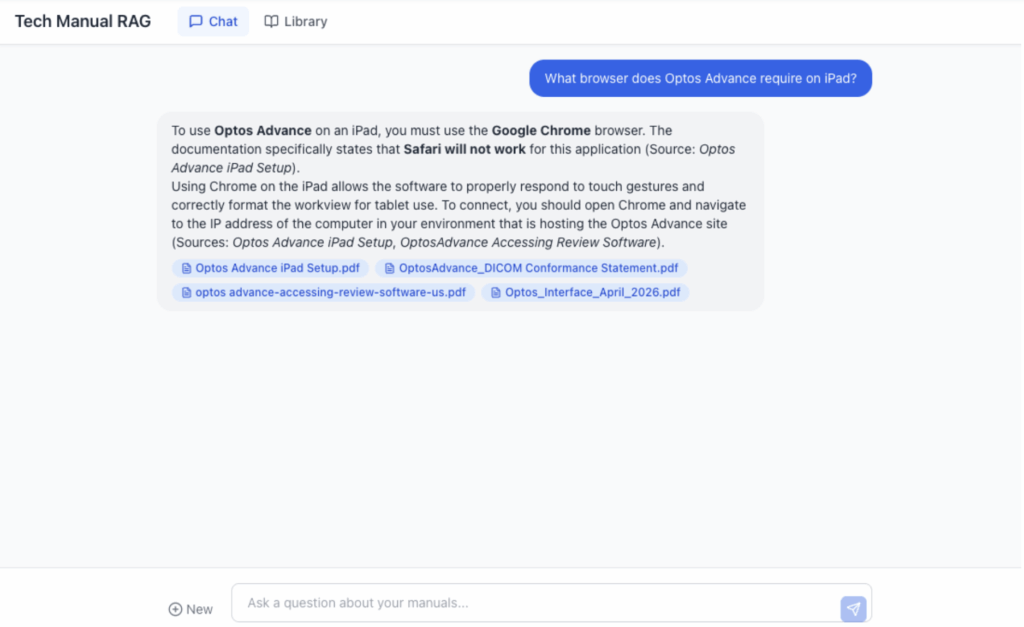
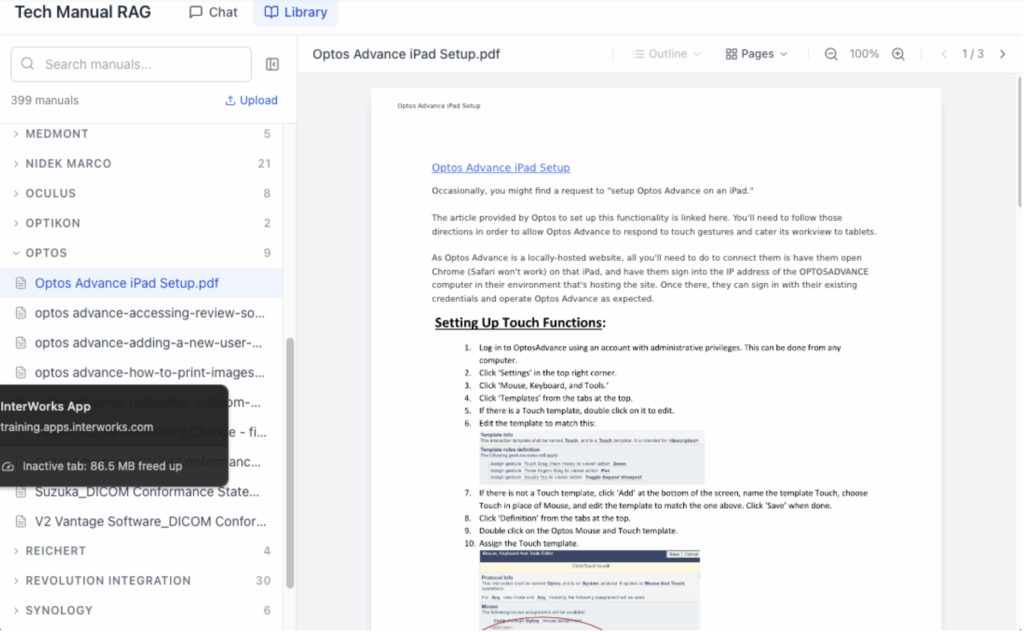
We built a two-page web app: A chat interface on one side, a browsable PDF library on the other. Ask a question, get an answer with clickable citation badges that open the exact page of the source manual. Retrieval runs on Google’s Gemini File Search, with Gemini Flash 3.0 generating the answers. It is deployed to Railway behind Cloudflare Zero Trust, and it is live for the team today. We chose managed retrieval over a custom vector database because the goal was to solve the problem, not to build and maintain a product. The accuracy for Gemini File Search also performed incredibly well in our evaluations for this use case, at a very competitive price. This made the cost and performance characteristics perfect for this use case, while allowing us to not worry about managing the entire RAG pipeline and chunking strategy. Here’s what that looks like in practice:
How It Works
Our tech staff open the app to immediately type their questions. Since it’s behind Cloudflare Zero Trust, the same identity that gets them into the company’s other internal tools gets them in here, with no new account or password. In fact, they are likely already signed in and will not see another prompt for those credentials.
They type their questions in plain English and can ask follow-up questions or clarify for better responses. They get back grounded answers with clear citation badges showing which manuals it came from.
If they click the citation, they are taken to the appropriate manual, and the text the agent used to answer the question is highlighted, making confirmation of the answers or deeper research easy. In medical device support, “The AI said so!” is not good enough. A tech needs to see the source, check the context and decide whether the answer applies to the device in front of them. The citation turns that from a manual hunt into one click. That means we have:
- Citations that go somewhere: Every answer links to the exact page of the exact manual, so verifying an answer is a click, not another search.
- A browsable library: Not everything is a question. The library groups all 257 manuals by manufacturer with search and an embedded viewer, plus page-thumbnail navigation, bookmarks and a collapsible side nav so a long manual is easy to move through.
- The ability for the team to add manuals themselves: When a new device ships or a manufacturer updates its docs, anyone on the team can upload the PDF through the app. It gets indexed and is immediately searchable for everyone.
That last one matters more than it sounds. What started as 257 static documents kept growing to almost 400, driven by the people who use it.
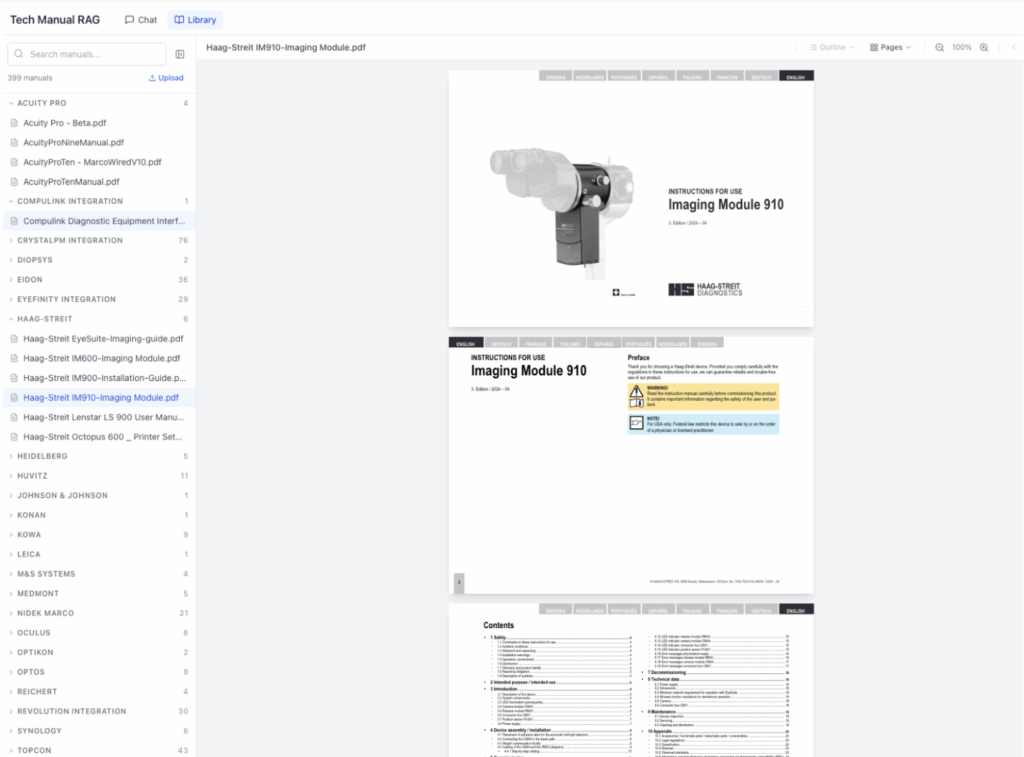
Above: A PDF displayed in our system
How It Was Built
The retrieval layer is Gemini File Search, which indexes the PDFs and finds the relevant passages. We chose it after a broader RAG proof of concept that compared several retrieval approaches. Gemini File Search scored high on our retrieval-accuracy metrics and was easy to work with for dense, technical content. It was also a good fit for this particular client’s IT landscape.
The more interesting decisions were about what not to build. There are no user accounts, because Cloudflare Zero Trust handles identity, and there is no database, because chat state lives in the browser session. There is no admin panel, no analytics dashboard, no fine-tuning, no custom embeddings and no vector database to manage. The retrieval is a managed service, the deployment on Railway is a managed platform and the auth is a managed layer. The only custom code is the chat interface, the citation linking and the upload flow and everything else is someone else’s problem.
That was a deliberate bet. The biggest risk with an internal tool is not building it, it is maintaining it. Keep the surface area small, use managed services where they exist and make sure the tool can survive without the person who built it. That discipline is also what made it fast. I told the team ,”a few weeks” on a Saturday, had it working in dev by Tuesday and shipped to production on Wednesday. A few weeks became three workdays.
To be clear, it did not stay done, and those three workdays were just the start. As the manual count grew, retrieval got harder. The prompt that worked cleanly at 257 documents started returning fuzzier matches as the corpus expanded and the content overlapped. We used Posthog to observe the performance and learn from real world use. We iterated on the prompts and added metadata filtering, so the search narrows by manufacturer and device before it ever ranks passages. We also kept improving the reading experience as people leaned on it — adding the thumbnail navigation, bookmarks and collapsible nav. That is the unglamorous maintenance a managed service does not do for you, and it is the work that keeps the answers trustworthy as the library grows.
Why It Matters
For the techs, the change is concrete. A question that used to mean opening files and scanning pages now returns a sourced answer they can verify in one click while the customer is still on the line. The team reports saving many hours a week. Because every answer points back to the original manual, they are not trading speed for trust, which in medical device support is the whole game.
It also changed who owns the knowledge. The library replaced the shared Box folder without taking anything away, and because anyone can add a manual, it stays current on its own. It stopped being a tool one person maintains and became the team’s knowledge base.
The credit goes to the IT team who support these devices every day. They knew which manuals mattered, named the quirks that needed to be searchable and drove what got built. We built it with them, not for them.
Where This Could Go
The app works, but it still lives in its own tab. The next steps are about meeting the team where they already work:
- An MCP server: A Model Context Protocol server would let Claude call the tool directly, so a tech in the middle of a Claude conversation about a device could ask, “What does the manual say about this?” and get a sourced answer without leaving the chat.
- An Internal NotebookLLM: This is something other teams could use to build for their own knowledge bases too. If we added the ability to create “notebooks” of knowledge, we’d have useful repositories for various teams to use and act as a foundation for bigger use cases.
- A Slack entry point: Most troubleshooting happens in Slack. Putting the manual search there means answers show up in the channel where the problem is being worked, not in a separate app.
- Into the ticketing system: Right now this is a human driven tool, but we could also supply an agent with this same tool and begin to automate research of our support tickets. That is a natural follow-on engagement that builds on the foundation of this solution and continues to deliver better, faster answers to customers.
The web app stays the verification layer underneath all of them. AI answers are useful, but the human still needs to see the source and make the call, and every path leads back to the exact page.
Takeaway
The knowledge was never missing. It was 257 PDFs deep in a Box folder, slower to find than a customer would wait. Now a tech asks a question and gets a sourced answer they can verify in a click. If your team references a pile of documents constantly and searches it painfully, that is a solvable problem.