
This blog post is AI-Assisted Content: Written by humans with a helping hand.
I’m a code first person. Given a choice between clicking through a UI and writing SQL, I’ll write the SQL. It’s faster, clearer and I can read it later. That preference isn’t a problem in Sigma. The challenge I ran into wasn’t that Sigma didn’t support my approach. It was that I was putting my code in the wrong layer.
The Performance Tradeoff
Custom SQL and low code Sigma joins perform very differently:
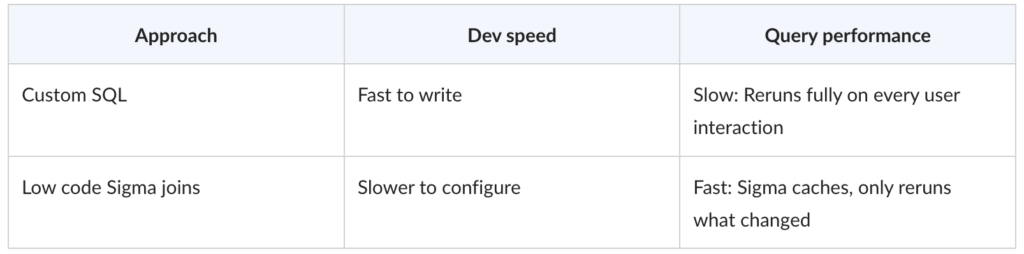
With low code elements, Sigma caches the result set and does not need to rerun queries on every interaction. With custom SQL, Sigma treats the query as a black box and reruns it from scratch on every interaction.
The practical implication: Write your SQL in dbt, materialize it, and let Sigma’s low code layer sit on top. You get SQL control where it belongs and caching where users feel it.
The Gate Pattern
Parameterized custom SQL lets you inject control values directly using {{parameter_name}} syntax. This works well until you have several user inputs, because the query reruns on every change, even partial ones.
The fix: A gate element with a conditional filter that returns an empty table until all required inputs are filled. The downstream query stays dormant. When the last input is set, the gate opens and the query runs once.
Good for complex SQL that needs user configured filters but doesn’t write anything back. Not a silver bullet: Once the gate opens, normal rerun behavior resumes.
Where It Gets Hard: Sigma Apps
When users are submitting data rather than querying it, two specific limits come up:
- Cross table matrix input: One input drives the shape of another (e.g., 3 stores × 4 SKUs = 12 row grid). Sigma’s input tables are row by row. Generating the cartesian product inside Sigma’s compute layer is slow and fragile.
- Bulk insert: Sigma’s writeback is designed for single row entry. Without a loop construct, bulk submitting means manually scaffolding one action per expected row, with conditional logic to skip unused ones.
At the time of this writing Sigma had no native dynamic bulk insert. Sigma ships features regularly — check current docs before assuming this gap still exists.
The Third Option: Push the Complexity Upstream
My problem was that I kept thinking the choice was binary between low code vs custom SQL. But there is a third option:
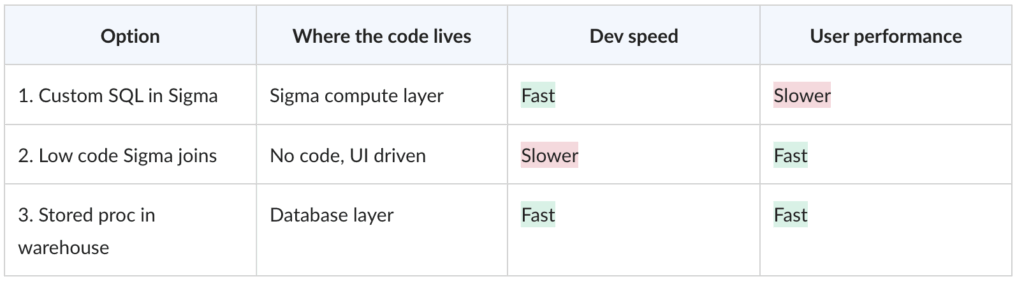
The problem with custom SQL isn’t writing code, it’s writing code in the wrong layer. Move it to a stored procedure in the warehouse, wire a Sigma button to call it, and you get both fast development and fast performance
Sigma collects the input. The database does the work. Sigma displays the result.
The Reframe
Sigma isn’t fighting the code first mindset. It’s clarifying where code belongs: Transformation and state management in the database, input collection and display in Sigma. Once you stop trying to do both in the same layer, the tool stops feeling like it’s working against you.
One thing worth watching: Sigma recently introduced workbooks-as-code into private beta, which materially changes how migrations to Sigma can be approached. For code-first builders specifically, the ability to manage workbook structure programmatically closes a gap that previously pushed all version control and deployment logic into the warehouse layer. It’s not here yet at scale, but it’s coming.