
This blog post is Human-Centered Content: Written by humans for humans.
Same Tool, Different Game
Nine months ago, I wrote a tool comparison comparing Sigma, Tableau and Power BI head-to-head, with the blog framed around the evolution of BI and where each tool wins. After attending Sigma Workflow conference this week in San Francisco, the clearest thing to emerge is that a BI tool comparison itself is the wrong framing. The question isn’t “which BI tool” anymore, it’s now more “what does BI even mean when the tool is also the workflow?”
Here’s What I Got Right, and Where I Missed the Mark
There is still value in comparing BI tools. Organizations are constantly making tooling decisions when evaluating analytics platforms and those distinctions still matter when comparing new wave tools like Sigma to the legacy players. Tableau still wins on visualization precision and design storytelling. Power BI still wins inside Microsoft shops. Sigma still wins on cloud-native live data and low barrier to entry. These statements still hold true. However, that post lived inside the assumed category framing of what role a Business Intelligence/Data Visualization tool actually plays.
BI has historically been descriptive analytics and tells you what has already happened. While still valuable, this means the takeaways, the conversations and the action steps required all take place somewhere else. For the past two decades, BI 2.0 played an invaluable role, but now, descriptive analysis is no longer satisfying the requirements of modern businesses. Enter Sigma and their app building capabilities.
So, What is Sigma Building?
Sigma first released the concept of data apps in October 2024, and it went public in March 2025. In their own words at the March 2025 Data App launch, “A true data app is a purpose-built solution that combines real-time data, user inputs, and workflows — all in one seamless experience, directly on live cloud data.” As data apps have evolved into AI apps, Workflow 2026 made clear that Sigma isn’t trying to be a better BI tool, it’s about being something the BI space doesn’t have a name for yet.
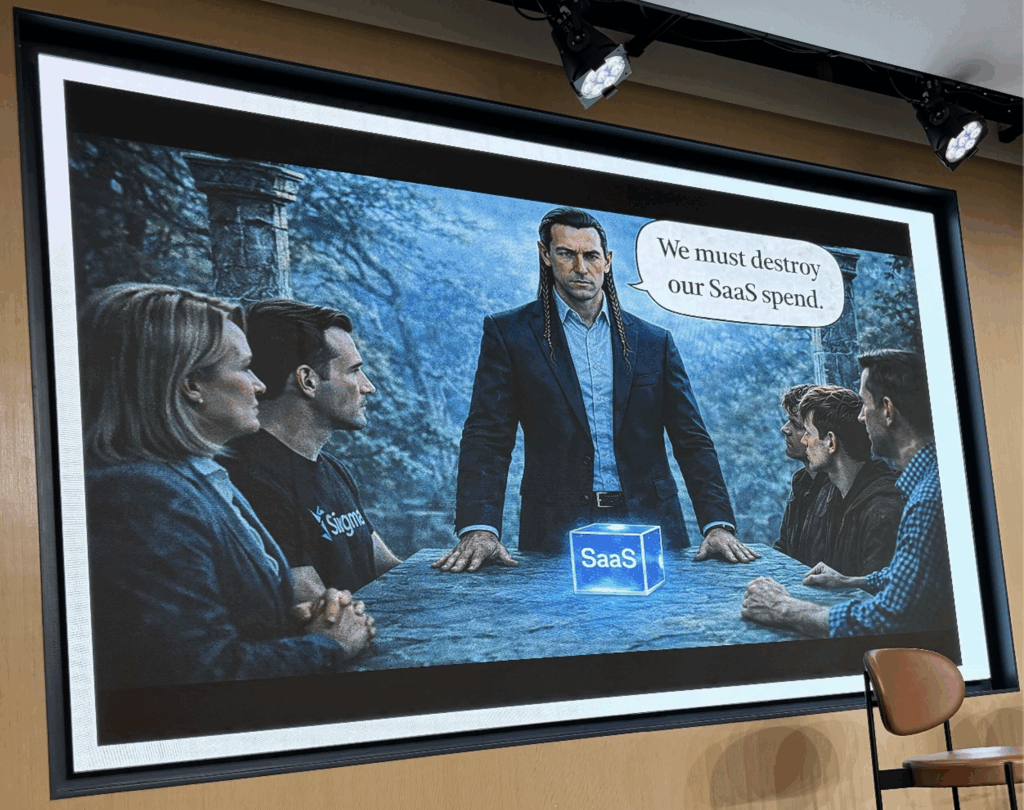
Above: A slide from Orla Clifford, VP Operations, in her “Art of the Possible” session.
The pitch isn’t a better dashboard. It’s replacing the disconnected SaaS tools sitting between your data and your decisions. The goal of the “SaaS Takeout” is the ability to supplant other software tools with native Sigma processes that live on top of your governed cloud data warehouse.
Sigma has woven together numerous core capabilities that make their tool special:
- Input tables and writeback as the foundation.
- Modals, actions and triggered workflows turning the BI “workbook” into an operational app.
- AI is woven into the workflow itself through formula assistance, natural language building, Databricks Genie and Snowflake cortex integration, and Sigma agents (coming soon!)
- Within the last two weeks, they also added API call actions, which unlocks whole new app functionality to rival other tools outside the BI space.
The result? A governed platform where you can build, analyze, act and scale repeatable workflows — without exporting to Excel or opening a separate tool.
Redrawing the Competitive Map
The Sigma competitors aren’t just legacy tools like Tableau, Power BI, Qlik, or Looker plus other modern BI tools like Thoughtspot, Omni, and Hex. Sigma has stretched the borders of what’s possible in a “BI tool” and now faces a whole different class of competitors converging from the app-building world. What’s the difference that makes Sigma special?
Traditional BI tools start with visualizing your data, but are now trying to bolt on other features to existing enterprise products, resulting in some clunkiness and retrofitting since tools like Tableau and Power BI were never designed from the ground up for warehouse first, live data, with a two-way data connection model.
Other app building tools like Retool, Lovable and Replit start with building something operational, where they now try to add on and incorporate data connectivity and analytics. These tools are very powerful, but have different ideologies around data governance, warehouse integrations and an analytics identity.
Sigma can be the best of both worlds by uniquely starting from governed, live warehouse data and building toward application takeouts. The moat they hold is sitting where the data already lives (Snowflake, Databricks, BigQuery, etc.), inheriting warehouse permissions natively, and the ability to act on that data within the same surface. No other tool cleanly owns this intersection.
One honest tension I’ve observed over the last year was that Sigma used traditional BI terminology of workbooks, pages, tables, layouts, etc. Not a bad thing, as it’s part of the low barrier to entry when building reports and data products while providing data lineage and governance. However, apps are a different type of product with different user flows, formatting and API calls.
Two recent announcements have helped resolve this in a way that lets this full workflow tooling come to life. Over the last two weeks, they announced the full capability to call API actions and the ability to trigger Sigma API from other tools. That push/pull mechanism is key for tooling workflows and moves beyond traditional BI infrastructure. The second update is that input tables will soon also have the ability to be “Sigma Tables” and live on an organizational layer, without being tied to a specific workbook. This matters because workflows can finally exist at the organizational level, eliminating the duplicated tables and logic that come from tying everything to individual workbooks.
The AI That Actually Belongs in Your Workflow
Many tools have added AI as a consumption layer where you ask natural language questions of your data and get a governed answer back. For most tools, the AI sits on top of metrics and semantic layers (Zenlytic is another BI tool I evaluated that does this well). Sigma also provides this functionality but is also incorporating AI into the building and production layer, where it does more than just answering analysis questions. Different functionalities of Sigma will help different personas. The first AI features rolled out were their formula generation tool, Ask Sigma as their natural language question tool, and query suggestions, which are all helpful for acceleration of building and helping consumers.
The incorporation of AI itself in the application (such as AI calls with Databricks Genie and Snowflake integration) unlocked many additional capabilities to leverage LLMs within the Sigma workbook itself by using warehouse governed and defined models. When AI is working with live, governed Snowflake data rather than a stale export or a screenshot of a spreadsheet, the outputs are fundamentally more trustworthy. That’s a positioning distinction that makes Sigma unique and helps distinguish from some other app building tools.
What are the new capabilities? A few months ago, they announced AI Builder, a tool for using natural language for building Sigma artifacts, such as charts, tables, filters and actions. As someone who spends considerable time building hands-on, the possible disruptions can be scary to think about if the demand is reduced for hands-on developers due to automation. On the other hand, it’s neat to think about the enhanced importance of data engineering and proper architecture. With the additional time saved during building, users will be able to spend more time focusing on product requirements and building useful products with enhanced capabilities that better align with genuine consumer pain points. An expected but still remarkable announcement at Workflow was Sigma Agents, which are workbook native and can drive infinite use cases and workflows.
There are a few types of Sigma agents — Conversational, Human-in-the-Loop and Autonomous. Conversational agents drive hyper-specific outcomes via the chat, human-in-the-loop agents are for manually triggered or approval-based events, and autonomous agents will power background workflows. Here’s a helpful snapshot from Workflow that breaks down the instructions, data, tools, and outputs that define the role of Sigma agents:
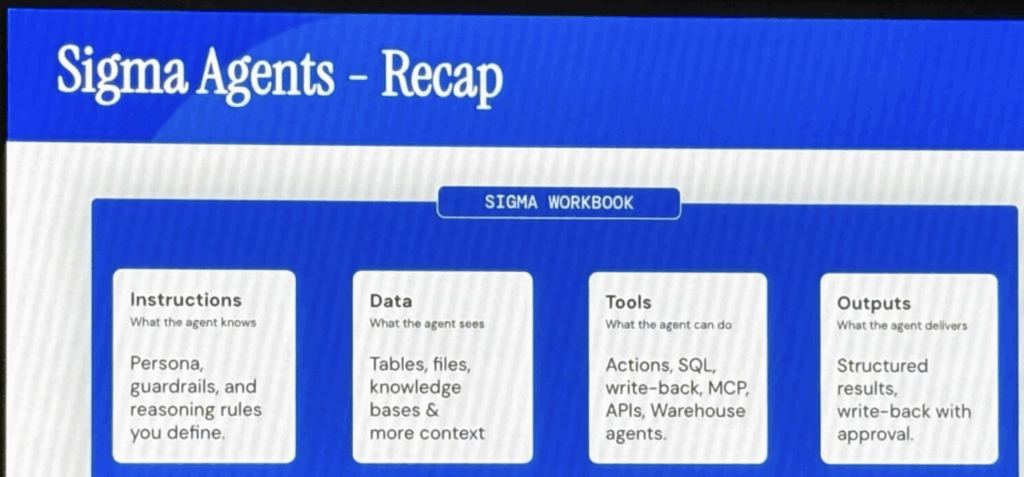
Above: A slide from the morning keynote.
In terms of timeline, conversational agents are available now, autonomous agents and the ability to bring your own MCP server are coming soon, and the capability to call your Sigma agents via API is on the roadmap for later this year.
What Does This Mean for Sigma Builders?
The role of the BI developer and analytics engineer is expanding in a real way. You’re no longer just building reports that inform decisions, the job is now to build operational surfaces where decisions happen.
The implications?
- The deep importance of best practice data modeling that is writeback ready, not just read only. If your data model wasn’t designed with input tables in mind, you’re going to hit walls and constraints quickly. You must now think about designated writeback schemas, when to materialize writeback input tables, how to protect your data sources, and how the app layer inherits permissions without working around them. The analyst who is able to understand best practice warehouse architecture and user workflows is the one best positioned to build scalable products.
- Governance looks different in an app than it does in a dashboard. Dashboard governance relates to who can see what, but app governance now deals with who can do what. Data access governance isn’t new, but app governance raises the stakes considerably. Misconfigured permissions aren’t just access issues but raise severe data integrity implications. Navigation patterns, modal flows and action sequencing all become part of the governance conversation in a way they never were in traditional BI.
- As an analyst, you’re going to have to put on your product developer hat. The muscle most BI developers haven’t had to build is requirements gathering at the workflow level. A dashboard can use any data and can be built speculatively (even if not best practice). If you build something, some people may find it useful, and many analysts consider their job done. However, an app has a specific job to do, and if the workflow doesn’t align with the actual pain point of the users, they won’t use it, regardless of technical quality. Thus, conversations should take place before you open Sigma about what decision is being made, what action follows it, what the user needs to see at each step, and what happens after they click. Dashboard thinking will be replaced with product thinking, and this is a deliberate skillset that will be required.
This transition isn’t simple. Most organizations implementing Sigma are still primarily analytical dashboards to start. There’s nothing wrong with that as a starting point, as it allows users to familiarize themselves with the tool and trust the product. As a Sigma partner, InterWorks is positioned exactly at the intersection of user centered design and helping organizations not just implement Sigma, but to think through what it means to build governed, actionable workflows on their data.
The Question has changed
Nine months ago, the question was about analyzing the strengths and weaknesses of BI tools and which is the right fit for your organization. While still incredibly important, the more interesting decision coming out of Workflow 2026 is, “Are you ready to stop treating your BI tool as a reporting layer and start treating it as the place where your business actually operates?”
It’s not an easy question. Answering it is a big ask — technically, organizationally and culturally. However, the direction is clear, and Sigma is my bet as the best tool in this market to fill this gap.
InterWorks can help you with these strategic discussions and implementing the tool itself. Whether you’re evaluating Sigma for the first time, migrating from another platform, or ready to push your existing implementation toward true data apps, we’d love to help.
