
This blog post is Human-Centered Content: Written by humans for humans.
Most retail teams operate within the same set of dashboards: Revenue by week, units sold by product, and perhaps a few filters for region or channel. Those views are undeniably useful, but they are fundamentally descriptive. They answer one question: “What happened?” As business intelligence practitioners know, descriptive analytics summarize historical data well but fall short when organizations need to anticipate future behavior.
That gap is costly. When visibility is limited to top-line performance, designing smart cross-sell and upsell strategies becomes guesswork. Teams end up sending broad campaigns to large segments, hoping something sticks. The result is generic promotions, lower conversion rates and missed opportunities to grow basket size with customers already in the database. This matters more than many realize. Selling to existing customers is 60–70% more likely to succeed than acquiring new ones, and yet most analytics tools are still optimized for acquisition metrics.
This article documents an approach to closing that gap, moving from “What sold last month?” to “Which customers should we engage next, and around which products?” Critically, the analytics run directly inside Sigma, alongside the dashboards business users already rely on.
Instead of living in a separate data science environment, the analytics run directly inside Sigma, next to the dashboards business users already know.
Our Approach: Basket Intelligence Inside Sigma
To address this problem, I built an interactive retail analytics application in Sigma that combines three capabilities:
- Market basket analysis powered by Python (association rule mining)
- AI-generated content for personalized marketing emails in multiple languages and HTML format
- Email-ready outputs so teams can act on insights immediately, without leaving the platform
Running the analytics directly inside Sigma means business users no longer need to switch between a BI tool and a separate data science environment to get answers. This reduces context switching, accelerates decision-making, and makes advanced models feel like a natural extension of the dashboards people already use every day.
If you want to visually walk through the app with me, check out this video here:
How It’s Built: Python, AI and Sigma Working Together
Under the hood, the app combines familiar BI workflows in Sigma with a few extra building blocks to deliver market basket intelligence.
Source Data
The application starts with transaction-level sales data: one row per basket, customer, date and product, already available in the warehouse and visible in Sigma. Some transformations were performed to improve visualization, but most data preparation happens within the Python layer itself.
Python Analytics
A Python script runs association rule mining on that data, using standard market basket techniques to identify products frequently purchased together and quantify the strength of those associations. This is made possible by Sigma’s native Python integration. It is worth noting that Python execution in Sigma is not supported by all data platform connections. Please refer to Sigma’s documentation to verify compatibility with your environment.
In this implementation, Snowflake serves as the Cloud Data Warehouse (CDW). This means Python code executes directly inside the Snowflake engine via Snowpark, Snowflake’s developer framework. As a result, any additional Python packages must be sourced from Snowflake’s Conda channel. For this project, the Machine Learning Library Extensions (mlxtend) were required to leverage the TransactionEncoder, which transforms raw basket transaction data into the binary matrix format needed for association rule mining.
Package installation in Sigma is managed at the CDW connection level, which is expected given that the CDW is ultimately responsible for executing the code. For detailed instructions on installing Python packages in your Sigma instance, refer to Sigma’s official documentation. This step is critical: An incorrect configuration can affect the entire environment.
(Believe me, we learned this the hard way. If you find yourself breaking up your connection, the steps to get it back and
working are available here.)
Run AI prompts from Snowflake in Sigma
Technical users can execute AI queries directly from a Sigma data app against their Cloud Data Warehouse using Sigma’s passthrough functions. Because Sigma is a cloud-native analytics platform, it can function as a bridge between a data application and the LLMs available in the data warehouse, allowing interaction with powerful AI models without ever leaving the dashboard. Available functions include CallText for text completions, CallNumber for numeric outputs such as token counts and CallVariant for semi-structured outputs like JSON.
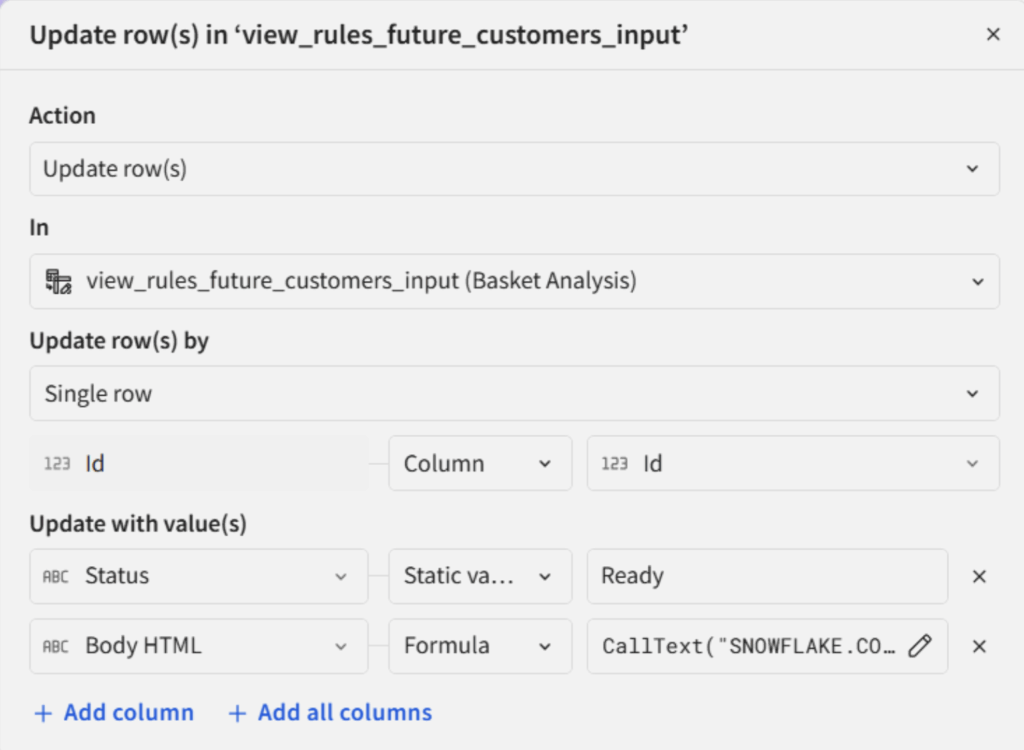
Above: Configuration of the action to update a row using a call to an AI query.
This project uses two main AI prompts, called at the row level via update actions: One to generate a marketing email in the customer’s native language, and one to convert the email body to HTML. The output quality is impressive and can be further refined through thoughtful prompt engineering.
Sending Emails from Sigma
Sigma currently supports seven export destinations through its built-in actions: Cloud storage, download, email, Slack, Microsoft Teams, SharePoint and Webhook. The email action is particularly feature-rich, supporting CC and BCC fields, as well as automatic inclusion of links and attachments to specific workbook pages. All fields in the interface can dynamically read values from other fields and controls within the workbook, enabling fully automated, context-aware outreach.
Together, these components transform standard sales data into an application that does not merely report performance — It helps teams identify who to contact next and reach out to them directly from within the tools they already use.
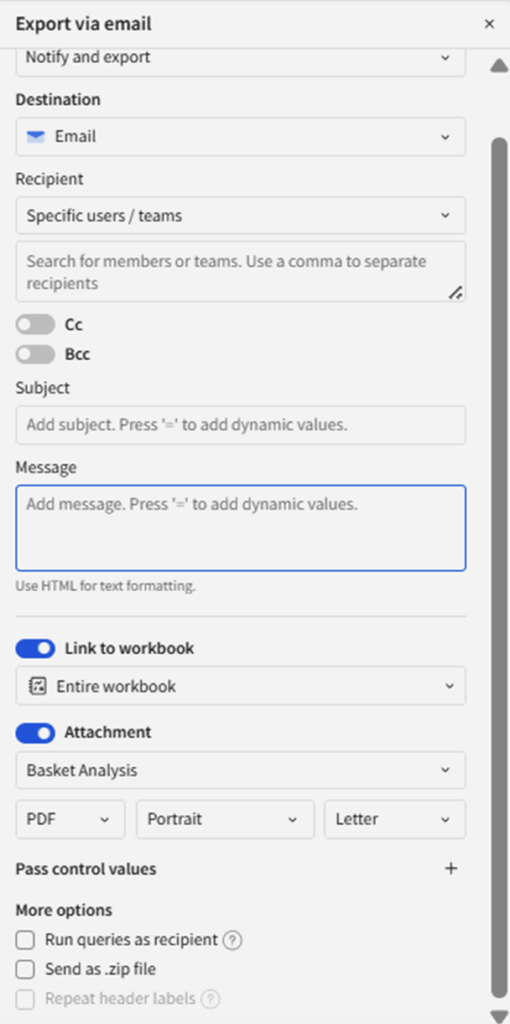
Above: Features available for the “Export via email” action.
Some Important Lessons Learned
Building this solution involved several meaningful challenges that are worth documenting for practitioners considering a similar approach.
First, running Python in real time can be slow, particularly with large datasets. Association rule mining is not especially resource-intensive, but more complex modeling tasks should be pre-computed rather than executed in a real-time setting.
Second, all data outputs using sigma.output() must be validated and must always return a value. When working with DataFrames specifically, any downstream object referencing the returned content will fail if no table-like variable is returned. A common mistake is assuming that child tables retain their content when the parent Python code produces no output, they do not. A simple validation pattern that returns an empty DataFrame with the correct column structure is strongly recommended to avoid this issue.

Above: Sample of code to always return a table.
Third, stay current with Sigma’s documentation on Python element capabilities. This feature is actively being developed, and certain restrictions apply. Notably, sigma.output() must be called unconditionally at the top level of the script. It cannot be nested inside conditional statements, loops or any other block. Sigma explicitly discourages using this method inside loops as well.
Finally, when defining actions with complex logic, using IF/ELSE branching improves both clarity and performance.
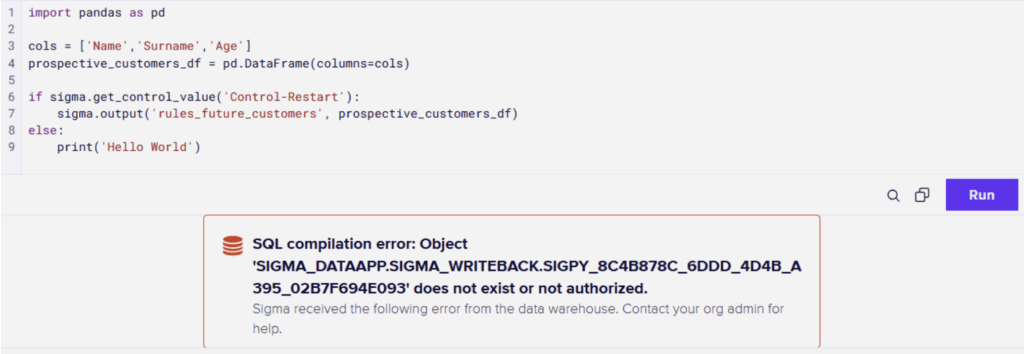
Above: From the series “One Simple Way to Break your Python Code in Sigma.” Remember to keep your sigma.output() calls at the top level of the script. It should never be nested inside a conditional statement, loop, or any other block.
Why This Matters
Retail teams are sitting on a largely untapped growth lever. As I noted above, selling to existing customers is 60–70% more likely to succeed than selling to new ones, yet most analytics tools still push teams toward acquisition metrics rather than nurturing the customers already in their database. The problem isn’t intent, it’s execution at scale. Generic campaigns simply don’t convert: 85% of customers are unlikely to respond to cross-selling requests that are irrelevant to their needs. Relevance requires data-driven targeting, and that’s exactly what basket analysis unlocks. Personalized upsells based on purchase history typically perform 40% better than generic offers, and cross-selling strategies can result in 42% more revenue overall.
But insight alone isn’t enough, the other half of the battle is closing the gap between analysis and action. By running association rule mining, AI-generated content and email outreach all within Sigma, the time from insight to action compresses dramatically. The analyst and the marketer work in the same space, acting on the same signals, at the right moment. That embedded intelligence is what separates teams that spot opportunities from teams that capture them.
Conclusion: Turning Basket Insights into Actionable Retail Strategy
By bringing together sales dashboards, basket analysis, AI-generated content and email-ready outputs, this application transforms raw transaction data into a vehicle for action. It enables retail teams to grow basket size and attachment rates by focusing on products with genuine add-on potential, improve campaign performance by targeting customers who are demonstrably more likely to purchase specific items, and make smarter inventory and assortment decisions by surfacing which products naturally move together and should be stocked or promoted as a group.
The broader takeaway is architectural: When advanced analytics and AI-driven content generation live inside the same platform as the business’s core dashboards, the friction between insight and action largely disappears. That is a meaningful competitive advantage, and one that does not require a dedicated data science team to deliver.
Related
