
This blog post is Human-Centered Content: Written by humans for humans.
A few weeks ago I published a post walking through two approaches to dynamic bulk insert in Sigma. One used native action sequences with a loop + condition pattern that required copy and pasting the same action blocks over and over. The other called a stored procedure through the Databricks Statement Execution API. Both worked. Neither was simple.
Both workarounds existed because Sigma had no native way to insert multiple rows from a dynamic source in a single action. That’s no longer true.
Sigma now has a native bulk insert action in private beta. It solves the exact problem both of those approaches were built around, and it does it without stored procedures, API connectors, no ceiling on row count.
🧪 Private Beta Notice: This feature is currently in private beta. Configuration options and behavior may change before general availability.
Types of Problems This Helps You Solve
- Bulk order entry
- User selects stores and SKUs, app writes one order line per combination so each line item can be tracked and processed independently
- Seeding an input table from a reference table
- Pull rows from an existing workbook table into an input table to create an editable copy you can modify without touching the source
- Splitting a multi-value selection into individual rows
- User picks multiple SKUs in one control, each needs its own row in the output so it can be tracked, priced or processed individually
What the New Action Can Do
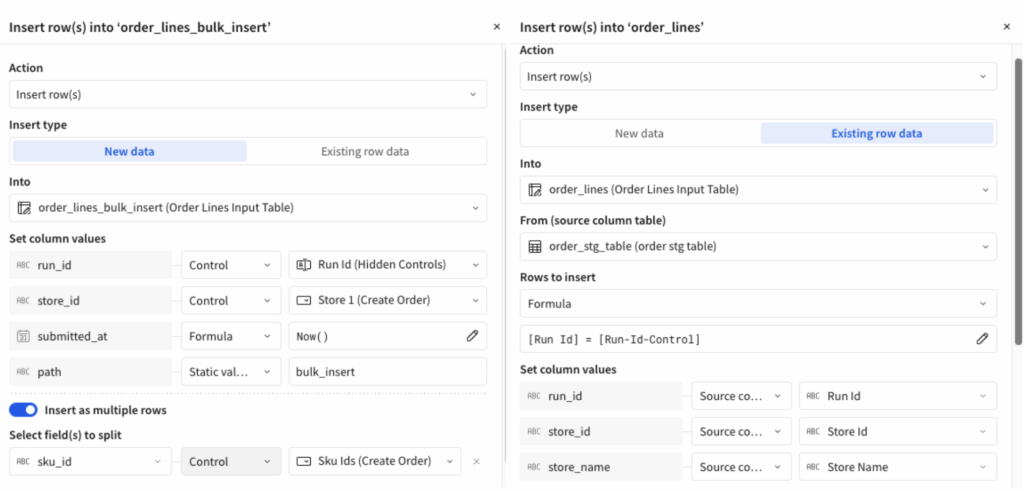
The Insert Row(s) action now has two modes:
- New data
- You define the rows explicitly (via the split toggle or just a single insert), column values can come from static values, source columns, controls or formulas
- Existing row data
- You point it at a source table inside the workbook, define which rows to pull (all rows, or filtered by column criteria), map source columns to destination columns and Sigma handles the rest.
The specific configuration options from the images above tell the full story:
- Into: The target input table
- From (source column table): Any table in the workbook
- Rows to insert: All rows, or “Column value matches criteria” with a column/condition filter
- Set column values: Map destination fields to source columns, controls or static values
- Insert as multiple rows: A toggle that, when enabled, lets you split on a field — so a single source record with multiple SKUs becomes multiple output rows
Why This Beats Both Workarounds
Versus the native action sequence approach: The old pattern required pre-building one Insert Row action per possible output row at design time. Each one needed conditional logic to skip when the row count fell short of the maximum. Supporting 25 rows meant 25 copies of the same action block. The new approach has no ceiling and no copy-paste. One action, any row count.
Versus the stored procedure approach: The stored proc was the right call when you needed truly dynamic row counts. But it came with real overhead: An API connector in Sigma admin, a stored procedure in the warehouse, grants for the service principal and a Databricks specific workaround since Sigma didn’t have a native Call Stored Procedure action for that platform. More importantly, the stored proc approach was writing to a regular Databricks table. The new native action writes directly to a Sigma input table.
Best Practices
- Use “Existing row data” when your source is a staging table
- User makes selections, selections populate a staging table, submit triggers the bulk insert.
- Use “Insert as multiple rows” when one selection maps to many output rows
- The split option handles the fan-out.
- Filter out incomplete rows at the action level
- Use “Column value matches criteria” to avoid inserting stale or incomplete staging rows rather than cleaning them up downstream.
- Keep staging tables scoped tightly
- Only include the columns the insert action needs. Extra columns add noise when mapping source to destination fields.
Who Should Care About This
If you’ve used either workaround or struggled with bulk inserts, struggle no more. The feature is in beta, but the core functionality is already there.