
This blog post is Human-Centered Content: Written by humans for humans.
Continuing our series on integrating AI features into the Sigma development environment, today we’re focusing on a key consideration: the cost of using AI-powered tools within your dashboards. Sigma currently supports four AI-driven features: Formula Assistant, Explain This Chart, Ask Sigma and AI Queries. In this post, we’ll take a closer look at the costs specifically associated with running AI Queries, which leverage your cloud data warehouse (CDW) to deliver intelligent insights directly into Sigma.
In case you just jumped into this article straight from your search results I suggest you dedicate five minutes to read some of my previous publications in which I cover the basic steps to make you Sigma environment AI-ready.
A Brief Recap
In my last blog post, I introduced the usage of Sigma’s passthrough functions to invoke AI features available in our company’s cloud data warehouse (CDW). However, as expected, this entails a cost. In this context, however, it is charged by your CDW provider rather than your Sigma subscription. In this instance, I am going to be explaining the cost computation based on Snowflake’s pricing schema.
Then What About the Actual Costs?
Snowflake Cortex AI functions incur compute costs based on the number of tokens processed. A token represents the smallest unit of text handled by these functions. In industry terms, a token is typically equivalent to about four characters, though this can vary depending on the LLM model used. Besides, you need to keep in mind the type of subscription your company has purchased, which ultimately is what decides on the price per credit and the figures you will be paying.

Above: Put simply, every time you run an AI prompt, it consumes tokens. Snowflake has set a number of credits per million tokens used. Here credits mean Snowflake’s billing unit of measure for compute resource consumption. Then those credits have a cost based on your subscription plan.
Important to remember that the schematic displayed above shows token-based Cortex AI usage that is billed as “credits per million tokens.” Snowflake’s AI catalog also includes features priced per pages, messages, GB or compute-hours (for example: AI Parse Document, Cortex Analyst messages, Document AI, Cortex Search), and some REST API models are listed directly as “$ per million tokens” rather than via credits. On top of AI charges, standard Snowflake costs for warehouses, serverless features, storage, data transfer, etc. are billed separately according to the rest of the consumption table.
The AI-Powered Dashboard Explained
To demonstrate the computations described above in a practical context, I developed a dashboard that uses Snowflake’s AI powered functions through Sigma’s passthrough capabilities. The dashboard displays the cost associated with each AI operation in real time, (including tokens, credits, and dollars), all triggered as you interact with its components.
The example uses one of Sigma’s sample datasets: The BIKES database, which contains a fictional set of charging stations in San Francisco. AI is used to generate descriptive narratives for each location, translate the generated text and compute sentiment scores for user reviews.
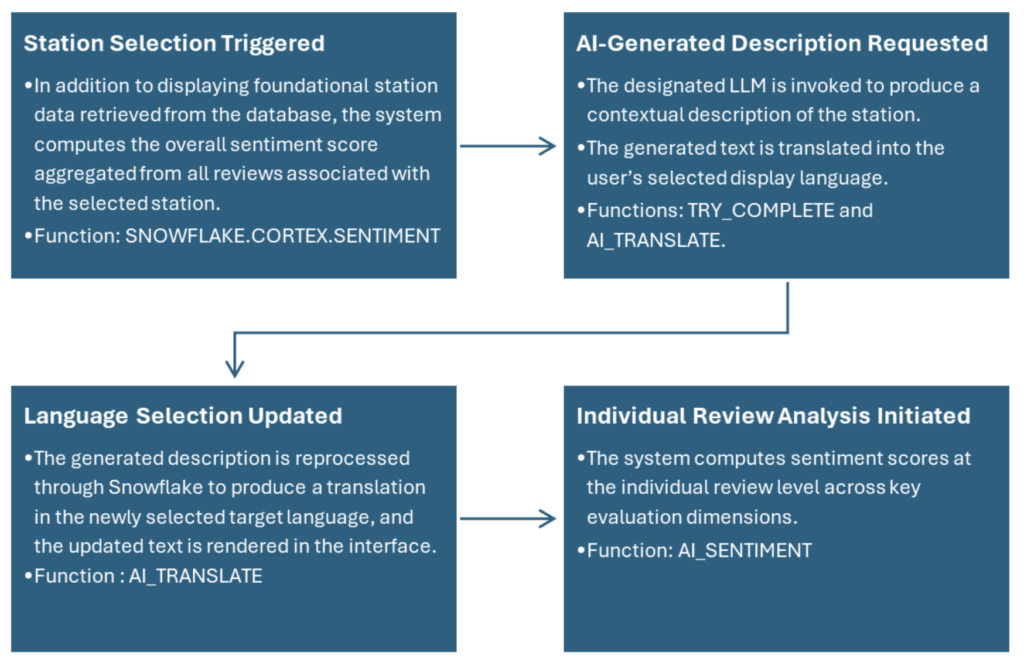
Above: An overview of the workflow within the dashboard. Each user action functions as a trigger that invokes Sigma’s passthrough functions to retrieve and display AI‑generated outputs. We calculate the tokens, credits and price at the column level by using calculated fields in a temporary table that stores the complete history of AI queries.
We logged each operation into a table to track token costs. After all, LLMs bill for both the input and the output (surprise!). Once there, we used the SNOWFLAKE.CORTEX.COUNT_TOKENS function in the “Tokens” calculated field to estimate token usage.
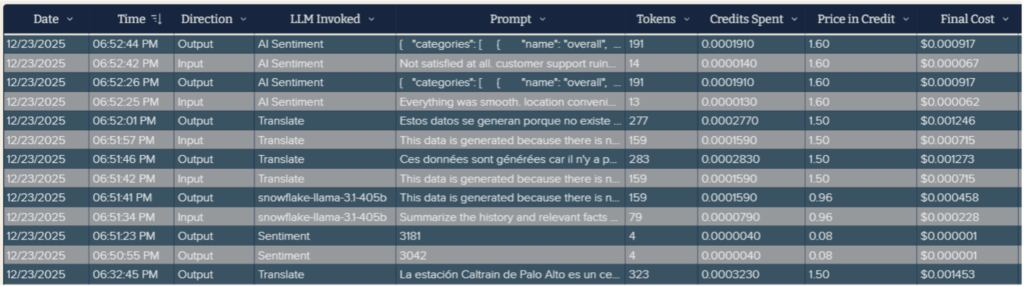
Above: Structure of the table to store all the operations performed in the dashboard.
Check out the formula we implemented, note that it uses by default the LLM model snowflake-arctic-embed-m to calculate the final token count. This is another implementation of a Sigma passthrough function to call and AI model:
If( IsNull( [Prompt] ), 0, CallNumber( "SNOWFLAKE.CORTEX.COUNT_TOKENS", "snowflake-arctic-embed-m", [Prompt] ) )
The following are the names of all the AI functions used in the dashboard and their respective links to Snowflake’s documentation:
- TRY_COMPLETE : To get a response from my generative text prompt. The advantage of this function is that when the operation cannot be executed, it returns “NULL” instead of throwing an error.
- COUNT_TOKENS: The first version of the AI function to calculate the number of tokens computed in a prompt for the large language model or the task-specific function specified in the argument. As of when this blog was published, Snowflake had released an updated version named AI_COUNT_TOKENS. Unlike COUNT_TOKENS, it accounts for the managed system prompt that is automatically added to the beginning of the input text when using a Cortex AI function.
Note: According to users from the Snowflake community forum, AI_COUNT_TOKENS is implemented as an external function and can fail with 500 errors when tools like Sigma batch multiple rows/prompts in a single request. SNOWFLAKE.CORTEX.COUNT_TOKENS runs natively inside Snowflake and is therefore more robust for batched calls.
- AI_TRANSLATE: This one is straightforward: It just covers translations.
- AI_SENTIMENT: Used to get an overall sentiment from the text entered, but also according to categories defined but the user.
- SNOWFLAKE.CORTEX.SENTIMENT: Provides an overall sentiment score.
To wrap up, I invite you to explore the sample dashboard and experience firsthand how each action translates into realtime cost insights. I hope you find it both informative and engaging. If you have any questions, feedback or ideas for further enhancements, feel free to reach out — I’d be glad to continue the conversation.