
Using Comments in Tableau

Using Comments in Tableau

Tim Costello
//

There’s something you can do to make your data easier to work with in Tableau, and I bet you’re not doing it. I love sharing this tip when I teach Tableau. Right-click on any dimension or measure in the Data pane and choose Default Properties > Comment. You’ll be presented with a text editor where you can enter notes and comments about this field.
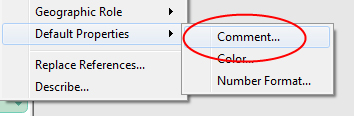
Default Properties > Comments” width=”354″ height=”116″ /> </p>
<h2>Creative Uses for Comments</h2>
<p>This is a great place to put the formula for a calculated field with some notes about why you created it and how it should be used. You can describe a dimension here and help people understand what it represents. Or, maybe you can put a note to let people know how to use a measure and what the default aggregation should be (sum, min, max, average, etc.). I like to add comments to calculated fields as they change over time to show when the changes happened and what the previous versions of the calculation were.</p>
<h2>Format Your Comments</h2>
<p>Notice the formatting options? Pick the right font, format the font (bold, italic, underline) and maybe add a color to call out an important detail. Pretty soon, you’ll have something that’s not only functional but is also nice to look at!</p>
<p><img fetchpriority=

When you’ve finished editing your comment click “OK.” Now, whenever you hover your mouse over that field, you’ll see a tooltip pop up to display your comment!
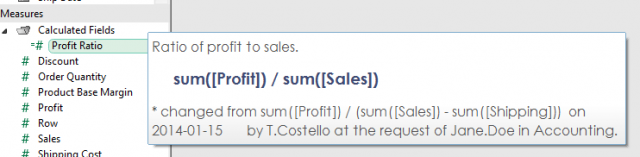
Complete Comment

SIGMA RAPID START

Switching your analytics to Sigma?
Speed up success with a Rapid Start!

InterWorks uses cookies to allow us to better understand how the site is used. By continuing to use this site, you consent to this policy. Review Policy OK

×

Interworks GmbH
Ratinger Straße 9
40213 Düsseldorf
Germany
Geschäftsführer: Mel Stephenson

Kontaktaufnahme: markus@interworks.eu
Telefon: +49 (0)211 5408 5301

Amtsgericht Düsseldorf HRB 79752
UstldNr: DE 313 353 072

×

Love our blog? You should see our emails. Sign up for our newsletter!