
This blog is featured in our AI Use Case Library of real AI solutions.
The Problem
When a home-services company continued their growth and was able to buy other similar companies, it may have seemed easy on the surface. They have a similar book of customers with similar service histories. However, all of that data must land in the company’s central management platform, coming from various systems and formats before the new locations can run as part of the business. To make it more challenging, for this company, their central platform is web-based and had very minimal APIs, so there was no clean way to load the data programmatically.
That left two bad options: They could pay people to retype thousands of customer and service records by hand, slowly and with the mistakes that come with it, or they could stall. And because the company planned to keep acquiring, this was not a one-time chore. Every new deal brought the same wall, and the wall was always in the same place: Getting the data into a system that did not want to take it in bulk.
What We Built
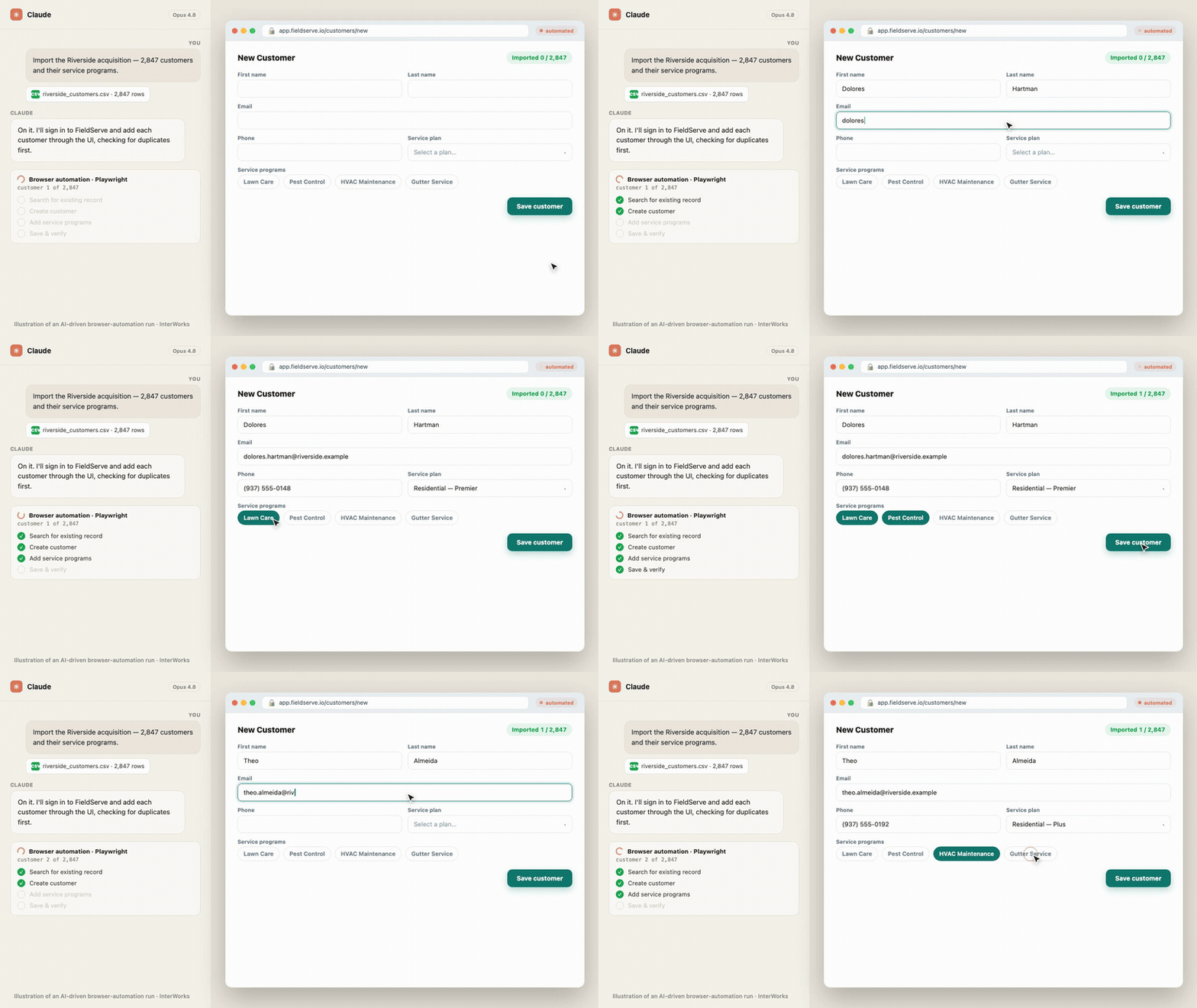
We built a browser-automation bot with Playwright that operates the platform exactly the way a person would. It reads a CSV of the acquired company’s customers and services, logs into the web app, searches for each customer to avoid creating duplicates, creates the ones that do not exist and adds their service programs. It tracks its own progress, so a run can stop and resume without redoing work. We built and iterated the whole thing with Claude. It imported the first acquisition end to end, and it was designed to run again for the next one.
How It Works
From the operator’s side, a job that used to mean weeks of manual entry becomes something you start and monitor. You hand the bot a CSV of the acquired company’s data, and it works through the records one by one, putting each customer and service into the platform through its normal screens.
A few things make it dependable rather than a fragile screen-scraper:
- It checks before it creates: The bot searches for each customer first, so an import that gets run twice does not litter the system with duplicate records.
- It does the full job, not just the easy half: For each customer it creates the record and then adds the service programs that go with it, which is the part that makes the data actually usable on the other side.
- It survives interruptions: A progress tracker records which customers have already been imported, so if a run stops partway through, the next run picks up where it left off instead of starting over.
- You can watch it work: We used Claude to build a live progress dashboard for monitoring the runs in real time, which took about thirty seconds to put together.
How It Was Built
The first real decision was which tool should do the driving. The no-code automation platforms the team considered first, the n8n and Power Automate and Zapier tier, could not do what this needed, which was to agentically enter bulk data into a specific web UI with all its quirks. Playwright gave full programmatic control of the browser instead. We chose it over Cypress for a practical reason: Cypress is built and opinionated for QA testing and will not allow some of the actions a data-import automation has to take, while Playwright simply drives the page.
The more interesting story is how Claude’s role grew over the life of the project. At the start, the workflow was hands-on. We would screenshot DOM elements and go back and forth with Claude to work out the right selectors and the right sequence of actions, then feed those into the script. Over time that loop collapsed. Claude started doing the DOM inspection itself, and by the spring the automation had become genuinely agentic. During one run for this client, it hit an unexpected snag and instead of failing, it looped a few times reading the DOM on its own to work out how to script the import it was supposed to be doing. The work moved from a person writing automation with Claude’s help to Claude largely writing and repairing the automation by reading the page.
Underneath, the structure stayed simple on purpose. One script handles the main import, creating customers and attaching their services. A second handles reprocessing, adding services to customers that already exist. A CSV-based progress tracker records what has been done so any run is resumable. None of it is exotic, which is part of why it could be stood up quickly and handed off cleanly.
This was a small, fast engagement, the kind of low-commitment build that fits a problem you need solved now rather than a platform you intend to run for years.
Why It Matters
For the company, the first acquisition’s data went into the platform without standing up a room of temporary workers to retype it, and just as important, they had a repeatable path for the next deal instead of facing the same wall again.
The broader point is about timing. When a system has no usable API, browser automation is the bridge that lets you start moving immediately instead of waiting for a better option that may never arrive. It is fast to build, cheap relative to manual entry and it meets the system on the terms it already offers — its own screens.
That’s not to say browser automation is always the ideal endpoint. The company did attempt to build out an API to their own platform for production imports, but that effort did not pan out. This automation remains the process they rely on for each new acquisition. That said, if there is a way to get the data from an API or database in your project, that’s almost always the best course.
In the end, this AI automation was the right fit for the job. It kept the business from being stuck and handled each acquisition while allowing the deals to continue to move forward.
Where This Could Go
The approach is not specific to one platform or one industry, which is what makes it worth having in the toolkit.
- The next system without an API: The same browser-automation pattern applies to any web platform a company is stuck loading by hand — an old CRM, an ERP, a field-service tool with no integration to call. Each one is the same problem in different clothing.
- More of the agentic workflow: Push further on letting Claude read the DOM and write and repair the automation itself, so each new system takes less human scripting than the last and the process can adapt and repair when changes to the system happen.
- A repeatable migration accelerator: Package the import flow, the duplicate checking and the resumable progress tracking into a reusable starting point, so the next acquisition or the next client engagement begins from a template instead of a blank file.
This is a recurring need we see arise across clients. A monthly report that involves logging into multiple systems to get data. A quarterly process that needs multiple files from different websites reconciled. We keep meeting companies whose most valuable data is trapped in a system that will not hand it over easily, and the tools to get it out are better and cheaper than they have ever been.
Takeaway
The data was never the hard part. Getting it into a system with no real API, over and over with every acquisition, was. Browser automation turned that wall into a job you can start and walk away from, and it remains how the company brings each new acquisition’s data into the platform. If your growth keeps stalling at the same data-loading step, that step is more solvable than it used to be.
