
This blog post is AI-Assisted Content: Written by humans with a helping hand.
I spent years trying to kill Excel.
Not literally. But as an analytics architect, I approached every spreadsheet like a building that needed to be condemned. Manual data entry. No source of truth. Formulas nested inside formulas. One wrong change and the whole thing breaks.
I was right about most of that. But I was missing the point entirely.
The Problems Are Real
The case against spreadsheet-driven workflows is well documented:
- Data gets entered by hand, which means data gets entered wrong
- Multiple people email different versions of the same file and nobody knows which one is current
- A formula breaks silently in row 847 and nobody notices until the quarterly review
- The analyst who built the whole thing leaves, and the file becomes a black box everyone is afraid to touch
From an analytics perspective, the answer seems obvious: Write a SQL query, automate the pipeline, connect a proper BI tool, done. Most of what business users do in Excel manually can be replaced with a query that runs automatically and is accurate every time.
I still believe that. But it’s an incomplete answer to an incomplete question.
Why Excel Persists
Most organizations that deploy Tableau, Power BI or any other BI tool never replace Excel. They run both. Finance has dashboards in Tableau and still does all their planning in Excel. Operations has a beautiful Power BI report and still tracks day-to-day work in a spreadsheet.
Why does Excel stick around? Because those other tools solved turning data into reports and completely ignored a different problem: The work that happens before and around the data.
Dashboard tools are extraordinarily good at pulling data from a warehouse and presenting it visually. But they never competed with the part of Excel that lets you:
- Enter and track data that doesn’t live anywhere else yet
- Build a quick calculation model without calling IT
- Run a multi-step process with the click of a button
- Do something completely custom that no dashboard template was ever designed for
Excel’s staying power isn’t about reporting. It’s about flexibility and speed. A business user can open a blank spreadsheet and have a working tool in an afternoon. A proper app takes weeks, a project, budget approval and engineering time.
What Makes Excel Hard to Replace
Even when a better tool exists, Excel rarely gets phased out. A few reasons why:
- Macros — A business user with no coding background can create a button that does anything: Pull data, reformat tables, run calculations, clear and reset a file. All on click, without involving anyone.
- Ownership — When someone builds a process in Excel, they control it. Replacing it with a governed app often means handing that control to engineering.
- Automation tools sit around the data, not inside it — Power Automate and Zapier are useful for connecting systems, but the user is still working in Excel. The trigger is wired to the outside of the process, not embedded in it.
Enter Sigma
Sigma has a spreadsheet-style interface that’s approachable for business users, and under the hood it’s querying your data warehouse directly.
For dashboards and reporting, Sigma is excellent. Tableau to Sigma migrations are generally straightforward to scope — you can see what you’re replacing and replicate it.
The more interesting, and honestly harder, territory is what Sigma calls AI-apps: Workflows where users don’t just view data but enter it, act on it, trigger processes. This is where Sigma competes with Excel in a way that Tableau never even tried. And this is where it gets complicated.
Sigma’s Action Builder
Sigma’s user action system is a real step forward. You can build button-driven workflows that write data back to the warehouse, trigger multi-step logic and orchestrate reasonably complex processes without writing any code.
But here is an illustration of where it still falls short of the Excel macro: In Excel, when a process gets too complex, you open VBA and code your way through it.
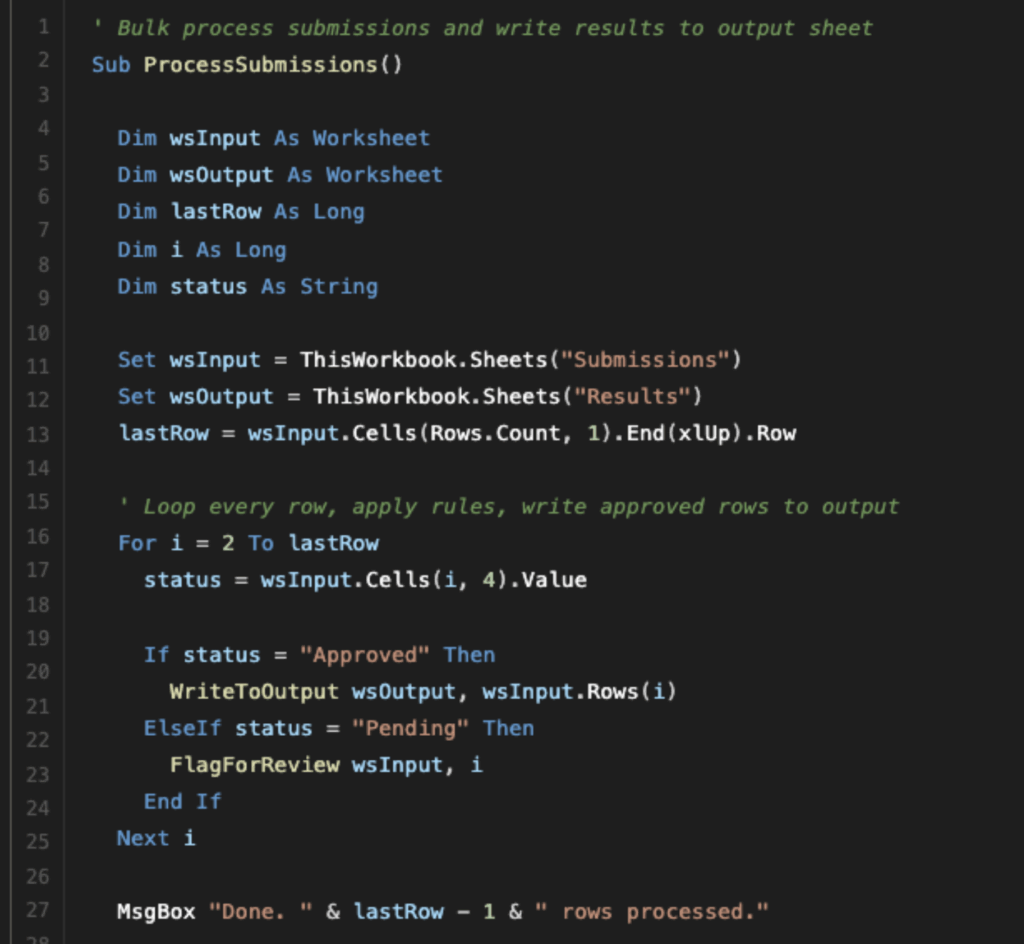
Above: VBA Code Example showing loops and if statements
In Sigma’s action builder, every step is manually constructed in the UI. For simple workflows, this is fine. For anything approaching an Excel macro in complexity, you’ll spend a lot of time building something fragile.
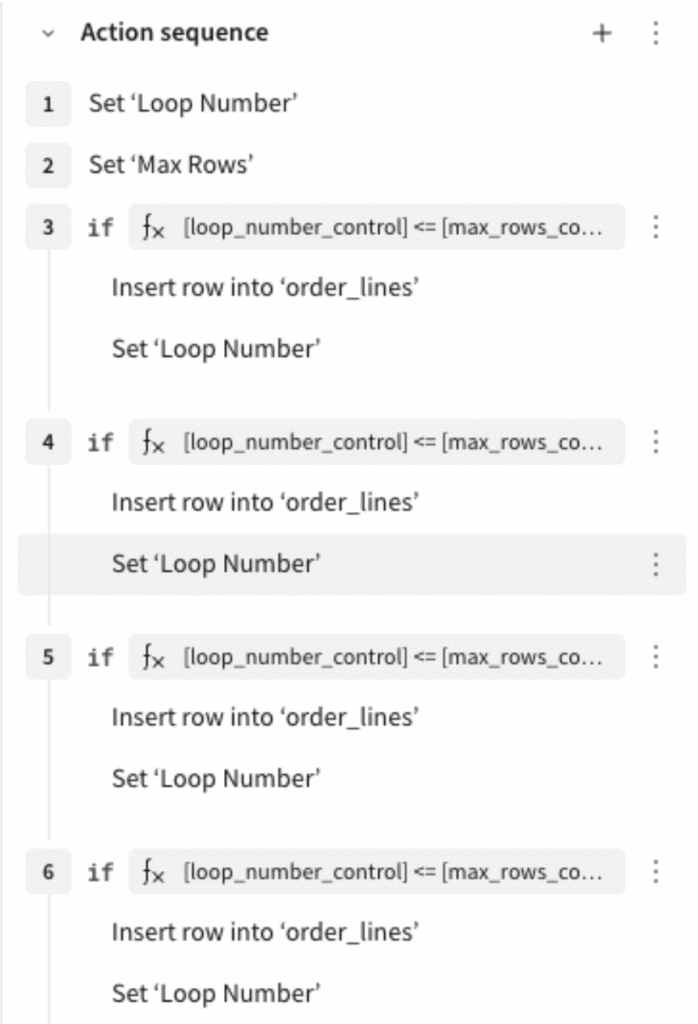
Above: Sigma action sequence to replicate loops and if statements
The Right Answer When Actions Aren’t Enough
For complex action logic, the solution isn’t to build more inside Sigma’s action builder. It’s to push the logic into the warehouse. Sigma actions can call stored procedures. Write the complex logic there, where it can be tested, versioned and maintained. Wire a Sigma button to call it. The user gets their one-click experience. The logic lives somewhere can be maintained easier.
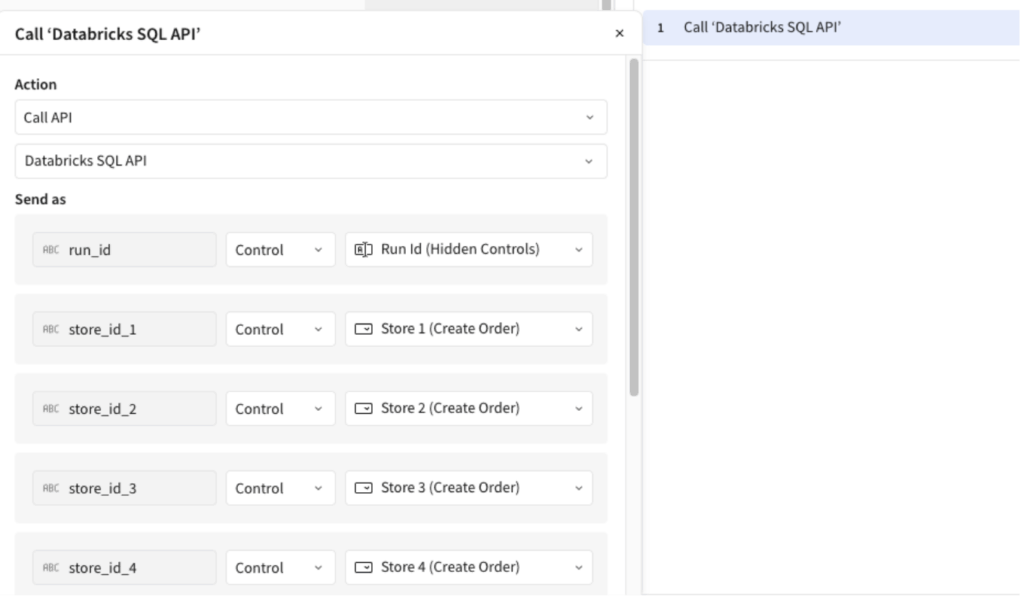
Above: Sigma action calling a stored proc to run the complex logic in the datawarehouse
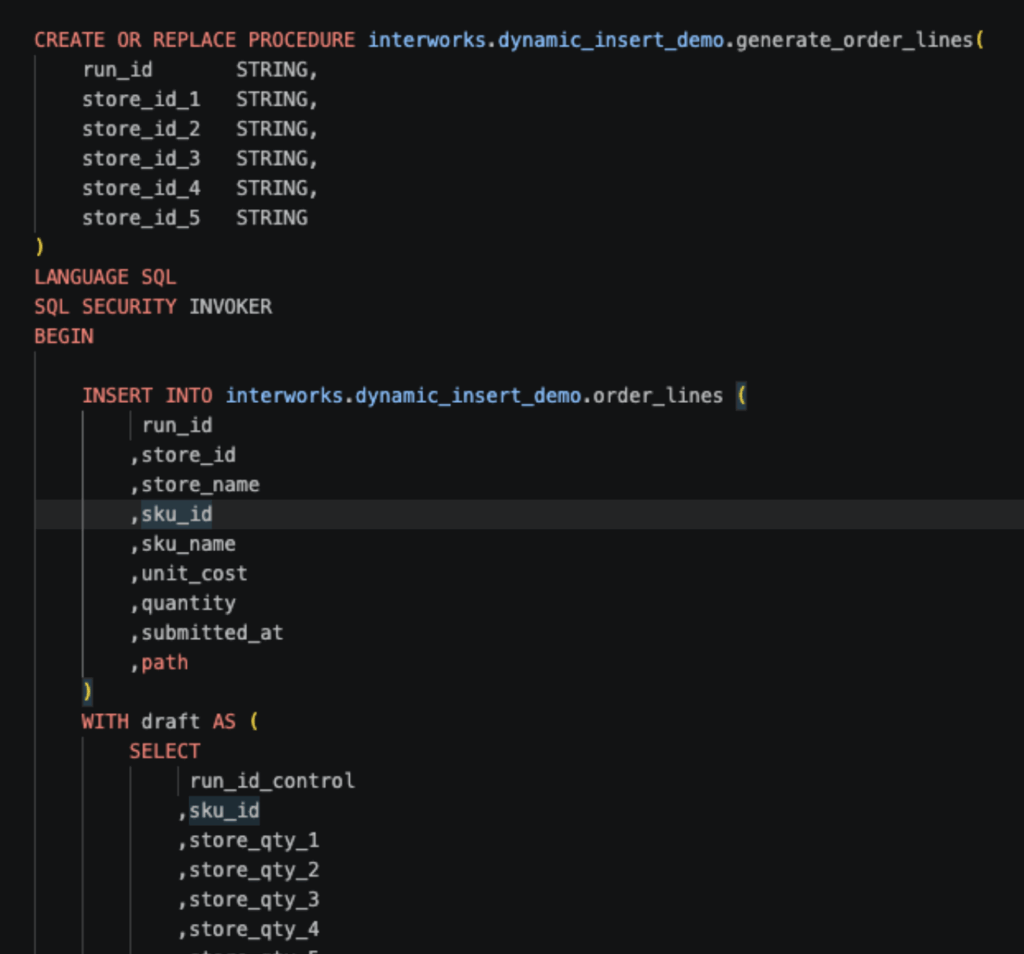
Above: Stored Proc housing all the complex logic
This is the intended architecture for nontrivial operations. It also means complex Excel macro migrations aren’t just Sigma configuration work. Warehouse-side development is needed. Different skill set, different scope, different timeline.
When an Excel migration runs long, the usual culprit isn’t Sigma. It’s that nobody respected what the Excel file was actually doing and underestimated the complexity.
The Tool Comparison Chart
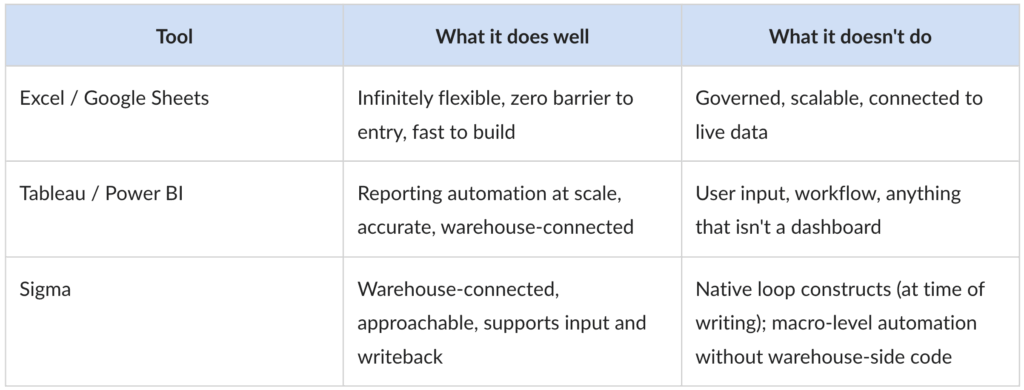
My Take
I still think Excel workflows should move to better tools. The data quality argument is real. The governance argument is real. The “the nobody knows what this macro does anymore argument” argument is real.
But Excel has survived every attempt to replace it because it meets a real need: People can build complex, functional processes without waiting on engineering. The complexity doesn’t disappear when you migrate to Sigma — it moves. It can move into the action builder, where recreating macro level logic becomes a tedious sequence of manual steps that takes longer than anyone planned. Or it can move into the warehouse, where stored procedures require the right skills.
Sigma can replace Excel. If you understand the complexity inside Excel before you begin a project, Sigma will deliver. Underestimate Excel, and you’ll be explaining the timeline.