
When I first used Sigma in early 2024, it was still a spreadsheet-native analytics platform. While still interesting at the time, it was not until they launched data apps (now known as AI apps) that I become truly excited and got my mind spinning about all the operational workflows it could power. If you read my previous blog, you know I’m excited for the product direction that Sigma is taking. However, I’m a developer myself, and I think it’s key to know how to build well in this new paradigm where you don’t just surface data but can act on it.
The honest answer to what makes a good data product is that the work happens before you ever put hands to keys. Many builders in BI are accustomed to starting with a data source and a question. Building analytical apps requires something different: a clearer picture of the process you are supporting, the personas and people involved, and what the target outcome is. If you do these steps right, you’ll make a useful product. If you skip it or fail, you end up with more unused tech debt or will find yourself spending more time rebuilding.
This post is about the upfront thinking and also falls into the territory that InterWorks is known for through our “User-Centered Design” and “Designing for Data” workshops — helping our clients apply the right thinking models to dashboards and apps before they start building. When Greg Bonnette and Katrina Menne presented a framework for this at Sigma’s Workflow 2026 conference, it resonated with me immediately and I wanted to share it more broadly.
Is Your Project a Good Candidate for an App?
The first step is to evaluate your use case and decide if you are building an app or a dashboard. Dashboards tend to be the next evolution from an Excel doc, with more toggles to help you discover insights. Apps aim to enable you to act on those insights through extra configurations. However, some “apps” are just dashboards with extra steps, and building them like apps will make them harder to maintain without making them meaningfully better. Before spending time during product design or development, it’s worth asking if your use case has the characteristics of a workflow that fits your users’ needs:
- Actors: specific people or roles responsible for specific actions
- Tasks: discrete, defined units of work
- State changes: something moves from one status to another as work progresses
- Handoffs: work passes between people or systems at defined points
- Doneness: there is a clear, declarable definition of complete
If these points don’t align with what you have in mind, you still might have a valid reporting need; it just might not be an “app” workflow. This isn’t a bad thing, reports and dashboards are still valuable, but they require distinctive design thinking and it’s best to avoid blending them so you don’t produce something that does neither job particularly well.
One thing I’ve found: Many business stakeholders won’t know your native vocab for this process, so part of our role is to help get them there. Ask them to walk you through what happens step by step, who does what and how they know something is finished. These answers will help guide your decision-making framework. When stuck trying to get to the root issue, ask the five why questions:
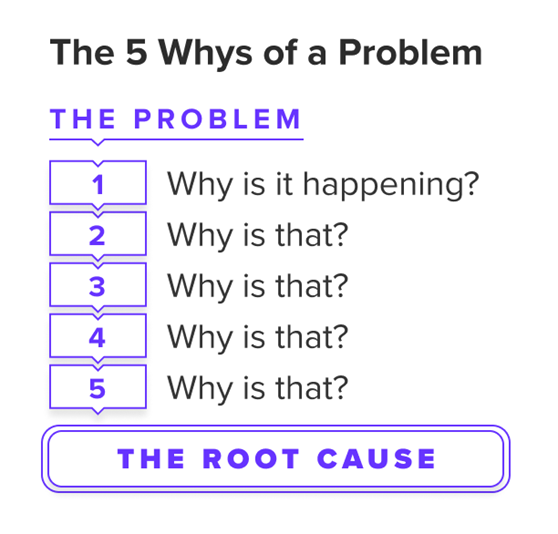
No, it’s not satirical. By continuing to ask follow-up questions, you’re able to lead the conversation and guide the stakeholder to the root cause even if they can’t articulate it themselves.
Introducing BUILD Framework
Once you’ve confirmed you’re building an app, the next question is how to plan it. The BUILD framework, presented by Greg and Katrina at Workflow, is a practical guide for doing this. It’s not a checklist, but it will help you think about different stages of the planning process, where each can help you choose the right architecture for decisions you will make before you build.
- B — Business Objective: What outcome are you building for, and who needs to achieve it?
- U — User Path: What is the simplest path a user should follow to reach done?
- I — Input Modeling: What are you adding, what are you overwriting and how much recall do users need?
- L — Look and Feel: How do you make this app feel obvious, calm and smooth to use?
- D — Development Cycle: How will you ship, validate and keep improving the app over time?
Business Objective
Start here with your North Star: Who are you building for and what does “final” look like? Even if it’s not fully fleshed out yet, a non-specific idea produces a vague app. Be clear here and it will result in smoother downstream decisions. In addition to knowing who the primary users and outcomes need to be, it’s key to know what’s in scope or out of scope. It’s a fine balance between one centralized analytics hub and having out-of-scope bloat, so try your best to align features to your dedicated goal. Anything serving wildly different personas or workflows is normally a signal that it might be best to create separate distinct apps, so draw the line early and stick to it.
User Path
This is one area where switching your mindset from designing dashboards to apps can be challenging. In reporting, you design for consumption. Someone reads the dashboard and draws their own conclusions. In app development, you’re designing for action. The user has a job to do, and your app should make the path to done as obvious as possible.
Your action here is to map the flow before you do anything. Grab your nearest whiteboard, pen and paper, or a tool like FigJam or Figma. Identify the user’s first action and follow it forward: What should they look at or act upon next? And then what does the user do? Keep pulling the thread until you reach a clear definition of done. This exercise almost always reveals handoffs and dependencies that would otherwise get discovered mid-build, which is a much more time-consuming way to find them.
As you would imagine, the user path will determine the navigation model. While some workflows have linear steps and move forward in a sequence, others are hub-and-spoke, where users navigate back and forth to a central view. Knowing which you need will shape the layout of your app.
Input Modeling
This is the most technical area, and the core question revolves around whether end users will be creating new records or updating existing ones. While this may be intuitive to those with data warehousing experience, the answer will have effects on downstream auditability, reporting and rolling back changes.
My general rule (and also most use cases) is to append, meaning to insert new rows rather than overwriting existing ones. Appending preserves history, supports audit trails, and makes it much easier to report on what changed and when. Overwriting is appropriate for small, stable configuration-style values where history doesn’t matter, but those cases are less common than people assume.
If you can imagine a help desk ticketing scenario, you may assume you would want to overwrite the prior status with a new one when you have an update to make, but it’s just as easy and better practice to append. When you do this, you can just take the row for that ticket ID with the most recent timestamp and use this as your current value while still preserving prior updates.
Another decision is the way you let users edit: either via forms or in a spreadsheet-like way by changing the cell values. Grid/spreadsheet editing is faster for bulk changes across many rows and will feel familiar to anyone comfortable in a spreadsheet. Form editing is slower but more deliberate, which is better for high-stakes, single-record actions where validation and context matter. Neither is universally correct, so the right choice depends on the risk profile of the action and the volume of changes a user is making at once. Let the workflow drive the decision.
Look and Feel
As much as many of us may be proud of our beautiful dashboard/app, the root goal is to have a functional experience, not an aesthetic one. Users should know where they are, what they should do next, and how to navigate back if they get stuck.
A few key principles:
- Give users clear choices, as too many choices lead to analysis paralysis (hesitation).
- Have clear paths, as dead ends can frustrate users quickly.
- Keep click paths short.
- Pre-populate information when you have it. It lessens the time for users to interact and decreases the possibility of data entry issues. Examples of information you might already have in the system are the user, their role, current context, the row they’re editing, etc.
Sigma has decent options for navigation and layout choices including tabbed containers (my favorite), containers and modals + popovers for info pop-ups. As someone who builds apps, it’s easy to know your own app’s click pattern and how to navigate around to get what you need. However, the underlying question is always the same: if someone opens this app for the first time with no training, ask yourself: “Will they be able to pull the same value out of this app as I can”?
Development Cycle
Sigma has better native ways for DevOps than other BI tools I’ve used for years. The first published version of an app is never the end or the finished product — ship early versions for feedback, test across roles and edge cases, and plan to iterate. One thing I’ve learned is that the most valuable feedback you’ll get is from real users doing real work, and you can’t get that feedback until something is in their hands even if it’s not the super-duper, perfect, polished version quite yet.
Other tips include role-based testing to confirm permissions behave correctly, a clear ownership model so users know who to go to when something isn’t working and some mechanism for tracking how the app is being used. Again, I recommend building in a lightweight way to collect usage data early as it’ll help guide future improvements rather than guessing.
Lastly, Sigma has great version tagging, which is handy for having a Dev and Prod version in simplest form. You might have a use case where business users only get access to the Prod-tagged version, your data team can review in UAT-tagged versions, and the primary developers might publish changes to Dev-tagged versions as an example. All versions live in the same root URL, so users only have to save one version, toggle between what they need. Or, you can even pre-load what version shows up by default for them. No more switching tabs and searching your environment for the proper versions. There is also edit history and version logs for restoring prior published versions as needed.
A Mindset Shift for App Builders
Great app builders don’t even have to be the most technically skilled users. They’re the ones who do the planning work seriously before they start building by sitting with a stakeholder, understanding a process deeply and translating that into a well-scoped, well-designed app that people want to use.
Sigma is a capable, flexible tool that will largely do what you tell it to. The hard part, and what ultimately determines whether an app sticks, is designing it properly so it addresses a real workflow and solves an actual pain point. The BUILD framework is a practical tool for getting there, but don’t skip the diagnostic at the top. The best app is still the one that should have been built in the first place.
Want to Go Deeper with Data Design?
If this kind of design-first thinking resonates, InterWorks offers Designing for Data workshops— hour-long sessions (foundational and advanced) that help teams apply structured thinking to dashboards and apps before they build. If you’re looking to audit existing content or get hands-on design expertise alongside a project, our UX Design and Discovery engagement is built for exactly that. Reach out to learn more.
The BUILD framework was presented at Sigma’s Workflow 2026 conference in San Francisco by Greg Bonnette, Field CTO, and Katrina Menne, Product Evangelist at Sigma Computing. This post draws on content from the “Best Practices for Building AI Applications” session.
