
This blog post is Human-Centered Content: Written by humans for humans.
As data teams strive to deliver faster, smarter insights, Sigma is stepping up by embedding AI directly into its dashboard experience. With features like Formula Assistant, Explain This Chart, Ask Sigma, and AI Queries, users can now interact with data in more intuitive and intelligent ways.
This blog explores some of the functions Sigma provides to transform traditional dashboards into dynamic tools, making data exploration more accessible, automated, and insightful. Whether you’re building reports or uncovering trends, AI in Sigma is changing the game for business intelligence.
If you’re new to exploring AI features in Sigma, I recommend taking just five minutes to read my earlier blog post where I walk through the essential steps to prepare your Sigma environment for AI integration.
What are AI Queries?
By using passthrough functions or user-defined functions, technical users can execute AI functions in the analytics layer. Because Sigma is a cloud-native analytics platform, its AI features can leverage the power of the LLMs available in the warehouse. This means that the users can interact directly with the best LLMs that are available in the warehouse by calling a set of functions specifically built for that purpose. Here’s a list of passthrough functions suitable for executing AI queries from the Cloud Data Warehouse (CDW):
- CallDatetime Calls a data platform function that returns a date data type.
- CallGeography Calls a data platform function that returns a geography data type.
- CallLogical Calls a data platform function that returns a logical data type.
- CallNumber Calls a data platform function that returns a number data type.
- CallText Calls a data platform function that returns a text data type.
- CallVariant Calls a data platform function that returns a variant data type.
The syntax is very simple, for example:
CallText(function_name, argument)
Here, “function name” is The warehouse function to call and “argument” is one or more arguments to pass to the warehouse function.
To Streamline Your AI Calls, Implement User-Defined Functions
User-defined functions are an alternative approach that system administrators can implement to make the process of using the built-in AI functions easier for all users. This feature becomes handy when your company has decided to use a specific LLM. For example, in screenshot 1 below we created a function named GetAICompletion to send prompts to Snowflake’s snowflake-artic LLM model. For the final user the experience is transparent, meaning that it does not make any difference when it comes to calling either a built-in or a user-defined function.
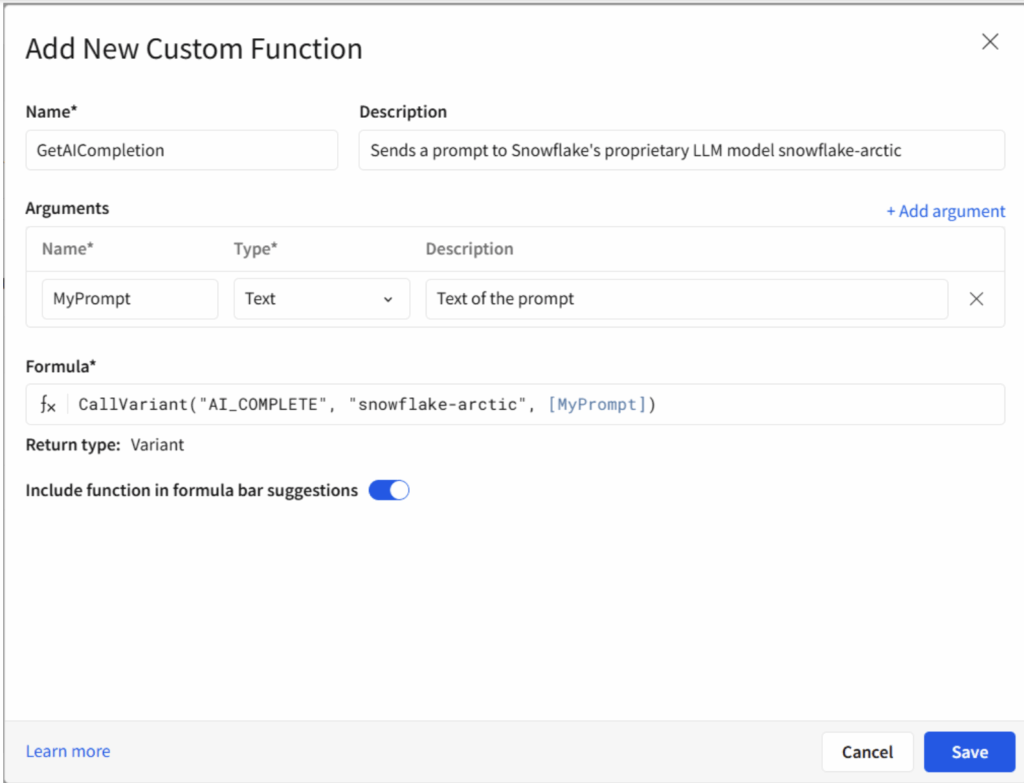
Above: Interface to define custom functions in Sigma. This option is exclusively accessible to Administrators under the section: Administration > Account > Create Custom Function.
Which LLM Models Can I Call?
As you can see from the code above, Sigma is passing over all the task to the CDW provider. Thus, it keeps faithful to its role as a middleman that eases the process of exchanging data between our data app and the CDW your company is utilizing.
Having said that, the answer to the question is simple: You can call any LLM your CDW supports if it is available in your geographical zone. Taking Snowflake as our main reference, the full list of AI functions can be found here. For most of them, you will see that the documentation clearly states which LLMs can be used as inputs and which models are available depending on the region your account is seating. A workaround for this issue is to enable cross-region inference. This parameter enables inference requests to be processed in a different region from the default region.
It is worth mentioning also, that Sigma supports calling AI functions from many other very important cloud-based, data platforms in the market: Databricks, BigQuery and Amazon Redshift.
Keep an eye on the updates your CDW provider periodically releases because the LLMs available may change and hence your Sigma passthrough functions will fail if the LLM becomes obsolete.
How Does It All Come Together?
Example 1: Getting numeric outputs
Say you are using the model mixtral-8x7b to run some prompts, and you want to know how many tokens each call has consumed.
CallNumber("SNOWFLAKE.CORTEX.COUNT_TOKENS", “mixtral-8x7b”, “Summarize the history and relevant facts about Cowper at University, a location in Palo Alto, California.”)
You may call the Snowflake function SNOWFLAKE.CORTEX.COUNT_TOKENS using the same model’s name mixtral-8x7b to calculate how many tokens the prompt attached consumed. Here you can infer that token computation may vary from LLM to LLM.
Example 2: Getting text outputs
CallText("SNOWFLAKE.CORTEX.COMPLETE", "llama2-70b-chat", "Generate a random review about one ice cream flavour of the brand Braums from Oklahoma")
The screenshot below displays the results of calling this function directly from a text field.
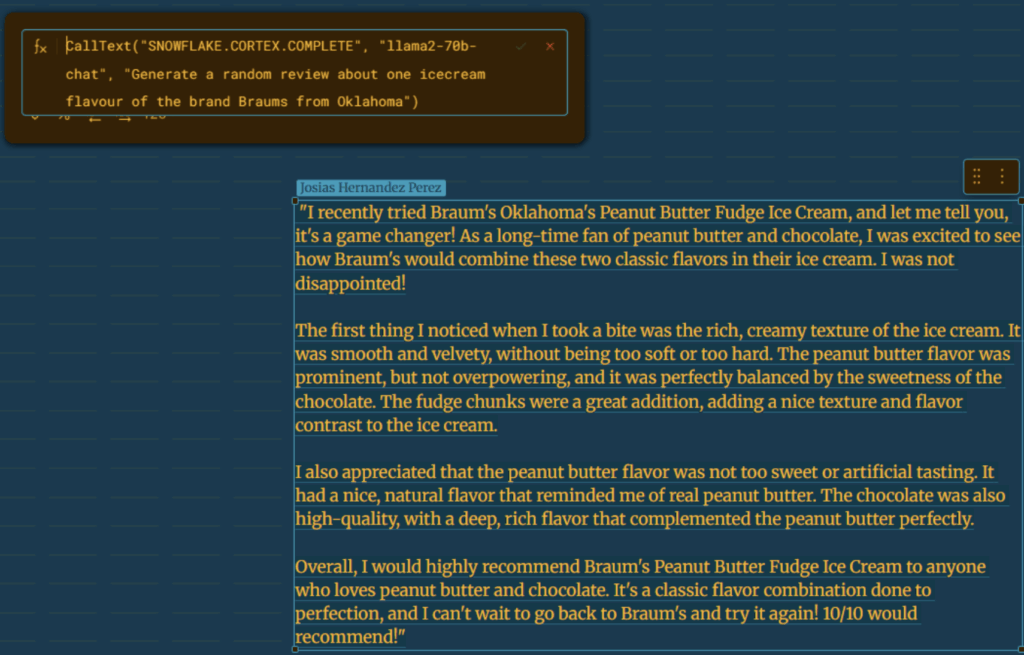
Above: Sample input and output from the passthrough function CallText in a Sigma text object. We can dynamically write in the text objects by entering the call to any function as a formula after typing the equal (=) sign. The value returned from the CallText
The SNOWFLAKE.CORTEX.COMPLETE function used earlier has been updated, and Snowflake now recommends using TRY_COMPLETE instead. The key advantage of TRY_COMPLETE is that, if the selected model is unavailable in your region, the function returns NULL rather than raising an error. This makes it a more resilient option for production workloads.
Example 3: Calling a user-defined function
There is not much to explain here. Just call your function as you would do with any other. It is important here to remember the type of input and output parameters. By the way, if you are testing a newly created function right in your workbook it won’t be available unless you refresh the whole webpage. Yep, that is it. Unless you press F5 and reload your Sigma environment it won’t appear there at all, just one of those odds and ends.
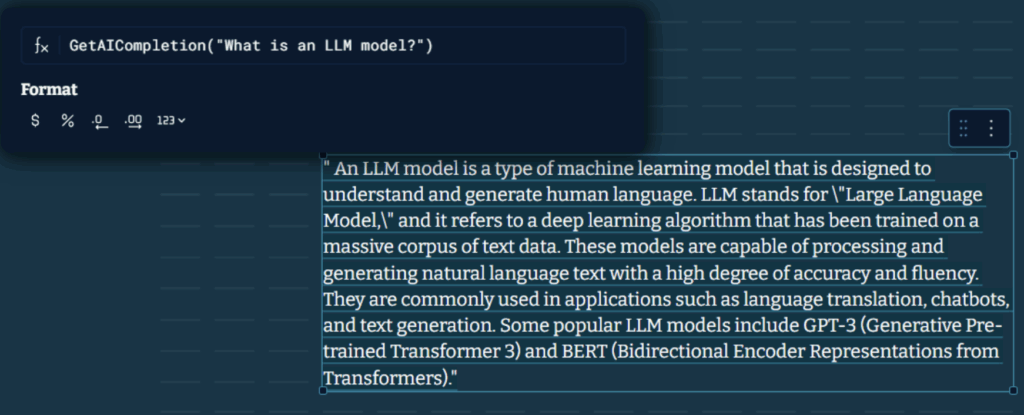
Above: Implementation of a user-defined function as an alternative to access Snowflake’s AI features.
Example 4: Getting variant outputs and passing parameters from my Sigma interface
The function CallVariant is one of my favorites because it is very flexible and it eases the process of cleaning unstructured data i.e. string tokenization. A Variant in this context is a flexible data type that can store different kinds of data (e.g., JSON objects, arrays, numbers, strings) without enforcing a strict schema. On the other hand, string tokenization means breaking a text string into smaller pieces (tokens), like words or phrases, which is common in text processing and data cleaning tasks.
If (IsNotNull([Review-Selected]),Text(CallVariant("AI_SENTIMENT",[Review-Selected],SplitToArray("Charging Speed.Maintenance.Hygiene.Dock Availability.Location.Seating.Support.Quality.Safety", "."))), [Review-Selected])
Take for example the code snipped above let’s see what it does: Here I am performing sentiment analysis over a product review that has been stored in a text field named “Review-Selected”. To achieve that I use a Snowflake function named AI_SENTIMENT. This function is able to evaluate the overall sentiment score in the given input text, however, what is more interesting is that it can even evaluate the sentiment score on any assortment of categories I choose.
If (IsNotNull([Review-Selected]),			# If the review has already been assigned
Text(							# Convert the output to string
    CallVariant(
        "AI_SENTIMENT",			#Parameter 1: AI function name
        [Review-Selected],		#Parameter 2: The review to analyze
        # Parameter 3: An array containing categories extracted from a period-separated # string using Sigma’s SplitToArray function.
        SplitToArray("Charging Speed.Maintenance.Hygiene.Dock Availability.Location.Seating.Support.Quality.Safety", ".")
        )
    ), [Review-Selected])	# If there wasn’t any [Review-Selected] returns “null” either way.
The result in practice is a semi-structured output (JSON) that encapsulates the overall sentiment score along with the value for each category. Note that if the text does not mention anything about a certain category the function returns “unknown.” The implementation of the code displayed above can be seen in here:
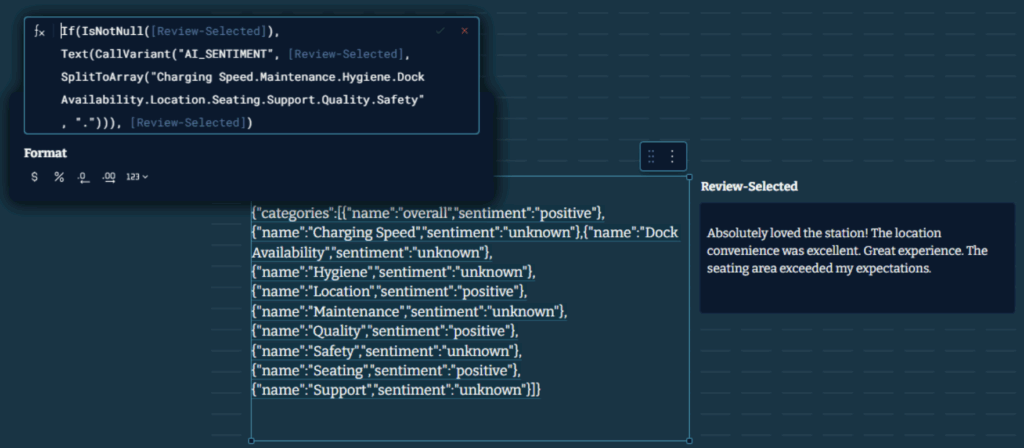
Above: Test of the CallVariant function in a text object using dynamic values. Note the usage of Text() to convert the output to string. The inputs come from the text object Review-Selected.
Well, that is it for today folks. I am sure you will find the post useful. All in all, as you can see passthrough functions in Sigma provide a powerful way to extend your analytics by leveraging the full capabilities of your data warehouse. This approach not only streamlines workflows but also ensures that your analysis remains both flexible and scalable, bridging the gap between intuitive BI tools and the raw power of AI-based functions.
If you want to see all these features in action, I invite you to visit this sample dashboard where I test many of the functions I explained above. In addition, I also showcase how the usage of AI in your dashboard is computed and provide an approximate valuation of its costs associated in real time.
Related
