
Amazon’s Bedrock service has become a popular choice for organizations looking to build AI into their existing cloud infrastructure. It provides fully managed model hosting, native integrations with familiar AWS services and offers ready-made components for agents, retrieval and content filtering. This lets teams extend existing security patterns and governance controls to AI workloads with minimal friction.
Getting a prototype running doesn’t take long, but the harder part is moving from experimentation to something you can actually deploy in an enterprise environment. That means AI systems that integrate cleanly with internal data stores and APIs, operate within controlled network boundaries, enforce access policies consistently and behave predictably under real-world conditions. In addition, LLMs introduce a new set of challenges such as prompt injections, data leakage or hallucination that need to be addressed.
This guide gives an overview of practical architecture patterns and security controls for building AI applications with Amazon Bedrock. Specifically, we’ll explore the following topics:
- Identity & Access Management (IAM) — Least-privilege access control
- Infrastructure Choices — Control traffic flow and network isolation
- Guardrails and Prompts — Content filtering
- Encryption — Using own CMKs where required
- Monitoring & Observability — Logging and alerts
1. Identity & Access Management (IAM)
Like other AWS services, Amazon Bedrock integrates with AWS Identity and Access Management (IAM) to control who can access models and agents, and what they can access. IAM can be applied at multiple layers of a Bedrock architecture — this enables fine-grained, least-privilege access, but also carries a risk for misconfiguration. Therefore, It’s important to maintain a clear picture of what permissions are applied to each component.
For example, an application might be allowed to invoke only a specific Bedrock agent, which then assumes a service role with restrictive agent permissions, including what models it can invoke, Knowledge Bases it can access and other agents it can call upon (in a multi-agent scenario). The layered IAM approach helps limit blast radius and align Bedrock deployments with existing AWS security best practices.
The following is not a comprehensive list, since the IAM setup depends on the specific architecture, but provides an overview of what is typically required:
- Application or user invoking the agent:
- This could be a user or an application that needs to invoke the agent via “bedrock:InvokeAgent.” In the case of an application running in ECS, for example, the ECS task role’s permissions policy would need to allow the agent invocation (same for instance roles in the EC2 scenario). Note that
bedrock:InvokeAgentmust be scoped to the agent-alias ARN or invocations will be denied.
- This could be a user or an application that needs to invoke the agent via “bedrock:InvokeAgent.” In the case of an application running in ECS, for example, the ECS task role’s permissions policy would need to allow the agent invocation (same for instance roles in the EC2 scenario). Note that
- Bedrock agent service role:
- This is the role utilized by the Bedrock agent to invoke models and perform actions. Within this role’s permission policy, you can define which models can be used, along with Guardrails to apply, Knowledge Bases to access, and more.
- Knowledge Base service role (if using a Knowledge Base):
- This role defines what data sources the Knowledge Base can access, such as S3, but also what embedding models it can access to create vector representations of the data.
- Lambda execution role and Lambda resource-based policy (if using action groups):
- These are critical when using action groups for agents: The Lambda resource policy defines who can invoke the Lambda function (in this case the agent), while the execution role sets the permissions for what the Lambda function may need access to.
Appropriate trust policies also need to be set for all roles to restrict which principals can assume them. Note that there are separate permissions for administering the different components, such as creating Guardrails. Related to administration, one other permission worth calling out is iam:PassRole — this is used when administering agents and can introduce a privilege escalation risk if scoped too broadly. There are preset managed policies that can be used for the IAM configuration which simplify the above, though these may not always meet your requirements. For AWS teams, the ability to manage AI workload access through IAM is a genuine advantage — same tools, same patterns and same auditability as with other AWS services. Getting it right, though, requires careful attention to how roles and policies interact across components.
Why this matters: Overly permissive roles are one of the most common misconfigurations in AWS deployments. Permissions that are scoped too broadly allow unauthorized access to your agents, models, and Knowledge Bases, putting your data and users at risk. In a Bedrock architecture with multiple interacting components, the blast radius of a misconfigured role can be significant.
2. Infrastructure/Network Choices
The same networking and edge services available across AWS can be applied to ensure your Bedrock-based applications are secured at the network level. Amazon Bedrock integrates with other AWS networking services, enabling architectures that align with your security and network requirements. For example, this might mean keeping traffic on private AWS infrastructure or deciding on how the agent is exposed to users.
PrivateLink can be used if traffic between one’s application and Bedrock needs to remain private and within the AWS backbone. One example is included below, showing a Bedrock agent that is accessed from within the AWS network by an application running on ECS. Here, AWS PrivateLink keeps traffic to the Bedrock service within the AWS private network, never exposing the requests or responses to the public internet. The application would leverage interface VPC Endpoints to reach Bedrock in this scenario. Note: A similar VPC endpoint setup can be utilized if Bedrock needs to privately access Knowledge Bases like OpenSearch Serverless. (Note that the default policy on a newly created endpoint is open, so a restrictive endpoint policy must be attached manually.)
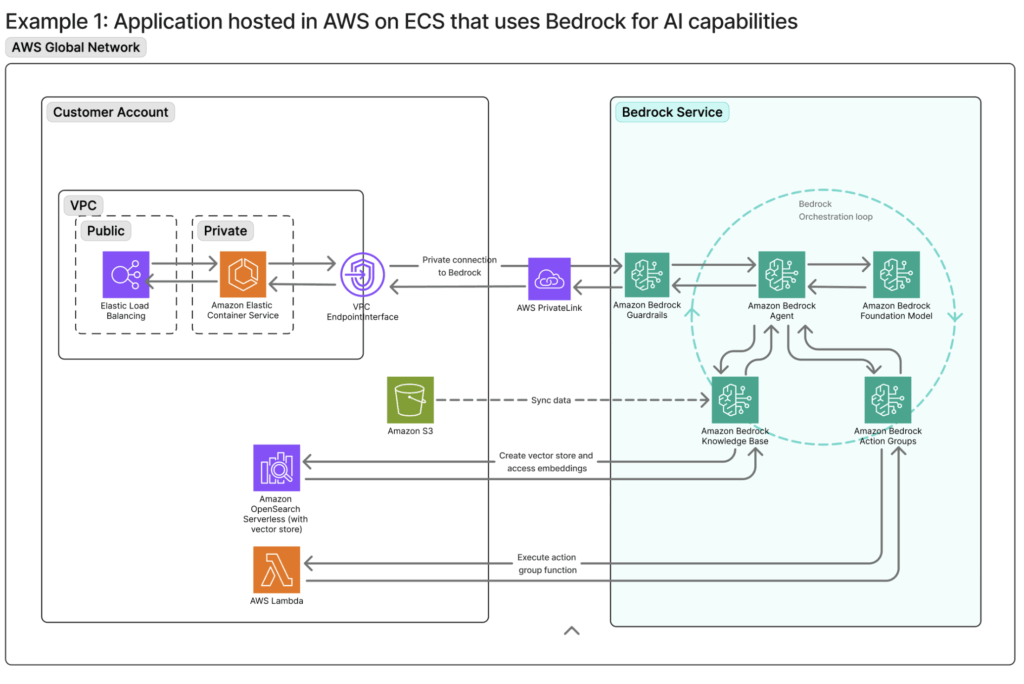
As with other AWS workloads, the application can be fronted by a load balancer, WAF, or CloudFront to manage traffic and security. For access from a corporate network, additional privacy measures such as a Site-to-Site VPN or Direct Connect connection could also be implemented.
A slightly different use case: Exposing AI-powered APIs to users on AWS. This is typically implemented using a serverless architecture built on Amazon API Gateway and AWS Lambda. To enhance security, an AWS WAF can be placed in front of the API Gateway to enforce rate limiting, geographic restrictions and other protection mechanisms.
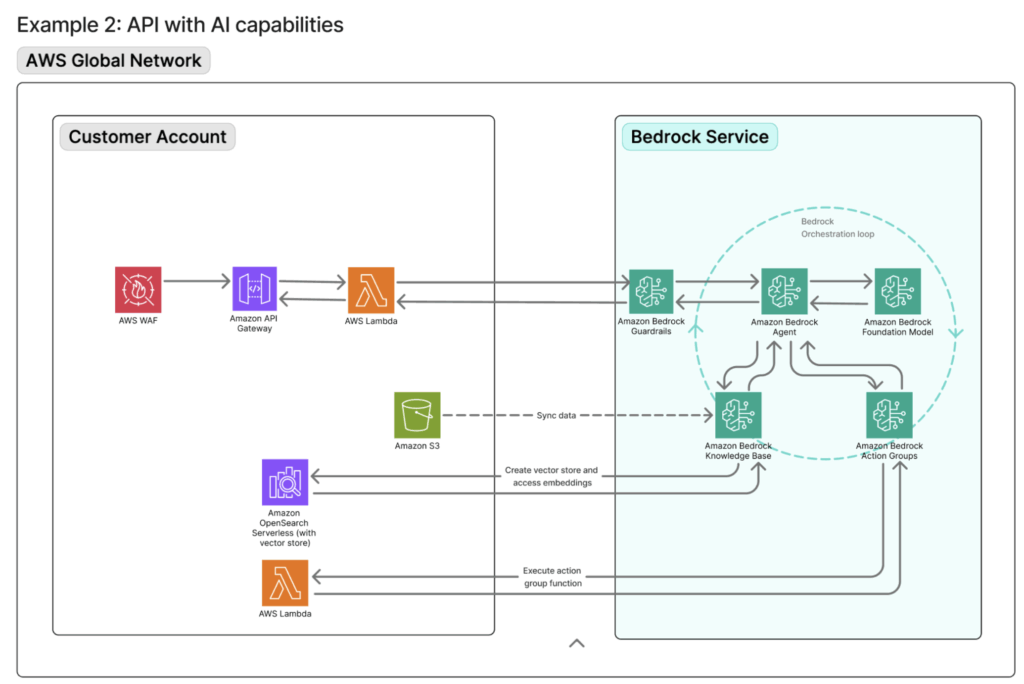
A typical request flow would look like this: The client requests reach the WAF which applies edge-level security controls. The traffic is then forwarded to the API Gateway, where throttling, quotas and authentication are enforced. Lastly, Lambda functions behind the API Gateway invoke Amazon Bedrock using IAM-based authentication.
Why this matters: Inference requests often contain sensitive data — user queries, internal documents, retrieved context. Without proper network controls, that traffic can be exposed in ways that violate compliance requirements or create unacceptable risk. Using some of the standard edge and endpoint services in AWS, you can ensure that your applications are built with network security in mind.
3. Guardrails & Prompts
Unlike traditional security controls, Bedrock Guardrails operate at the semantic layer. This is critical for AI systems, where the threat surface includes conversational manipulation, data leakage and model behavior that drifts from its intended scope. Traditional security controls like network firewalls and WAFs are effective at blocking certain traffic patterns, but they lack semantic understanding of user intent. While a WAF can inspect request payloads, it can’t reason about conversational context or detect prompt-based manipulation. This is where guardrails and prompt engineering become essential.
Bedrock offers six categories of enforcement to facilitate this kind of content detection:
- Blocking harmful or offensive content
- Restricting specific topics via natural language policy definitions
- Filtering on exact words or patterns
- Detecting and redacting personally identifiable information
- Verifying that responses stay grounded in source documents
- Custom logical policies through automated reasoning checks.
Guardrails serve as the external safety net, catching violations even if instructions are ignored, misunderstood or deliberately bypassed, serving as one of the main safeguards against prompt injections. These can be evaluated for inputs, before a request reaches an agent, or for outputs when the response is passed back to the user. One thing to note when selecting models: Some of the latest available models require a cross-region inference profile when setting up Guardrails.
Bedrock agent instructions make up the system prompt and play a complementary role to the guardrails by shaping the agent’s behavior from the outset. Ideally, instructions and guardrails should be used in tandem to form a layered safety model. While these controls significantly reduce the attack surface, prompt injection is a challenge that extends well beyond Bedrock to LLMs as a whole — no combination of guardrails or architectural controls currently provides a guarantee, and organizations should design their systems accordingly.
Why this matters: Without semantic controls, an AI system can be manipulated into leaking data, violating policy or behaving in ways that create reputational risk. Therefore, it is imperative to tailor guardrails and system prompts to your specific agents. However, guardrails are non-deterministic and context-dependent, which means they should be seen as a critical piece of the puzzle, not as the sole protection mechanism.
4. Data Protection (Encryption & Redaction)
By default, Amazon Bedrock does not persist prompts or model responses. Unless model invocation logging is explicitly enabled, inference data is processed transiently and not stored by the service, thereby reducing data exposure.
Encryption at rest is handled using AWS Key Management Service (KMS). Bedrock-managed data is encrypted automatically using AWS-managed keys, with support for customer-managed keys (CMKs) where additional control over key policies, rotation and auditing is required. One example here is using one’s own CMK to encrypt an imported custom model. In addition, if model invocation logging is enabled, one can encrypt these logs with a customer-managed key.
Knowledge Base data sources have their own encryption settings, so one needs to ensure these are set accordingly. For example, documents stored in Amazon S3 use standard S3 encryption mechanisms such as SSE-S3 or SSE-KMS, allowing organizations to align data protection with existing security and compliance requirements. Finally, encryption in transit is enabled by default and Bedrock API calls use TLS 1.2 or higher, ensuring prompts and responses are encrypted while in motion.
CMK encryption is not enforced at the account level, but rather must be explicitly opted into at resource creation time, per resource. For example, achieving full CMK encryption across a Knowledge Base means configuring it at each stage, including the S3 data source, the vector store, transient ingestion storage, and the RetrieveAndGenerate API.
Why this matters: The default encryption covers many scenarios, but regulated industries often require key ownership and increased auditability. Assuming defaults are sufficient without verifying them is a common gap.
5. Monitoring & Observability
Comprehensive logging and alerting are essential for these types of AI systems. With the high volume of model and agent requests and responses, it is all the more important to maintain high visibility.
Like other AWS services, Amazon Bedrock relies on CloudWatch and CloudTrail for monitoring, providing visibility across operational and compliance dimensions. These logging and notifications workflows will be familiar to you if you’ve worked with AWS. For Bedrock, CloudWatch metrics track performance signals (invocation latency, token usage) or guardrail enforcement, while CloudTrail shows what Bedrock API calls were made. As alluded to in the previous section, model invocation logging is disabled by default and must be explicitly enabled. For deeper analysis, one can enable logging of the full request and response payloads.
It is also easy to set up automated notifications when there are anomalies via CloudWatch Alarms, like real-time alerts for spikes in guardrail interventions (this is the “InvocationsIntervened” metric), or perform analytics on the CloudWatch Logs. This is quick to configure, especially if one uses these types of alerts for other non-AI AWS services.
On the metrics side, throttled requests are excluded from both invocation counts and error counts, so alerting solely on error rates will miss throttling events. The agent service role also requires cloudwatch:PutMetricData scoped to the AWS/Bedrock/Agents namespace. Otherwise, agent metrics will not appear in CloudWatch.
Why this matters: Without visibility into how your AI system is behaving, misconfigurations and misuse can go undetected. Unlike traditional applications, the failures are less predictable, making logging and alerting all the more important.
Final Thoughts
Building on AWS means the controls you need — network isolation, IAM, encryption, observability — are already in the same environment as the rest of your infrastructure. That’s a real advantage. However, “available” and “well-configured” are two different things. Scoping IAM correctly, defining network boundaries or setting logging configurations all require care. Guardrails need to be calibrated to your specific use case, with out-of-the-box settings serving only as a starting point — and as deployments grow in complexity, these architectural decisions compound quickly.
This is where we spend a lot of our time — helping teams think through the design and implementation before it becomes a problem to untangle. If you’re working through a cloud deployment and want to talk through the architecture, reach out. We’d be glad to help.
