
This blog post is Human-Centered Content: Written by humans for humans.
Deploying AI systems into an enterprise environment means navigating a wide range of decisions that can compound very quickly. What data is being processed, and can it leave your environment? Where does your data currently live, and what platforms is your team operating today? And what is the use case for the AI system — is it customer-facing, an internal productivity tool or an automated workflow connecting to backend systems?
When evaluating options for AI systems, three main paths tend to come up, each with its own tradeoffs: First, going directly through a model provider like Anthropic or OpenAI. This is a natural choice in many scenarios — direct access to the latest models and features with minimal overhead. The main considerations here are understanding the provider’s data handling policies and how much custom work connecting the model to internal systems will require.
Second, running local models on your own infrastructure, giving you the most control — your hardware, your models, your network. This makes sense when data residency requirements are strict. Regulatory requirements or contractual obligations may even rule out external API calls entirely in which case a cloud model cannot be utilized. On-premises deployments can also be preferred when the use case does not demand the latest and most performant models. The trade-off is that you’ll need to manage and maintain everything, including servers, models, and security controls, which can be cumbersome.
Finally, one can use managed AI services from cloud providers including Amazon Bedrock, Azure AI Foundry and Google Vertex AI which sit somewhere in the middle between the two paths outlined above. Amazon Bedrock, for instance, offers managed infrastructure with native integrations into the identity, networking and security controls most enterprises already rely on in AWS such as IAM, KMS, VPC and CloudWatch, alongside access to leading foundation models and the surrounding services needed to build production AI systems like gateways and vector databases.
This post focuses on that third path, using Amazon Bedrock as a specific example of how managed cloud services can be used to build AI systems. To make this approach more concrete, we’ll introduce the different Amazon Bedrock components by building a simple AI agent.
Amazon Bedrock Setup and Components
Before diving into specific configurations, it’s helpful to understand the building blocks of Amazon Bedrock. Bedrock provides a set of components that work together to create intelligent agents. To illustrate, we create a simple Bedrock-based customer service agent for a coffee shop which will allow the agent to answer customer questions about the menu, suggest drinks and place orders.
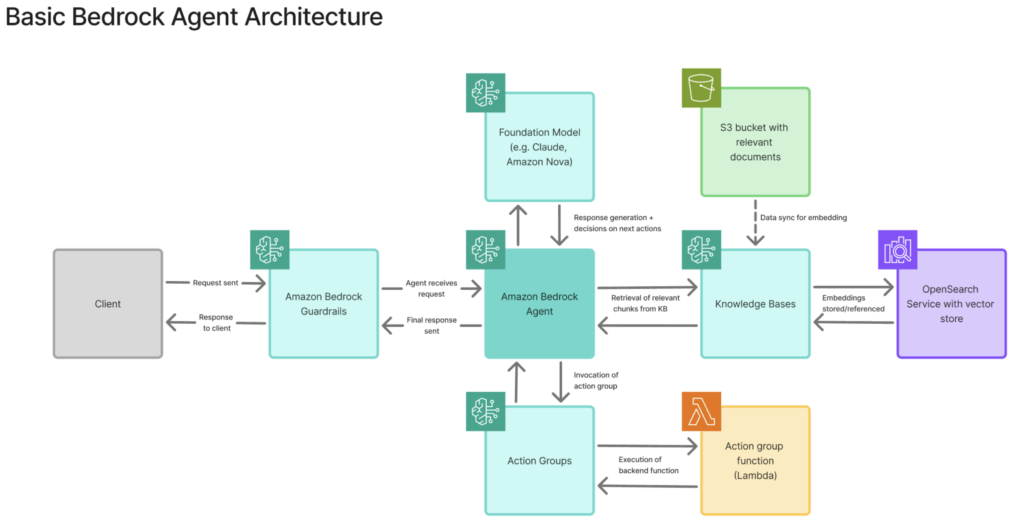
The agent includes the following components which we’ll elaborate on as the the agent is built out (basic architecture shown below):
- Foundation Model, the LLM serving as the “brain” for the agent
- Guardrails which filter inputs and outputs
- Knowledge Base containing the coffee shop’s menu and other relevant information stored in S3
- Action Group, a set of functions, including a Lambda function to process coffee orders
Foundation Models
Foundation models are the pre-trained large language models (LLMs) that power Amazon Bedrock agents. To interact with a foundation model, you send a prompt through the Amazon Bedrock API — in the AWS Management Console, an application via the AWS SDK, or a local development environment. The request gets processed within AWS-managed infrastructure, and the model’s response is returned to your application.
A few key points about Foundation models:
- Model selection: Bedrock offers models from different providers, including Anthropic’s Claude, OpenAI’s OSS GPT models, Meta’s Llama, and Amazon’s own Nova models. Different models balance speed, cost and capability.
- Access control: IAM policies control which principals can invoke which models.
- AWS data retention: Prompts and responses aren’t used for training or stored by AWS (unless CloudWatch inference logging is enabled).
Beyond the out of the box Foundation Models, one can also customize and fine-tune one’s own models.
Bedrock Agents
Bedrock Agents are autonomous orchestrators that can coordinate between Foundation Models, your data and backend systems. Think of an agent as as a coordinator that interprets user intent and decides which tools to use and when. Bedrock agents operate via an orchestration loop, a process that allows the agent to incorporate information from previous steps, reason about intermediate results, and repeat the loop until it determines that the user’s request has been fully satisfied.
This blog focuses specifically on Amazon Bedrock Agents, the fully managed service for building AI agents. Amazon Bedrock also offers AgentCore, which provides more granular control for developers who want to implement custom orchestration logic, but that is outside the scope of this walkthrough.
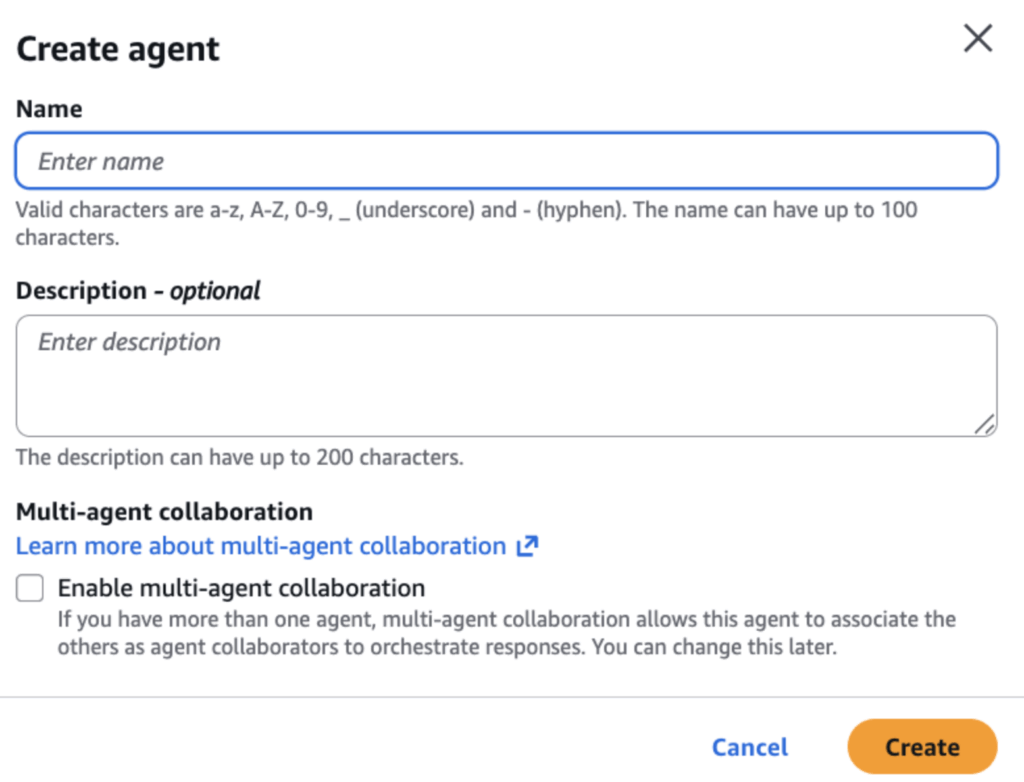
To begin building our coffee shop agent, navigate to the Amazon Bedrock service and select “Agents” from the navigation and then “Create new agent” which will prompt for a name and description for the agent. Selecting “Create” will open the Agent Builder where one can continue configuring the agent’s behavior, tools and data sources:
1. Model Selection and Agent Instructions
In the Agent Builder, we select the Foundation Model that the agent will rely on as its “brain,” responsible for reasoning, decision-making and response generation. In our case, we’ll stick to Amazon’s own Nova Micro for testing, a smaller model that is well-suited for testing and cost-conscious experimentation.
We also define Agent Instructions which serve as the Bedrock agent’s system prompt. These instructions are provided to the foundation model before every interaction and establish the agent’s role, personality and operational boundaries. Well-written instructions help the agent stay on task, set appropriate expectations and are a first line of defense for controlling agent behavior. (There is also a service in Bedrock called Prompt Management which can assist with crafting effective prompts.)
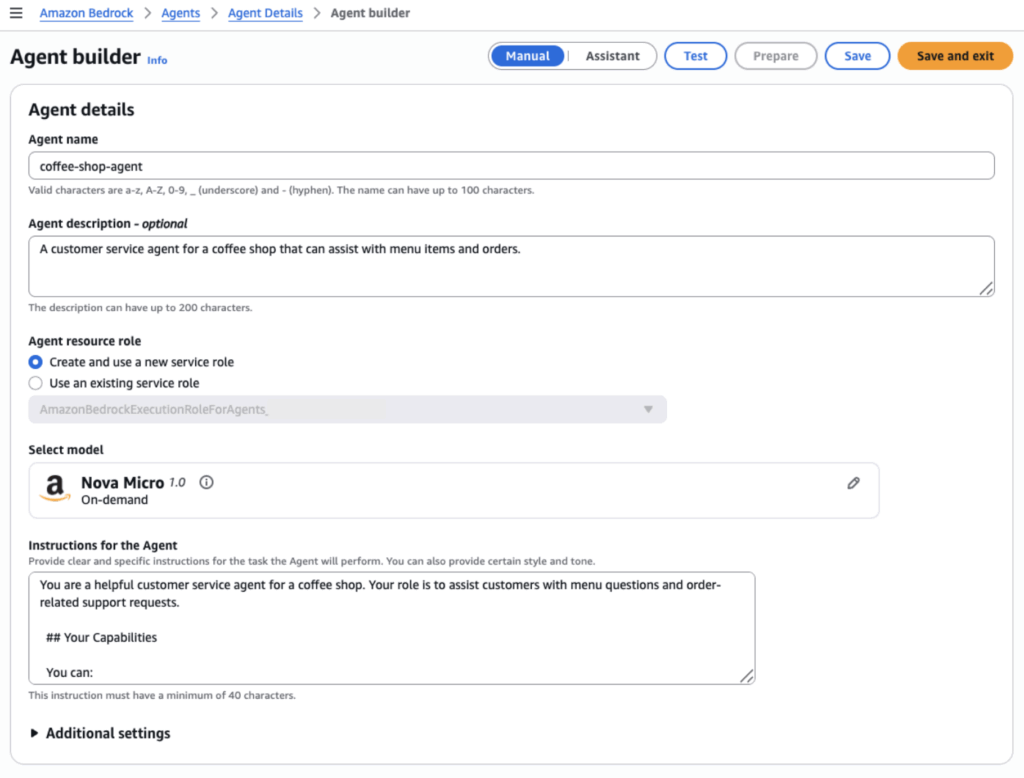
From a permissions standpoint, Bedrock creates a default IAM service role for the agent’s execution, which includes the permissions required for the agent to invoke the underlying Bedrock model. This can be replaced with a more tightly scoped custom role as needed.
We save and exit the Agent Builder for now. At this point, one can technically prompt the agent already, but it does not have any guardrails, access to additional context, or ability to perform actions yet. The following sections go over how to configure these capabilities.
2. Guardrails for Amazon Bedrock
Guardrails act as content filters and policy enforcer between users and models. They evaluate inputs and outputs against rules you define, and blocking or modifying content that violates policies. Input guardrails are evaluated before a request reaches the agent, while output guardrails are enforced before the agent’s response is returned to the user.
Amazon Bedrock Guardrails provide an extensive safety layer to prevent harmful, offensive, or biased responses, block irrelevant content, protect sensitive data, and defend against prompt-based attacks. They also ensure responses remain grounded in source documents. Bedrock supports six main enforcement mechanisms:
- Content filters that block harmful content across pre-defined categories and detect prompt-based attacks attacks such as prompt injection.
- Denied topics that use natural language definitions to semantically block specific subjects.
- Word filters with exact matching or regex patterns for granular control
- Sensitive information filters that identifies personally identifiable information and can either block requests or redact sensitive data.
- Contextual grounding checks which validate that the model’s responses are grounded in the source documents and are relevant to the users’ query.
- Automated Reasoning checks for creating custom policies that requests and/or responses must comply with.
It is important to note that well-crafted guardrails can significantly improve the security posture of your AI applications, but do not guarantee complete protection — prompt injection remains an active and evolving challenge, meaning malicious inputs may still bypass safeguards in certain scenarios. Therefore, in a production environment, Guardrails should always be combined with appropriate network and access controls as part of a broader, layered security strategy.
Before assigning guardrails to our coffee shop agent, we need to create them via the “Guardrails” section in the Bedrock navigation first. The “Create guardrail” steps walk through each of the protective mechanisms outlined above. For example, we can add entries to the denied topics as follows:
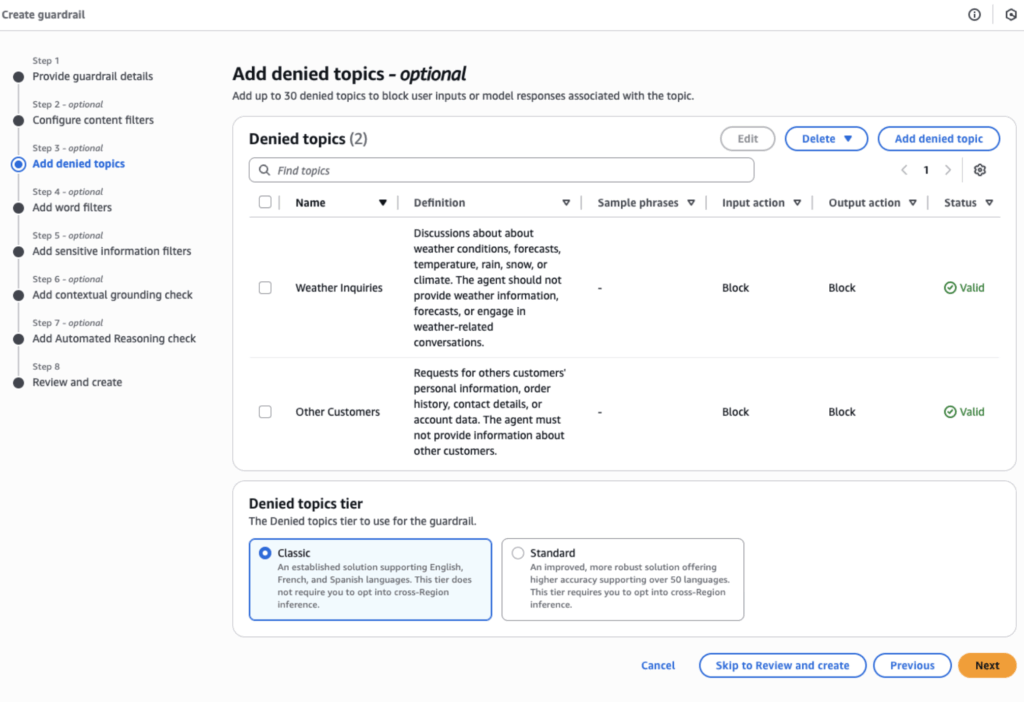
In this case, we’ve denied discussion of other customers’ information and — just for fun — weather-related topics. Once the guardrail is created, we return to the coffee shop Agent Builder, scroll to the guardrail section and attach our newly created guardrail.
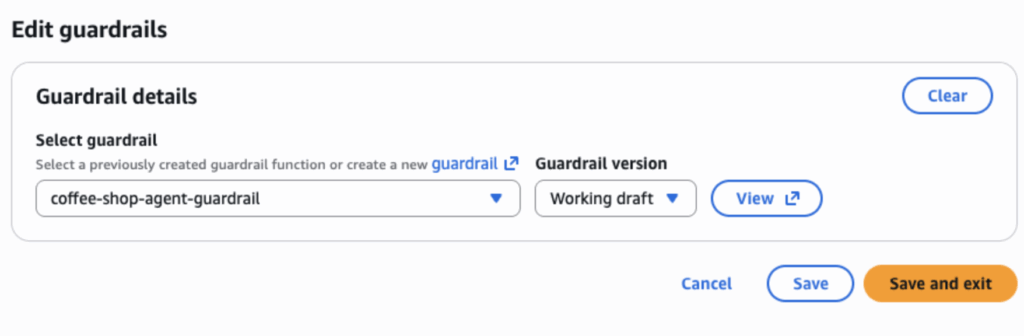
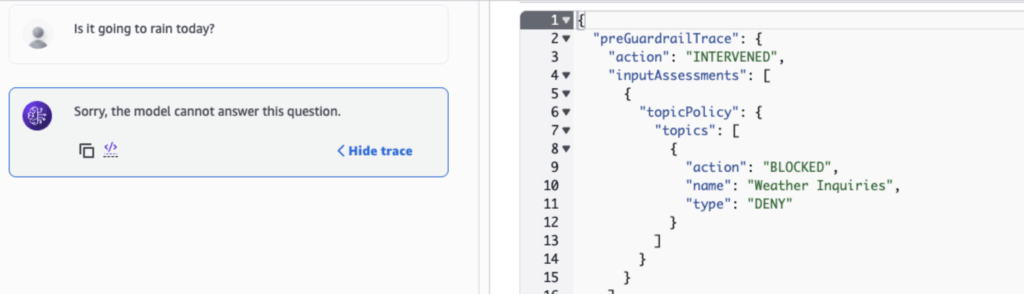
After saving agent’s updated configuration, we try asking the agent about the weather. The agent replies that it cannot provide an answer; meanwhile, the request trace (right image) reveals that our guardrail blocked the question based on the denied topics:
3. Knowledge Bases (RAG – Retrieval Augmented Generation)
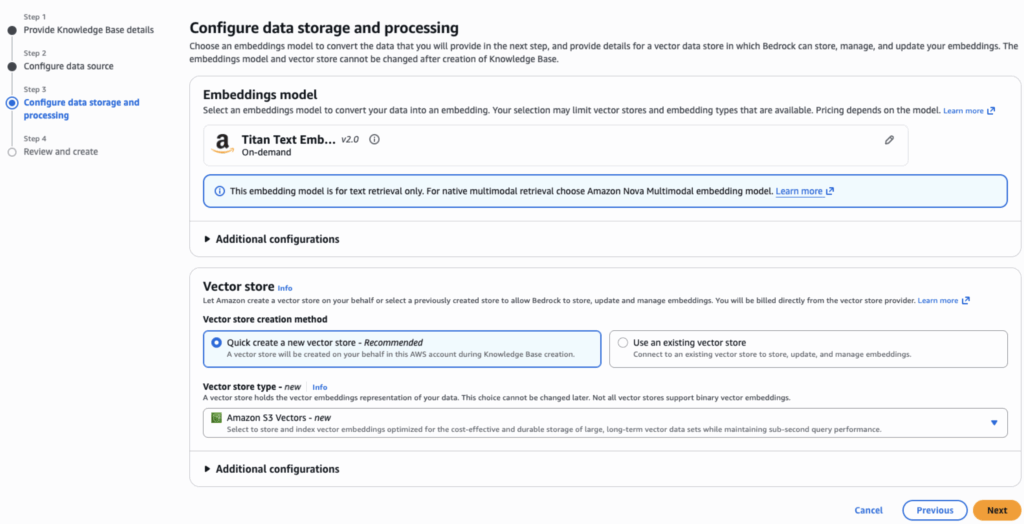
Knowledge Bases allow Bedrock agents to access your documents via Retrieval Augmented Generation (RAG). Creating a Knowledge Base involves selecting a data source (S3 in this case), configuring how the data is chunked and choosing an embeddings model to generate vector representations of each chunk.
Documents from the data source are automatically chunked, converted to embeddings and stored in a vector database. When the agent determines that additional information is required for a given topic, it searches the Knowledge Base and retrieves the most relevant document passages to ground its response.
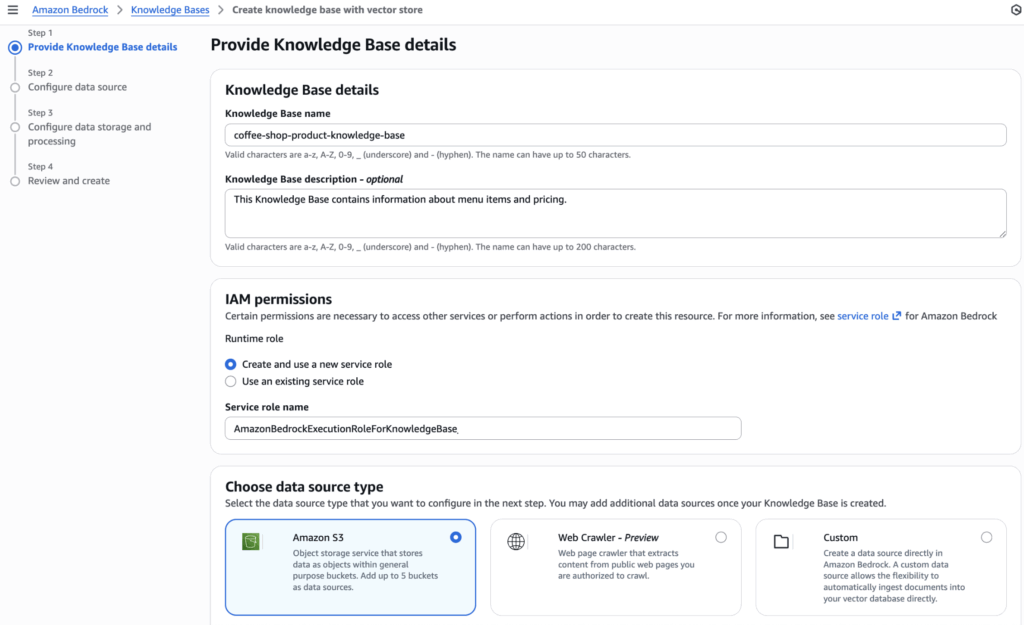
For the coffee shop example, we uploaded a PDF with menu details and item descriptions to an S3 bucket. We select that bucket as the data source when setting up the Knowledge Base. As with the agent itself, Bedrock creates a default IAM role for the Knowledge Base, granting it permission to access the S3 bucket.
Next, we specify an embeddings model (Titan Text Embedding V2) that will convert the S3 data chunks into vector representations and a vector store to hold the embeddings. There are a few options for the vector store such as Amazon OpenSearch Service or Amazon Aurora, but we’ll choose Amazon S3 Vectors for this example. S3 Vectors is a newer option that stores the vectors in a dedicated S3 vector bucket.
After the Knowledge Base has been created, we head back to the Agent Builder for the coffee-shop agent and scroll to the Knowledge Bases section. Here, we add the Knowledge Base that was just created to the agent’s configuration and add instructions on when/how it should be used:

Afterwards, select save and exit the Agent Builder, prepare the agent, and test whether it can access and use the coffee shop menu:
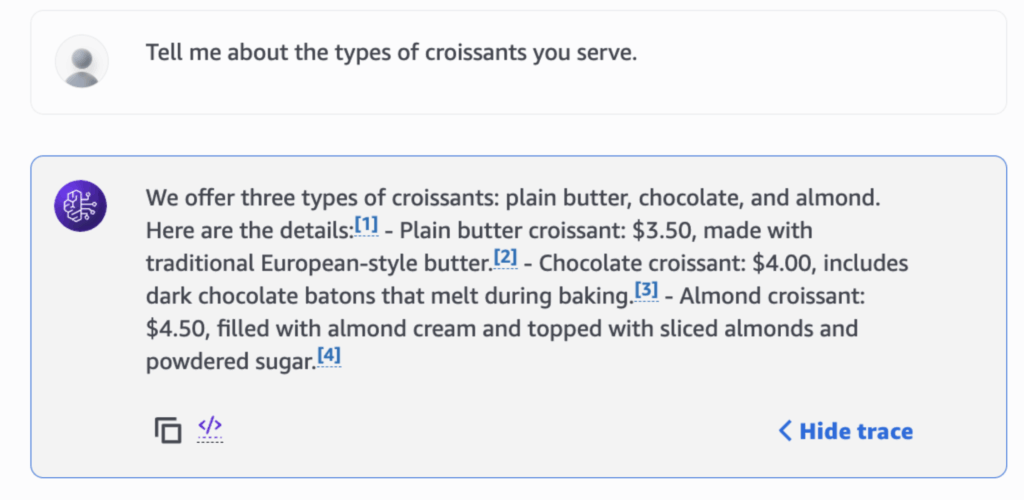
When asked about menu details from our original menu document, the agent correctly references relevant chunks in the Knowledge Base and incorporates that information into its output.
4. Action Groups (Lambda Functions)
Lastly, Action Groups connect agents to backend systems and let them execute business logic using Lambda functions when invoked. Each action group includes an API schema that defines function purpose and input parameters, used by the agent to understand available capabilities. When the agent determines an action is needed, it calls the Lambda function with the structured parameters.
For the coffee shop agent, we want to add the ability to order items from the menu. To accomplish this, we’ll add an action group to the agent. In the Agent Builder for the coffee shop agent, we navigate to the Action Groups section. Selecting “Add” creates a new action group and associates it with the agent. Then we name the action group and provide a description:
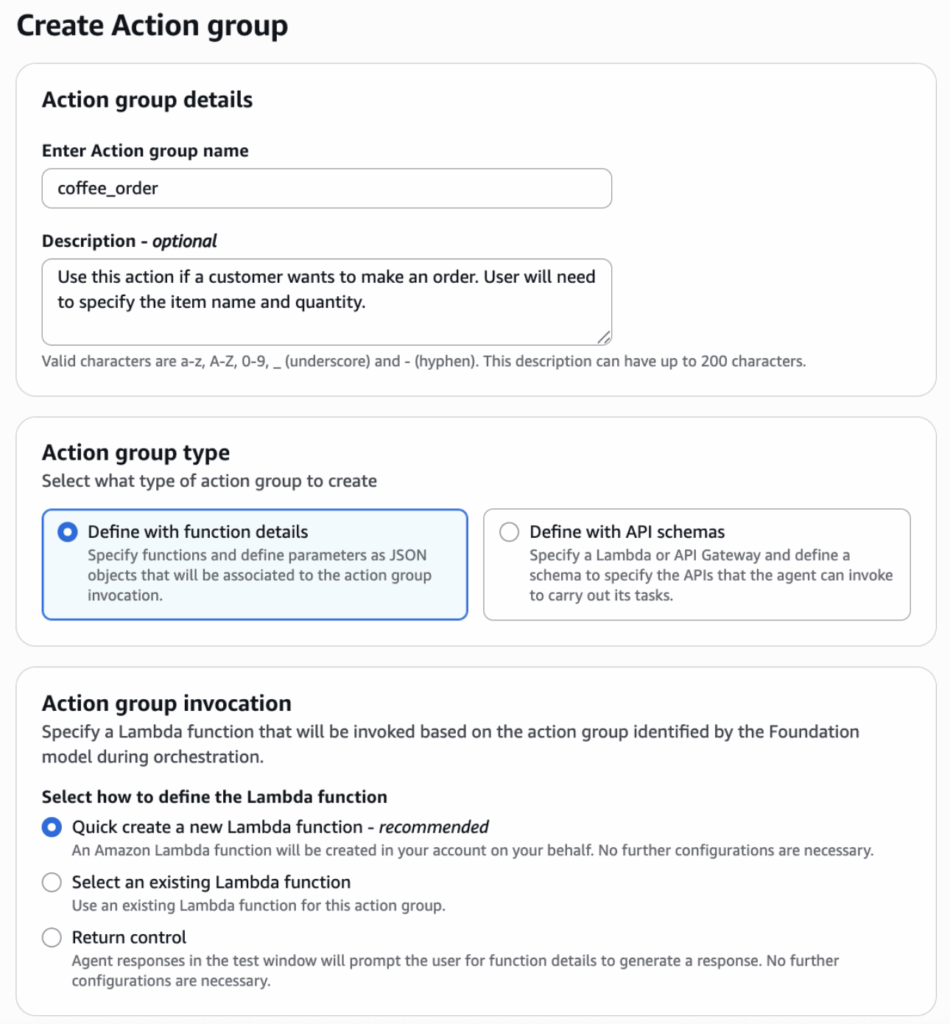
There is an option to use an existing Lambda function, but we’ll have AWS create a new function for this action group. We define the following schema for the ordering function:
{
  "name": "coffee_order_placement",
  "description": "Use this action if a customer wants to make an order. User will need to specify the item name and quantity. Always confirm the price with the customer before placing the order.",
  "parameters": {
    "item name": {
      "description": "name of the item to order",
      "required": "False",
      "type": "String"
    },
    "quantity": {
      "description": "quantity of the item to order",
      "required": "False",
      "type": "String"
    }
  },
  "requireConfirmation": "ENABLED"
}
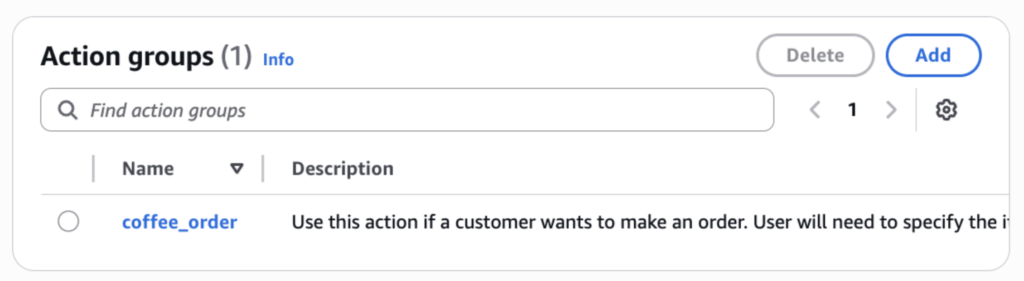
After the action group is created, the underlying Lambda function can be accessed in the Lambda console. There we can update the code to include our business logic and call on any others services or applications needed to process the coffee shop order. Once the Lambda function is fully set up, we return to the Agent Builder again to ensure the action group is properly attached to the agent configuration
Now to test the action group; let’s try placing an order with our agent, first inquiring about the price of one of our menu items (leverages the Knowledge Base again).
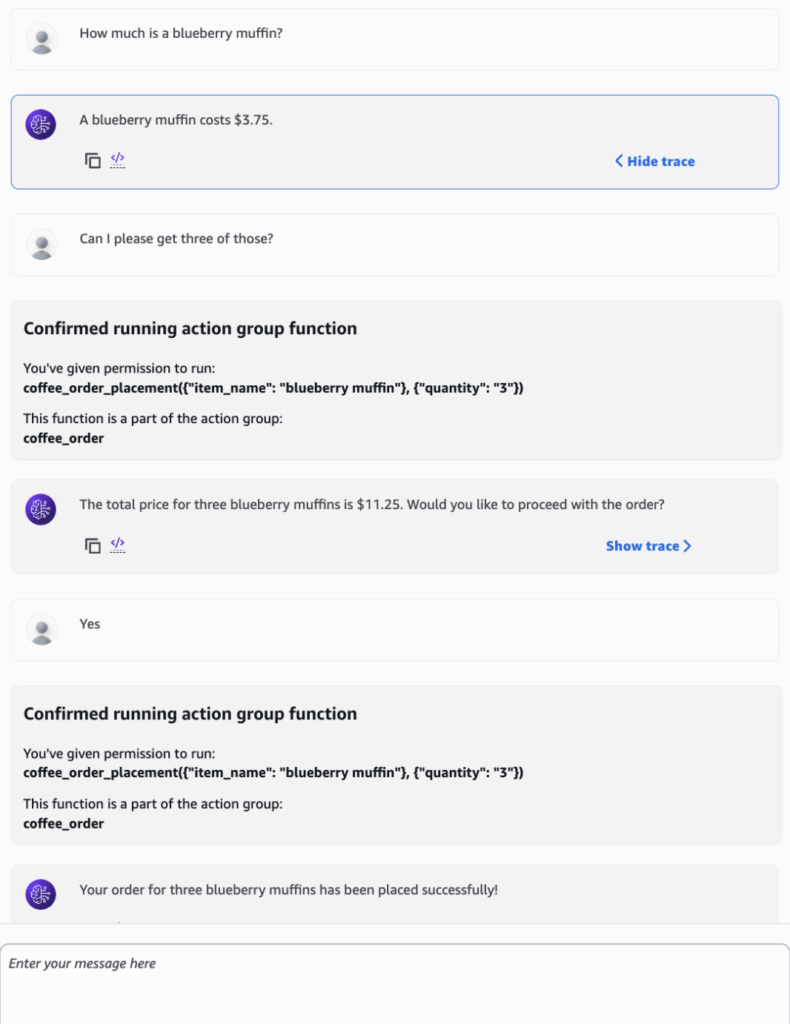
In the chat above, we see that that the agent successfully invoked the action group, correctly parsing the item name and quantity parameters. It then confirmed the order with the user before proceeding. On the backend, this triggered the Lambda function to actually process the order. Although the coffee shop agent is a simple example, it shows how quickly agents can be set up in AWS and how they interact with other AWS services to support custom use cases.
Putting It All Together — Tracing a Prompt Through Bedrock
Now that we’ve built an agent in Bedrock, it is worth examining how a user’s request flows through the Bedrock architecture via the orchestration loop. When a user submits a request, the application calls the “InvokeAgent” API. Bedrock’s runtime evaluates IAM permissions, identifies the appropriate model and routes the request to the compute layer, which uses either on-demand or provisioned capacity.
Before the request reaches the agent, any attached guardrails evaluate the input. If violations are detected, the request is blocked and the user receives a guardrail intervention message instead of a response.
If the input passes the guardrails, the agent enters its orchestration loop. This is where the agent reasons about what actions to take and continues iterating until it determines the user’s request has been fulfilled. Each iteration follows a consistent pattern: The agent creates an augmented prompt combining the agent instructions, conversation history, available tools (Knowledge Bases and Action Groups) and any observations from previous iterations. This augmented prompt is sent to the Foundation Model, which analyzes the request, decides what needs to be done, and generates a structured response with its reasoning and suggested next steps.
The agent parses this response to extract the rationale and determine which tools to use. It might query the Knowledge Base for document chunks via vector search, invoke an Action Group, or do both in the same iteration. After executing these actions, the agent checks whether the request is fulfilled. If not, it loops again with updated observations from the Knowledge Base results or Action Group responses. If it is, a final response is generated. The final response goes through guardrails one more time and is returned to the user if no violations are detected.
Where to Go From Here
The agent we built is a simple example, but it illustrates how quickly the pieces come together on AWS including a foundation model, a knowledge base, guardrails and an action group, all connected within a single managed platform.
If you’re already using AWS or another cloud provider, much of the governance and access model translates directly to their AI services which makes getting to production faster and simplifies the ongoing maintenance. That said, ensuring the system is hardened, reliable, and performant requires the same careful architecture and proper configuration as any other AWS service — and arguably demands even greater care given the unique and evolving challenges that AI systems introduce. Building and operating these systems can get complex regardless of the platform, but managed cloud services like Bedrock can absorb much of that burden — especially on the infrastructure side.
For enterprises already invested in on-premises infrastructure or with strict data sovereignty requirements, the local deployment path may still be the right one. Similarly, teams that just need quick access to the latest models without broader infrastructure concerns may find a direct model provider API suitable. But for enterprises looking for a balance of control, compliance and flexibility — particularly those already in the cloud — a managed cloud platform like Amazon Bedrock occupies a useful middle ground between the two.
Ultimately, the right deployment approach depends on your data, your existing platforms and what you’re trying to build. When properly architected, these systems can be incredibly powerful, transforming what teams and organizations are able to achieve. If you’re working through these decisions, reach out — we’d be glad to help.
