
Earlier this week, Sigma moved Workbooks as Code from beta to general availability. Users can now create and edit Sigma workbooks without ever touching the Sigma UI. They now have the option to use the Sigma API to retrieve, update and create workbooks with JSON or YAML. Here at InterWorks, we’ve been beta testing Workbooks as Code and Sigma agent skills for a while now. Even as we’ve developed our own tools, skills and workflows, we’ve watched Workbooks as Code mature quickly and we’re genuinely excited about what this means for BI development going forward.
With Workbooks as Code, migrations to Sigma can happen faster than ever. Developers can now move the structure of workbooks fully into Sigma quickly. At InterWorks, we’ve been hearing a frequent question: Will this speed migrations up?
The answer, of course, is not a simple yes or no. Instead, we see it as a “yes, and …”
Yes, Workbooks as Code and Sigma agent skills will make the technical pieces of migration move quickly. And: There are many parts of a migration that will still require human thoughtfulness, human decision-making and time.
We’ve seen that it’s not the technical pieces of a migration that take time – it’s everything else. Yes, the technical pieces go faster than ever. But the other stuff, the human stuff that takes time, is what leads to a successful migration and employees who are enthusiastic about their new tools, capabilities and BI environment. Approaching migrations with thoughtfulness, and a full picture of the resources and time required, sets everyone up for success.
Let’s start with the basics. What is a migration? We’ve discovered everyone has a slightly different definition of where a “migration” starts and ends and what a successful migration looks like when it’s done. At InterWorks, we look at migrations as opportunities to rethink and rebuild your BI environment. Organizations rarely decide to switch BI tools on a whim. There is almost always a desire to clean up content, align on business needs, define metrics and enable employees to use AI and answer questions natively.
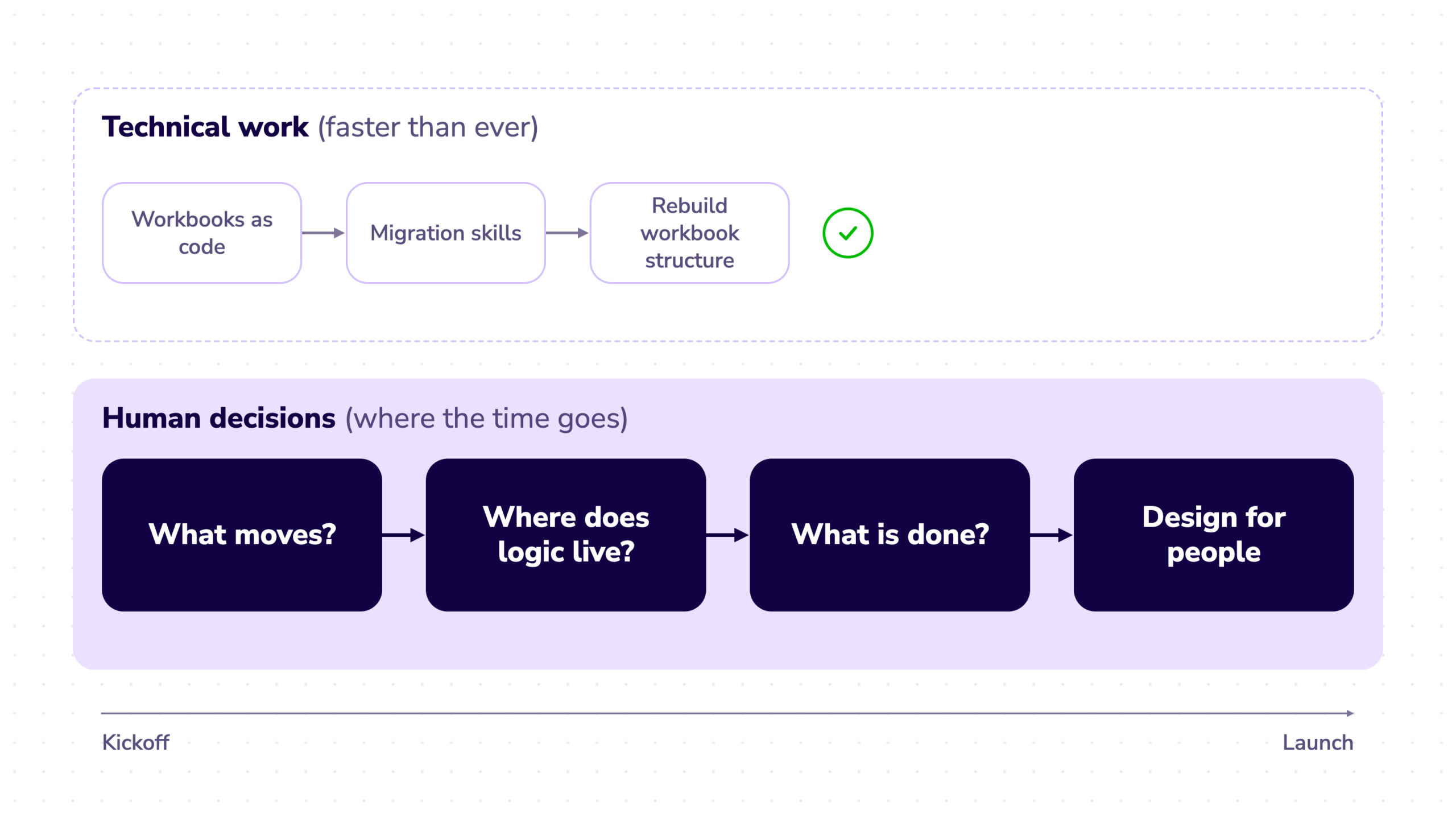
So, let’s get into it. What do the humans in the process do? At InterWorks, we set up our migrations with humans in the loop in four key places:
- Information Clustering
- Logic Rebuilding and Data Modeling
- Validation and Business Owner Sign Off
- Design Expertise
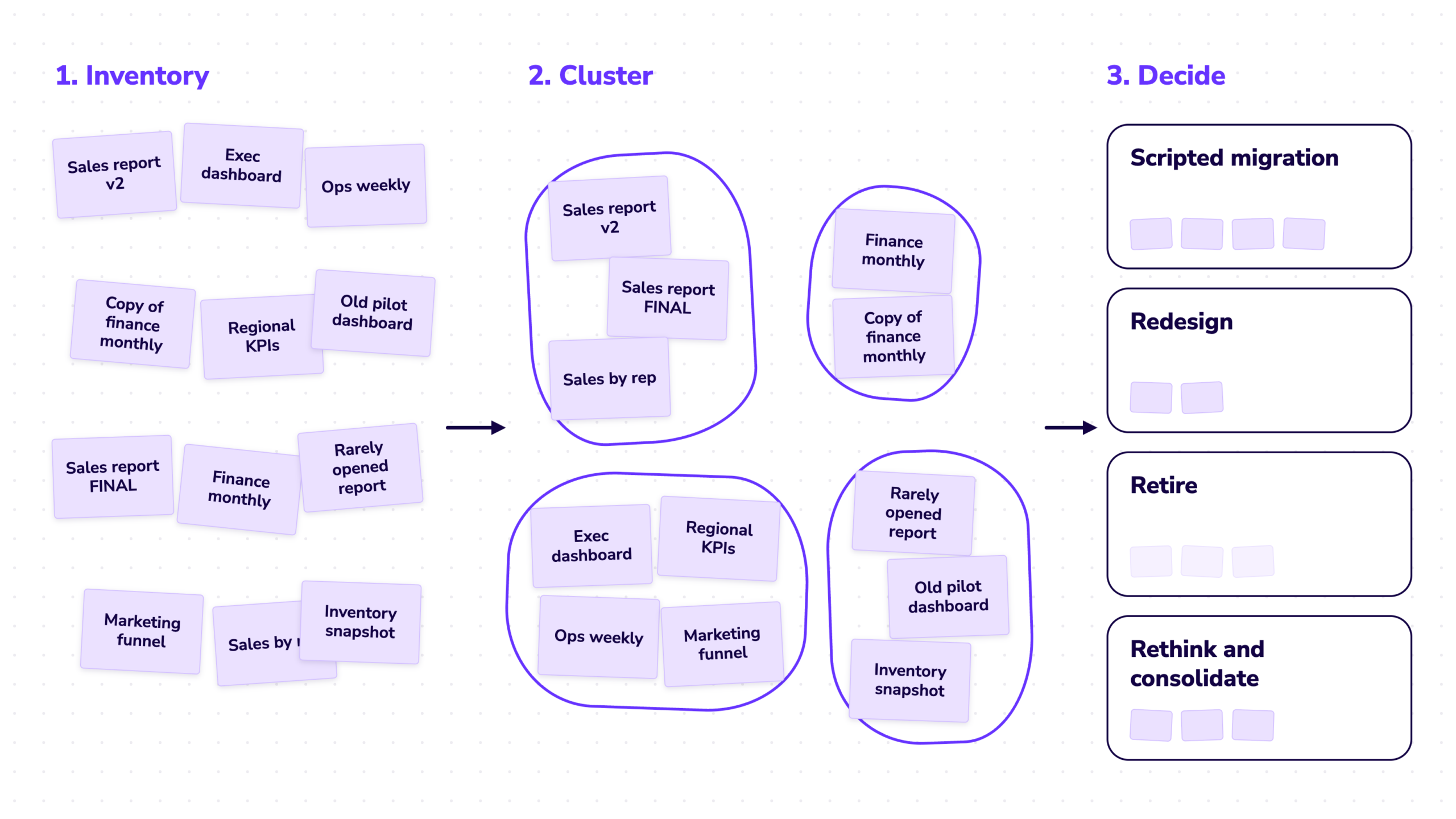
What Moves? Information Clustering.
Most likely, your BI environment wasn’t built in a day. And, most likely, it wasn’t built by one person or even one department. What we see over and over again is that organizations have huge corpuses of legacy BI reports. But when they decide to migrate, that huge number can be whittled down to the reports that are most used and actually solve business problems. Often reports from different departments serve the same purpose. Metrics from one report correspond to another, which answers a slightly different question. Legacy content should all be reevaluated and treated accordingly. Some reports can be handled with scripted migration, some require redesign, some can be retired, and some may be candidates for complete rethinking and consolidation.
If you go into a migration, ready to just use code to lift and shift, you’re missing out on a chance to evaluate where you are as an organization. What were the goals of your legacy reports and are they serving you today? Is the data centralized at the correct level? Are people getting the information they need, or are they building their own outside spreadsheets and AI dashboards that no one else can find or replicate?
This stage is where a data consultant can dive in, use analytical tools and AI to find the commonalities among reporting. They can talk to business users and stakeholders and find out what reporting is needed. They can identify reports that started out in parallel and then drifted into solving different problems. This data-driven, deliberate process helps organizations go into a migration with confidence knowing they’re not going to waste resources porting over content that is just going to replicate the same ungoverned behavior in your new, modern environment.
Where Does It Live? Logic Rebuilding and Data Modeling.
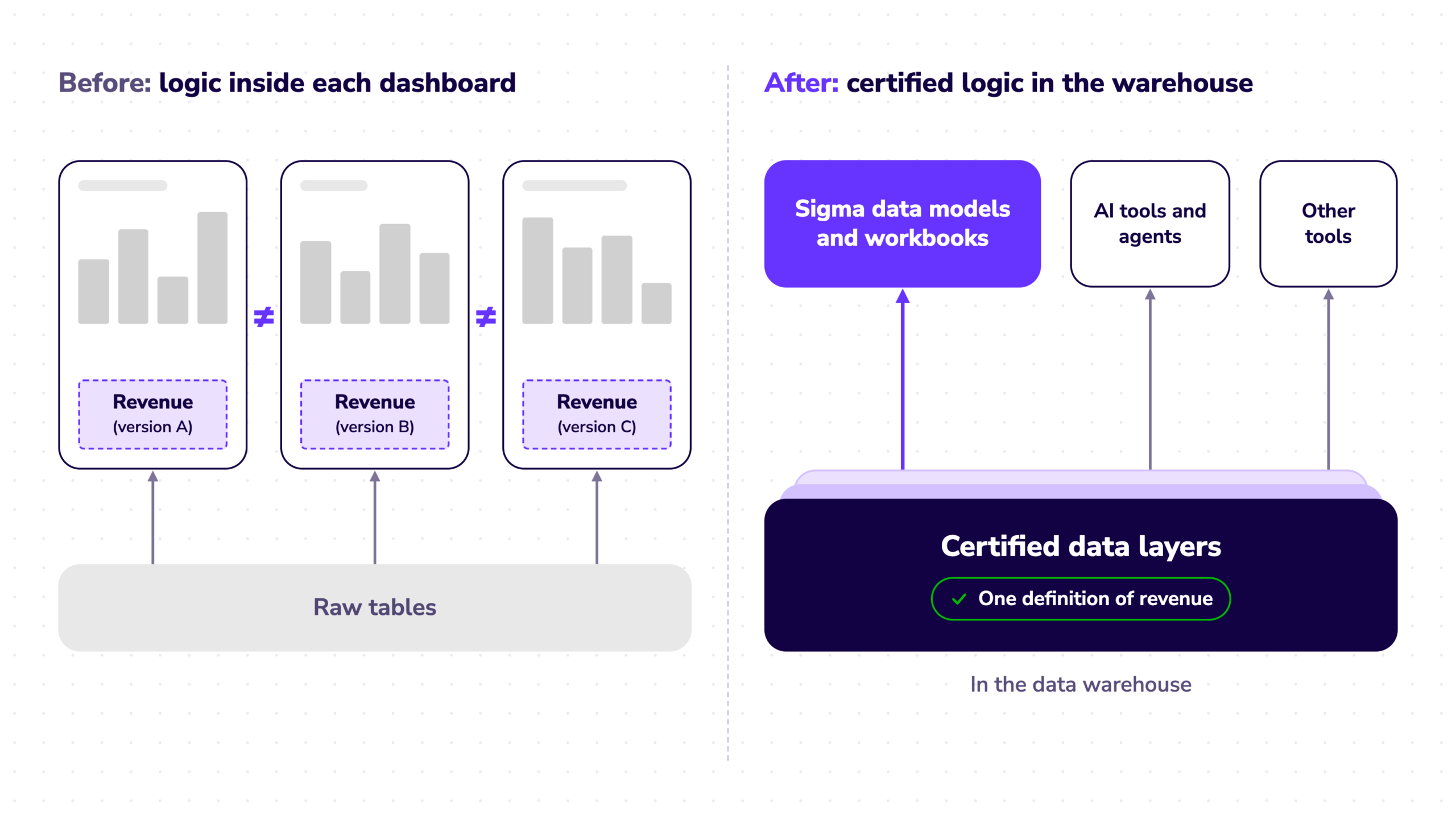
Once the reporting is clustered, an organization needs to decide where the logic will live. With Sigma and the drive to use various AI tools and agents, we’re seeing more of a push to store as much logic as possible in the cloud data warehouse. Putting logic within individual Sigma data models is a strong place to start for Sigma-only use. But that leaves logic and metrics stored in one specific tool. In an AI-forward organization, AI tools and agents need shared, certified logic.
We’ve used the phrase “The source of truth” for years at InterWorks. With AI agents and MCPs, we’re doubling down on the need for a certified source of truth within an organization. People are going to use AI and build what they want to see. Putting business logic in the CDW helps ensure they’re working with good data.
During a migration, this means doing data work in parallel with the migration. Putting the human in the loop here ensures you aren’t just porting bespoke logic from a legacy dashboard to a Sigma workbook. At InterWorks, we use our proprietary migration tool, Atlas, to fully document the logic and lineage of a BI report before we migrate. We look at the clustering we did earlier in the process and look at shared metrics across the environment and we pull the logic up from the workbook and into gold (and even platinum!) data layers in the cloud data warehouse.
This takes more time. It takes back and forth conversations between analytics engineers and data engineers and ongoing iteration. But the result is certified, portable, data that can be accessed by nearly any tool. When data aligns between tools, people use data more confidently, appreciate their tools and can focus on business decisions, instead of quibbling about which tool they used to come to their conclusions.
What Is Done? Validation and Business Owner Sign-Off.
Often when discussing migrations with our customers, we find that validation is easily overlooked. With the technical piece of migration taken care of, it’s easy to move content and then move on. But as we’ve all learned (probably many times by now), automated tools and AI aren’t always right.
InterWorks’ own internal tools and Sigma’s workbooks as code are impressive. They can do a lot, very quickly, but they still aren’t perfect. We’ve had consultants spin up agents to migrate content and come back hours later to a tool that thinks it’s done its job but has really just populated an empty Sigma workbook. Obviously, that’s an extreme case, but it emphasizes the ongoing need for humans in the loop.
We approach validation in four ways: data parity, business needs, security and governance, and sign-off. As we’ve discussed, over time, numbers are calculated and manipulated within dashboards and calculations. When pulling out logic and moving it to a cloud data warehouse, those numbers sometimes shift. Aggregation can change, metrics can be re-thought. There won’t always be a one-to-one exact match. Setting up end-users to expect parity vs. exact matches goes a long way in helping users accept new tools and processes. Whenever possible, we attempt to find parity in the upstream logic before rebuilding in a Sigma workbook. We fully document the calculations, aggregations and decisions that went into accepting that value so end users have full insight into the decision-making process.
It’s important to discuss the business needs of the data before asking business owners to sign off on newly migrated content. After years of using a dashboard or tool a specific way, some end users may not realize there may now be a better way to handle the data they need to use. The dashboard may not look the same, the filters and actions may be updated, but that doesn’t mean the content doesn’t answer the same business questions.
We recommend that prior to a migration the business user document what questions they are answering with each dashboard or report that will be migrated. Then, when they are looking at a new Sigma workbook, they can reference those questions and answers instead of focusing on UI differences.
Time also needs to be built in for workbook governance. Does the row-level and column-security still behave the same? Can restricted users access what they need to access and view only what they should be able to view. Skipping these steps at the end of a migration can lead to frustration and broken trust.
Finally, who has the final sign off? Deciding before the migration begins ensures developers aren’t bombarded with multiple rounds of feedback that never seem to end (ask us how we know!).
Design Expertise
We don’t just lift data from one platform to another. Over time BI environments grow and sprawl. Some dashboards are beautiful, some are utilitarian.
InterWorks spent the past 20 years proving itself as a company that helps organizations get to the bottom of their data needs. We are experts at listening to stakeholders, deriving requirements, designing beautiful artifacts and delighting our customers with solutions. In an age of AI tools and capabilities, it is tempting (and often very possible!) to rush straight to technical solutions. When you do that, you lose the magic of intuitive, well-designed and thought-out BI artifacts.
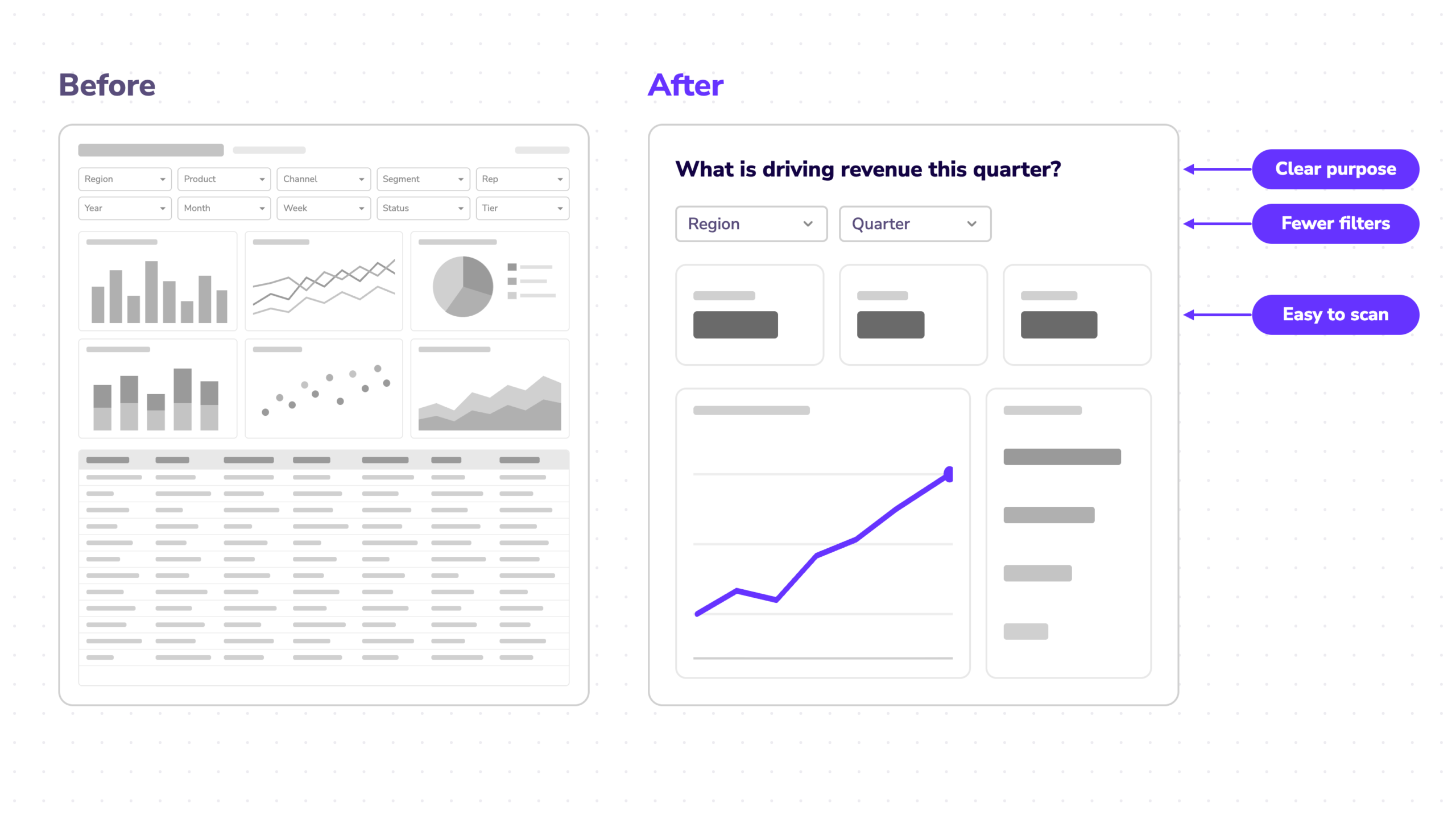
We still approach migrations and new BI development with an eye for design, just like we always have: What makes sense for the user, what draws a user into the data, what is the clear purpose of the report, and what makes it easy and intuitive to use? Our consultants are experts at creating and migrating workbooks with code; their technical skills are sharp, and they are excellent at building Sigma AI apps, workflows and reports. But they still retain those BI basics of ensuring the end result of all their work is simple, a clear visual product, made with humans in mind.
The physical migration is the easy part, and it getting easier, but human decision-making continues to be the key to a successful migration. If this approach sounds interesting to you, we encourage you to reach out and discuss a potential migration to Sigma.