
Curator by InterWorks is a portal platform that unifies your dashboards, AI apps and AI artifacts in one place. Learn more: interworks.com/curator
The Curator MCP server and API Relays are available now!
A few weeks ago, we showed how to host AI artifacts alongside your analytics in Curator. Ask Claude for an interactive chart, upload the HTML, and it lives in your portal next to your Tableau and Power BI content.
That was step one. This post covers the next two, using our Discover Ireland demo as an example.
First, you no longer have to do the uploading. With the Curator MCP server, an AI agent like Claude can work in your portal directly: building pages, uploading dashboards and adding them to your navigation. Second, those dashboards don’t have to be frozen in time. With API Relays, they can pull in live data from outside systems, safely, without a single password or API key ever reaching the browser.
The Problem: Great Dashboards, Stale Data
AI tools are very good at building dashboards. Ask for a weather chart and you’ll get something that looks great in seconds. But look closely at the data. More often than not, it’s typed straight into the file. The numbers were right the day the dashboard was made, and they get a little more wrong every day after that.
The obvious fix is to have the dashboard call a live data source. That’s where things get uncomfortable. Most useful APIs need a key, and anything inside a web page can be read by anyone who opens it. Putting a key there is like taping your house key to the front door.
So, teams end up choosing between dashboards that are safe but stale vs. dashboards that are live but leaky. Neither is a good answer.
Meet the Curator MCP Server
MCP (Model Context Protocol) is an open standard that lets AI assistants use tools. Curator now ships an MCP server, which means you can connect Claude, or another MCP-capable assistant, to your portal and simply describe what you want.
“Add a live weather dashboard to the Plan Your Trip page.” “Put a link to it in the main menu.” “Make the map match our theme colors.” The agent reads your existing pages and theme, makes the change and tells you what it did.
It does this with guardrails built in:
- It acts as you. The agent works with exactly the permissions of the Curator user who issued its token. It can’t see or change anything that user can’t.
- You choose the tools. Each token lists which actions it may take. Want an agent that can read but not change anything? Tick the read tools only.
- Everything is logged. Every call is recorded in Curator’s usage log under the token owner’s name.
- Changes can be undone. Page and theme edits save a snapshot first, so any change can be rolled back. New pages start hidden until you publish them.
Meet API Relays: Live Data Without the Risk
An API Relay is a saved, outgoing request that lives on your Curator server. Think of it as a trusted courier.
Instead of a dashboard calling an outside service directly, it asks Curator: “Please run relay number 1 for me.” Curator makes the call, adding any stored keys on the server side, and hands back only the answer. The dashboard never sees the credentials, and neither does anyone viewing the page.
Relays come with sensible controls:
- Credentials stay on the server. Keys are stored in Curator, encrypted, never in the page.
- Signed-in users only. A relay can be set to answer only people signed in to your portal.
- Opt-in for dashboards. Embedded dashboards can only use relays that have been explicitly allowed for them.
- Built-in caching. Curator can reuse a response for a set time, so a busy page doesn’t hammer the outside service.
And because the MCP server can create relays too, the agent that builds your dashboard can also wire up its data source. You hand over the key once, and from then on it lives in the relay, not in any dashboard.
A Concrete Example: Discover Ireland
To put this to the test, we pointed Claude at Discover Ireland, a demo Curator site all about touring Ireland. It already had several hand-built interactive dashboards, including a destinations map and a climate guide, but every number in them was hard-coded.
In a single conversation, Claude looked around the site, suggested a few options and then built them. Here’s what changed.
A Brand New Live Dashboard
“Ireland This Week” is a new page showing the weather across all fifteen destinations in the guide: conditions right now on a map, plus the last seven days of temperature, rainfall, wind and sunshine. It refreshes itself every 30 minutes. Claude created the relay to the weather service, built the dashboard, made the page and added it to the main menu.
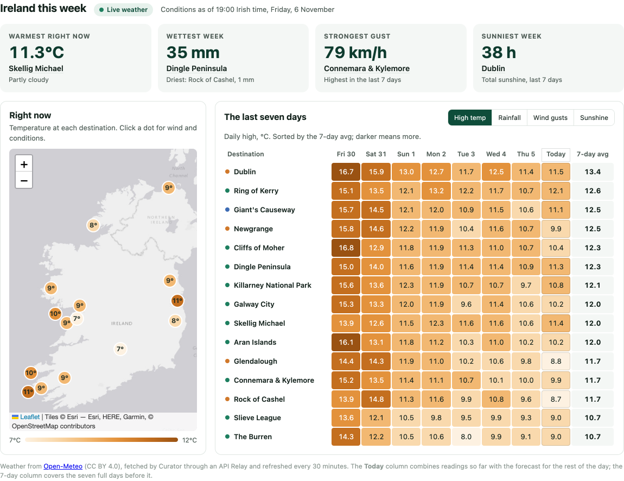
The new Ireland This Week dashboard, built and published by Claude through the Curator MCP server.
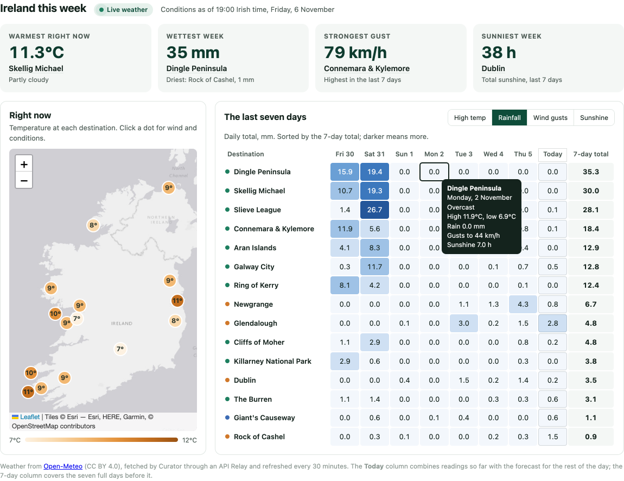
Switch between temperature, rain, wind and sunshine, and hover any day for the details.
An Existing Map, Now Live
The home page already had a map of every destination. It now shows the current temperature and wind gusts next to each place, and each popup tells you what conditions are like right now. If the weather service is ever unavailable, the map quietly works the way it always did.
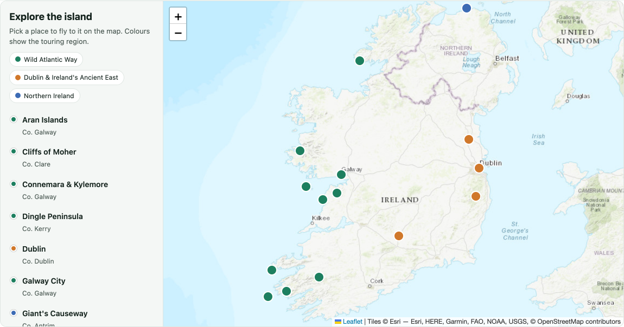
Before: A useful map, but nothing on it changes.
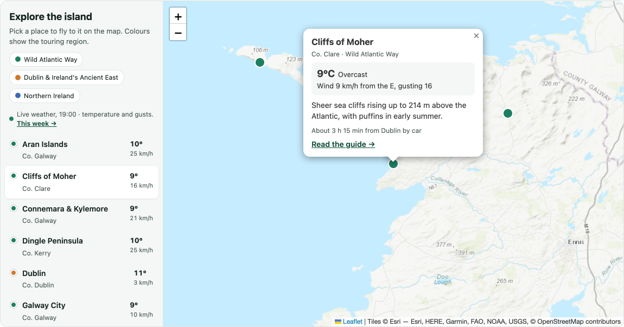
After: Live temperature and wind for every destination, using the same relay as the new dashboard.
A Static Chart That Now Tells a Story
The climate guide showed long-term monthly averages: helpful for planning but the same every time you looked. Now it overlays what actually happened over the past 12 months and sums it up at the top: Was it warmer than usual? Wetter?
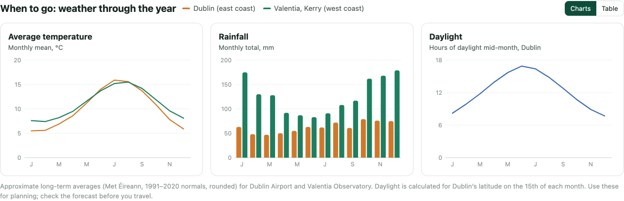
Before: Long-term averages only.
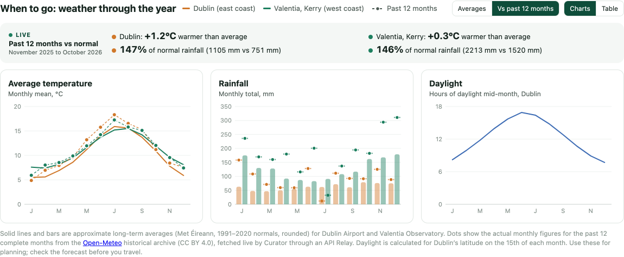
After: The past 12 months plotted against the averages, with a live summary at the top.
Why This Matters
Most of the work in a dashboard isn’t the chart. It’s getting it in front of the right people, keeping it current and doing both without creating a security headache.
The MCP server takes care of the first part: describe the change, and it shows up in your portal, inside the permissions and audit trail you already trust. API Relays take care of the rest: live data, with the sensitive parts kept on the server where they belong.
Put together, the distance between “I wish we had a dashboard for this” and a live, governed dashboard in your portal gets a lot shorter.
How to Get Started
Both features are available in 2026.11-02. To try them:
- In the Curator backend, create an MCP token and choose which tools it may use.
- Connect your AI assistant (for example, Claude Code) to your portal’s MCP address with that token.
- Ask it to look around your portal and suggest a dashboard, or describe exactly what you want.
- If the dashboard needs outside data, the agent will set up an API Relay. You provide the credential; Curator keeps it.
- Review the new page, then publish it when you’re happy.
Let’s Talk
If you want to see how this could work for your team, we’re here:
- Existing customers: Email curator@interworks.com for help getting set up.
- Want a demo? Get in touch with us.
Your dashboards shouldn’t go out of date the day they’re made. Now, they don’t have to.
Related