
This blog post is Human-Centered Content: Written by humans for humans.
The Problem with Feedback Today
If you build reports for other people, you know this cycle well.
A stakeholder pings you on Slack: “Hey, the numbers on that report look off.” Which report? Which numbers? You ask for a link. They send a screenshot with no context. You dig through your workbooks trying to match it. Twenty minutes later, you’re finally looking at the same thing.
Now multiply that across email threads, passing comments on calls, and the occasional “I mentioned this to you last week, did you see it?” You didn’t see it. It was buried in a channel you muted.
The feedback itself isn’t the problem. The problem is that it’s scattered everywhere with no structure, no context, and no accountability. Stakeholders don’t feel heard. Developers waste time playing detective. It’s a lose-lose.
I had this idea during a call one day: Wouldn’t it be great if users could submit feedback directly from the report they’re looking at, and it all landed in one place? That same day, I built it, deployed it and had it running in multiple workbooks. The Sigma Feedback App is the result.

If you want to check out the video form of this blog, you can view it here:
How It Works
The concept is straightforward. Every workbook gets a “Provide Feedback” button. When a user clicks it, they’re taken to a simple form where they select the workbook name, type their feedback and submit. That submission writes back to a single centralized table. Done.
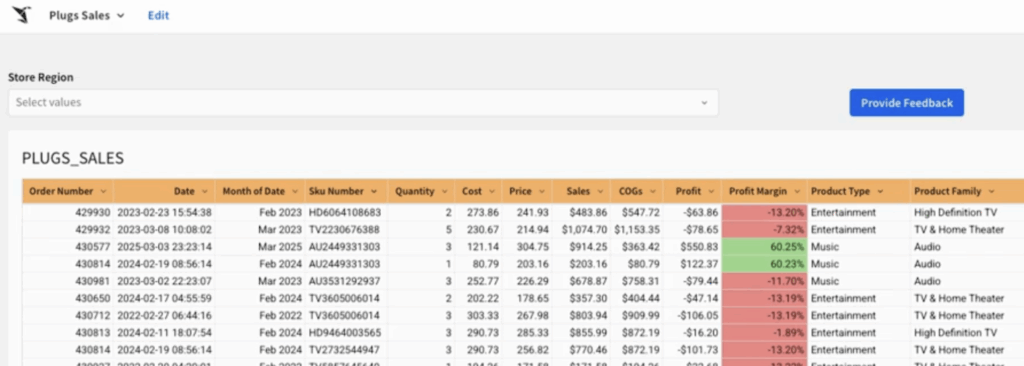
Above: The blue “Provide Feedback” button located in the top right of our example dashboard.
Here’s what that gives you:
- One button, any workbook.
The feedback button can be embedded in any workbook you manage. The styling, text, imagery and placement are all up to the workbook owner. As long as the button’s action points to the Feedback App, it works the same everywhere.
- One table, all feedback.
Every submission from every workbook writes to the same table. No more feedback living in five Slack channels, three email threads and someone’s memory. It’s all in one place, queryable and analyzable.
- Simple form, low friction.
The form is intentionally minimal. Pick the workbook, enter your feedback, submit. The goal is to make it so easy that people actually use it instead of firing off a context-free Slack message.
How I Built It
The build leverages a few core Sigma capabilities:
- Input Controls power the form interface.
A dropdown for workbook selection and a text field for the feedback itself. Clean, simple and familiar to anyone who’s filled out a form before.
- Writeback is the backbone.
When a user submits feedback, the data writes directly to a table in the cloud data platform. No middleware, no external integrations. Sigma handles the round trip.
- Actions connect the dots.
The “Provide Feedback” button in each workbook uses Sigma’s actions framework to open the Feedback App. This is what makes the pattern repeatable — any workbook owner can add the button and point it to the same destination.
The entire thing was built and deployed in a single day.
Why This Matters
This app solves two problems at once:
For stakeholders: Your feedback has a home. You’re not shouting into the void of Slack or hoping someone remembers what you said on a call. You click a button, describe the issue, and it’s logged. You know it’s been captured.
For developers: Feedback arrives with structure. You know which workbook it’s about. You can see all feedback in one view, spot patterns, and prioritize. No more asking “Can you send me the link to the report you’re referencing?” for the hundredth time.
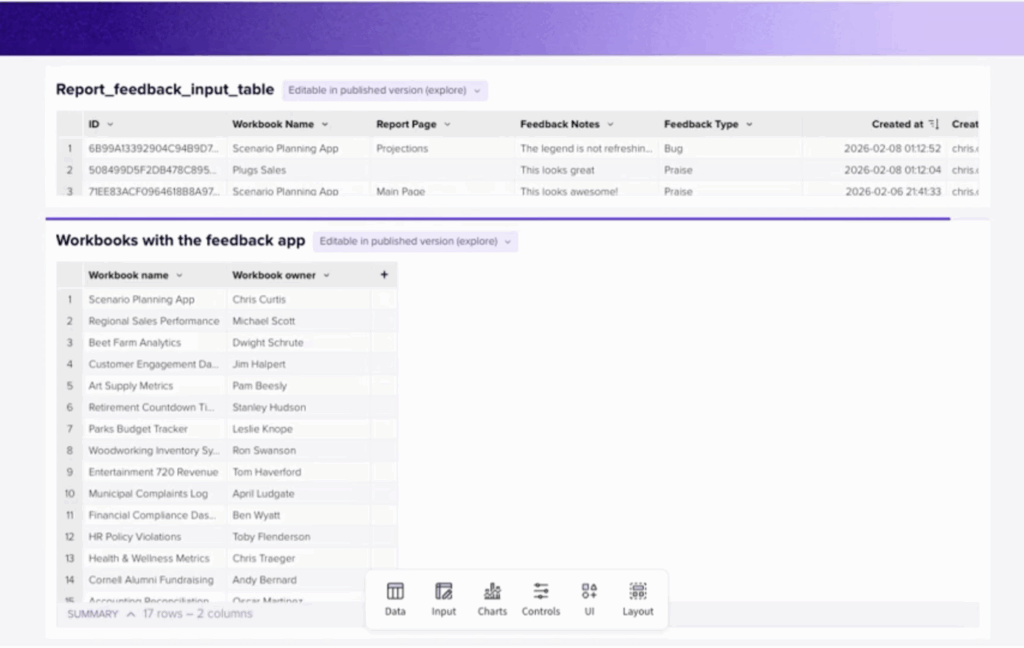
Above: A view of our centralized feedback table.
Beyond the immediate utility, the centralized table opens the door to real analysis. Which reports generate the most feedback? What are users consistently asking for? Are there reports nobody ever comments on (and should you be concerned about that)? A single feedback dataset turns anecdotal impressions into actionable insight.
Where This Could Go Next
The current version is intentionally simple. It works, it’s useful and it’s live. But there’s a clear roadmap of enhancements that would take it further:
- Reduce friction even more. Auto-capture the workbook name and page using URL parameters and hidden controls so users don’t have to select anything manually.
- Build a lifecycle workflow. Add status tracking ( New, In Progress, Resolved, Won’t Fix) stored in the same table. Workbook owners could manage feedback end-to-end without leaving Sigma.
- Trigger notifications. Fire a Slack message or email when a high-priority bug comes in. Route it to the right workbook owner automatically.
- Add ratings. A quick 1–5 star NPS control per report, trended over time alongside qualitative comments. Now you’re measuring report quality, not just collecting complaints.
- Connect to external systems. Integrate with Jira, Azure DevOps, or whatever ticketing system your team uses so certain feedback types auto-create tickets without manual intervention.
- Build a “voice of the user” page. A summary view showing top-requested enhancements, most-reported issues, and feedback volume over time. Hand this to leadership and suddenly you have data-driven justification for your development priorities.
The Takeaway
The best tools are the ones people actually use. This app works because it meets users where they already are, inside the report. The payoff is immediate for both sides: Stakeholders feel heard, developers get structured feedback and the organization builds a centralized record of what its users need.
If you’re a Sigma builder managing reports for others, you can have something like this running before end of day. The pattern is repeatable, the setup is minimal and the value compounds as adoption grows.
I’m using this myself now and actively looking for feedback on the app (yes, there’s a button for that). If you try it, I’d genuinely appreciate hearing what works, what doesn’t and what you’d add.
Ready to turn your Sigma ideas into real apps? InterWorks helps you design, launch and grow Sigma on modern cloud data platforms, with the architecture, coaching, and support you need.
